SongKong Jaikoz

SongKong and Jaikoz Music Tagger Community Forum

Wrong song title(s)

Hi all -

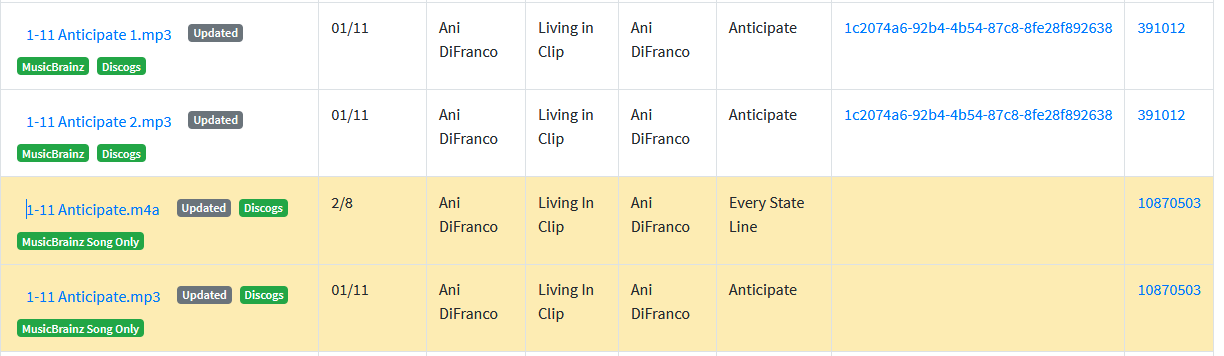
I am a new user and I just ran SongKong against my library of about 3000 songs. I have a bunch of duplicate songs in there, and all sorts of other messiness, so just getting started. I’m going through the report and a few things are confusing me. I’ll start with this one, which is that some of the song titles got changed to an incorrect title. For example, here are four tracks that are just different encodings of the same track:

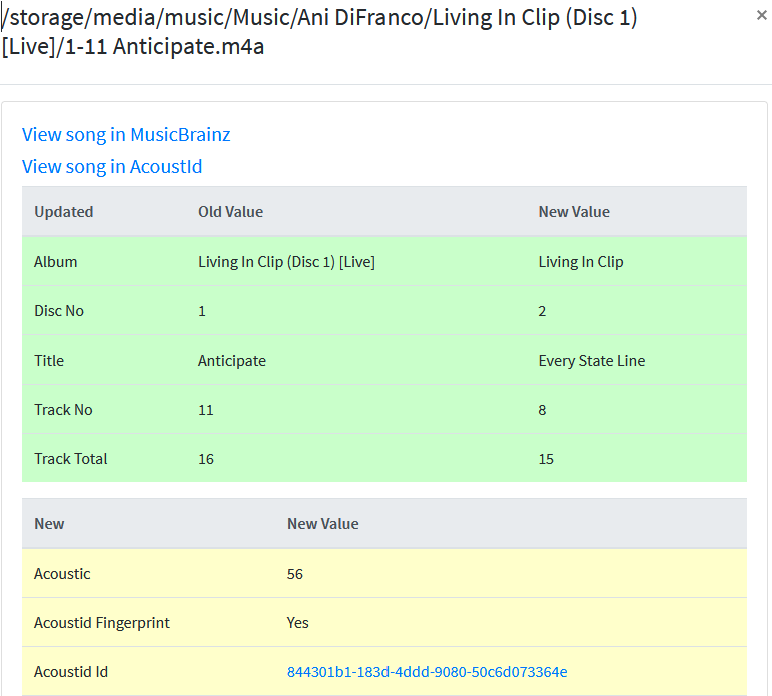
You can see that one of the titles is Every State Line, which is wrong. Clicking on the link in the report brings up

image

Here you can see that SongKong did update the title to the wrong one. I included the acoustic ID, which links to https://acoustid.org/track/844301b1-183d-4ddd-9080-50c6d073364e. As you can see, the ID is for Anticipate, and in fact the other three tracks shown in the report have the same Acoustic ID.

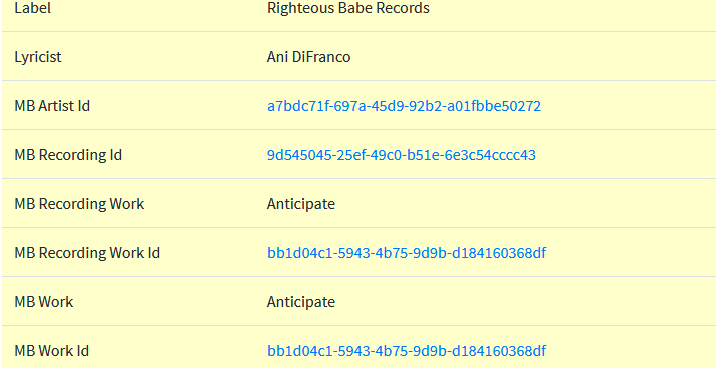
Furthermore, if I scroll down further in the track details, it lists Anticipate as the MB track name:

image

Can somebody help me understand what’s going on here? I have other inconsistencies in what SongKong did with my collection, but this seems a good place to start since it’s just so obviously wrong. I did create support files for this topic.

Thanks.
Andrew

Hi Andrew, you have discovered a bug that I will try to explain below.

  • First of all SongKong tries to match this folder to a single MusicBrainz Album that fails
  • It then notes there are possible duplicates and strips them out and matches a set of the songs to the MusicBrainz albums
  • The duplicates are grouped and addtionally groups these duplicates and matches to MusicBrainz albums

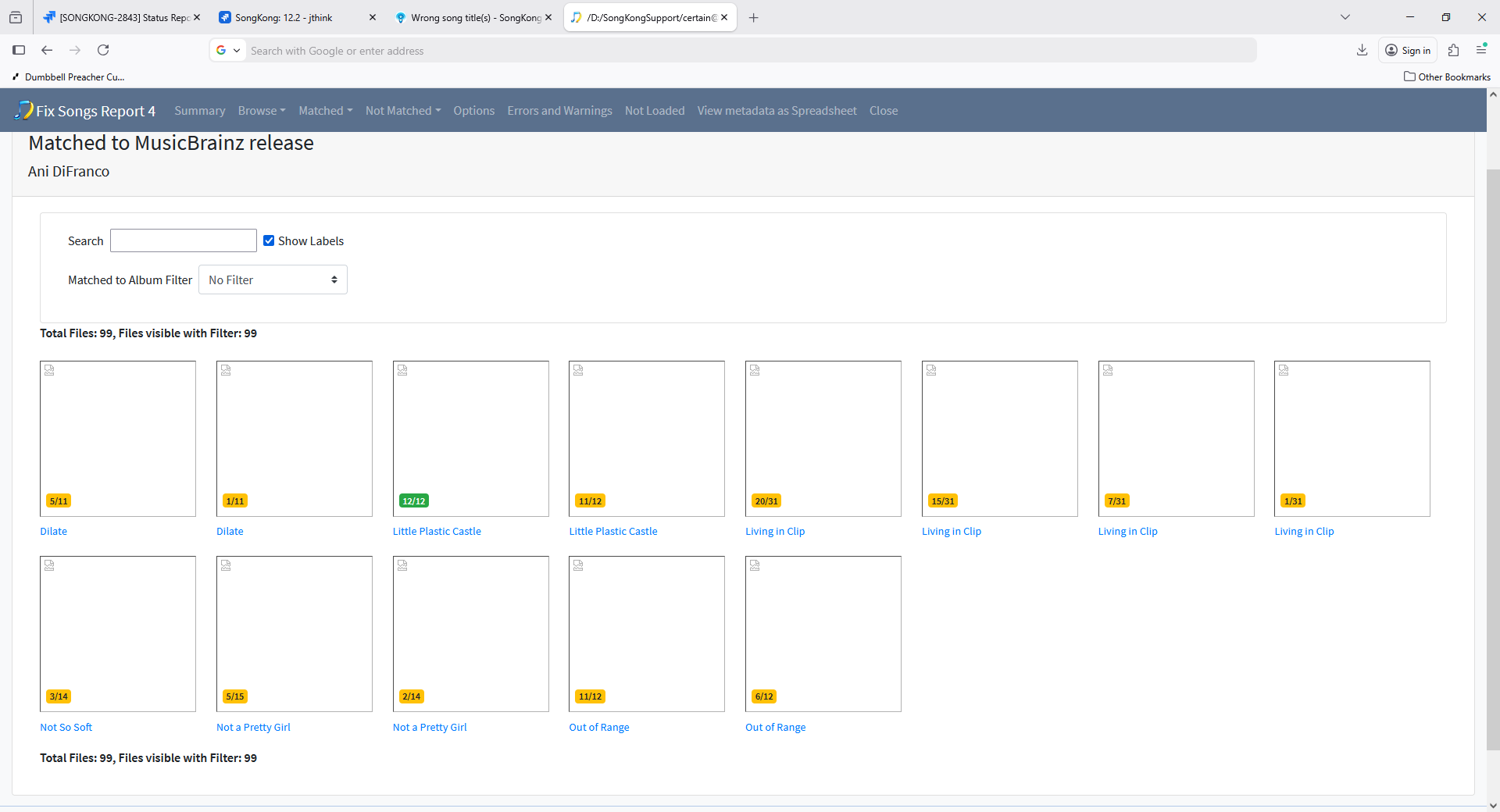
But there are quite a few duplicates files in that folder and there is a limit on how many times we reattempt the duplicate checking. You can see this with Matched to MusicBrainz Release section of report it has grouped songs into four different Living in Clip groupings

image

So we end up with three songs that are not matched to album they are just matched MusicBrainz Song Only:

  • 1-11 Anticipate.m4a
  • 1-11 Anticipate.mp3
  • 1-15 32 Flavors.m4a

and actually they are all matched to the correct song at this stage (as you noted)

Then an attempt is made to match this group of songs to Discogs, and this decides that the three songs match tracks on this album https://www.discogs.com/release/10870503-Ani-DiFranco-Living-In-Clip?redirected=true

  • 01/11 Anticipate (1-11 Anticipate.mp3)
  • 01/15 32 Flavours (1-11 Anticipate.m4a)
  • 02/8 Every State Line (1-15 32 Flavors.m4a)

So why did it allow this match ?

Anticipate has track length of 3:48, and Every State Line was 3:55. This was close enough to allow it to be considered a potential match for the 1-11 Anticipate.m4a track.

What should SongKong have done ?

Possibly the duplicate checking could have been iterated further. Certainly, since these songs had already been matched MusicBrainz Song Only with Acoustids and they both had the same Acoustid showing they were copies of same song the match to Discogs should never have been allowed, raised a issue to fix this.

Workaround

I notice you ran Delete Duplicates before this, but it was only run in Preview mode , if it has been run for real this would have stripped out some of these duplicate and this problem would not have occurred. I’m not sure, but I think if you run Fix Songs again on this folder it should resolve this issue second time round.

So, sorry about that, do you have any other issues you want to discuss?

Yeah I am still trying stuff out so I thought I’d improve all the metadata before running delete duplicates to make sure the duplicate songs were correctly matched before deleting! But I guess I should have done it the other way around. I made a filesystem snapshot before starting this process - would you recommend I revert and then do the duplicate detection, then update metadata and do duplicate detection again? Or should I just move ahead with duplicate detection based on current state?

Thanks for the response!

You are right to run Fix Songs first, I just noticed you had run Delete Duplicates preview only and noted it may have prevented this. Anyway I think the right thing to do is rerun Fix Songs on this data because I think it will fix it, you could just try against that one artist to get quick result.

I tried rerunning Fix Data twice. Once with unconditional rematch and one with rematch only if partial matches. Neither fixed the song title problem. I’m going to hold off deleting tracks until you have all the info you need. I generated another set of support files.

Here are some of the other things I saw that were unexpected or I can’t understand. As you can see on the report for run 4, it lists 16 folders with tracks that have two albums. One is the Living in Clip folder we’ve been discussing, so maybe the bad match is the explanation, but there are others that don’t seem to be the same issue. Here they all are and what seems to be going on:

1/ Living in Clip - already discussed

2/ Ani DiFranco/Out Of Range
Here some of the songs got their album changed from “Out Of Range” to “Out of Range”. Others did not. :man_shrugging:

3/Billy Joel/Greatest Hits, Vol. 2 (1978-1985) [Disc
Lots of the songs didn’t get matched, but a few of the MP3s did, which updated the album titles to the correct ones.

4/Compilations/A Bigger Piece of Sky
This is the same problem, I think, as with /6/ below. My suspicion as to what happened here is that I made a Best Of REK CD and then somehow those tracks got pulled into my iTunes library as a new album but the metadata was all screwed up.

5/Compilations/Greatest Hits Vol. 1 [Disc 1]
This is actually the Disc 1 from the same set as /3/ above. This time, the matched songs had their album updated to “Souvenir, The Ultimate Collection.”

6/ Compilations/No. 2 Live Dinner
This folder name is totally incorrect as is the existing metadata. Copenhagen is from “The Live Album,” and “Jessie with the Long Hair” is from Bigger Piece of Sky. SongKong correctly fixed up two of the Jessie tracks, but not the third one, and not Copenhagen. I’m not upset that these didn’t get fixed up, but maybe you are interested.

7/ The Beat Goes On
This CD is a compilation CD, so it doesn’t surprise me that matching could be ambiguous. However, it correctly matched the m4a tracks to The Beat Goes On, but matched the MP3 tracks to the later greatest hits album b.p.m., changing their info. Again, if I had deleted duplicates before running matching, I wouldn’t have noticed, but now I’m curious.

8/Crosby, Stills, Nash & Young/So Far
Some of the songs had their album updated to “CSN”. As with all the other directories, the MP3s and M4As rarely get updated the same way.

9/Dire Straits/Alchemy (Disc 1)
Same thing - a couple of the tracks had their album updated to “Alchemy: Dire Straits Live, Part One.” One interesting thing here is of the two tracks that had both an MP3 and M4A version, one track had the MP3 updated and not the M4A and the other track was the opposite.

10/Fleetwood Mac/Greatest Hits
One track got updated to match to a live version of the track from a German release.

11/Lyle Lovett/Live In Texas
“Live In Texas” vs “Live in Texas” - some tracks updated; others not

12/ Nanci Griffith/Other Voices, Other Rooms
“Other Voices, Other Rooms” vs “Other Voices - Other Rooms”

13/The Black Eyed Peas/Elephunk
One track here, two copies, one had the album changed to a rare CD 3-track “album”

14/The Cure/Staring At The Sea_ The Singles 1979-198
Some copies of some of the track had the album changes to a greatest hits album source.

15/Tristan Prettyman/Live Session - EP
OK - I don’t know why I have 9 copies of the same track! But in this case most of them did get updated, but two did not.

16/Various Artists/Crazy Heart_ Original Motion Picture Sou
Again, I don’t know how so many copies of some of the tracks got generated, but they didn’t all match to the same album.

These albums all showed up because there were multiple copies of tracks that matched differently. However, there also folders that didn’t have multiple tracks where the metadata got updated to the wrong thing. I.e. Bob Dylan/Biograph [Disc 1], where the album got changed from Biograph to “Bob Dylan’s Greatest Hits.”

I just want to say that I’m not looking for perfection. I just decided to resurrect my ripped music collection and try to get off streaming, so much of this hasn’t been touched in years. I also get that your software works best with whole albums and I definitely curated my collection down after ripping. So just looking for advice on how to get things under control as easily as possible!

Thanks again,
Andrew
Yes, Ive looked at almost all of them and in all cases there are duplicate files. So to reiterate what happens in these cases is we try to match all the songs in folder to one album, with any track on album being only matched once. Clearly this is not possible when have duplicate files so if SongKong identifies potential duplicates it splits the songs in folder into multiple groups and tries again.

So take the 10/Fleetwood Mac/Greatest Hits example the folder has 5 songs, including two copies of Say You Love Me, so it first fails to find a match then creates two groups, one with four songs and one with one song. The four songs are matched to the Greatest Hits album, then the remaining song is matched to the right song but not the best album. It is important to note that the same identical version of a song (expecially popular ones) may be on multiple albums, now when matching four tracks that makes it much easier to find the right album beause all four tracks need to be on the same album. When only matching one track, any album that track appeared on could potentially be the right album

Now I’m not sure why it matched this particular release it is not optimal, and I will look in the logs further.

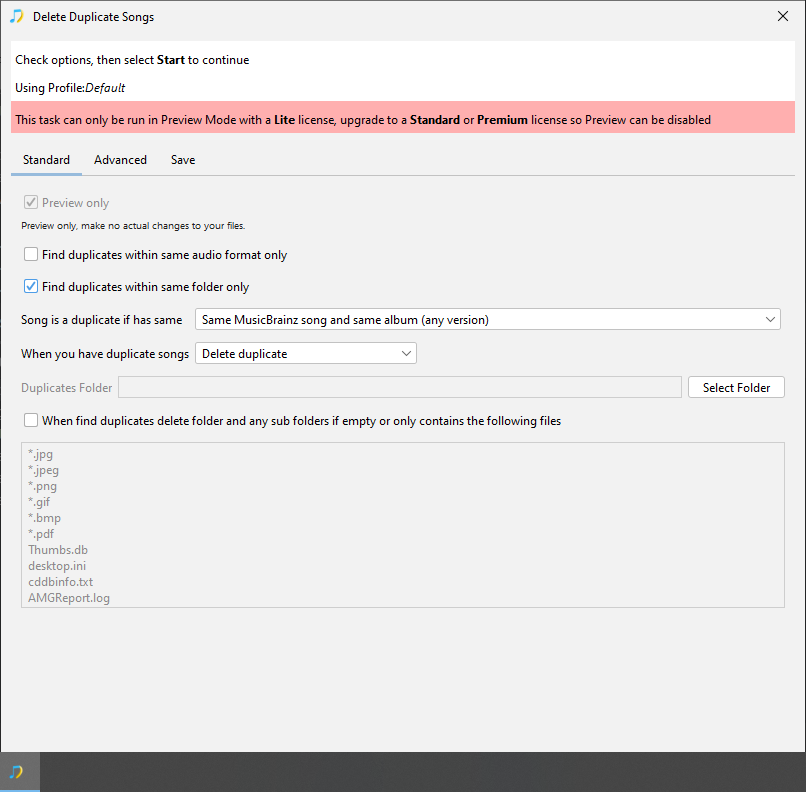
However, all these issues seem to be when you have duplicate files so the logical thing to do would be to remove duplicates. I would recommend running Delete Duplicates in preview mode and check it is deleting the preferred files, amending options as necessary and then run for real. You could also manually delete files not picked up by Delete Duplicates.

This is a different issue, the first thing is this is part of a 3 CD set however in your directory structure there is no all encompassing parent folder to tie the discs together

e.g you have

/Bob Dylan/Biograph [Disc 1]
/Bob Dylan/Biograph [Disc 2]
/Bob Dylan/Biograph [Disc 3]

the better way to have things is:

/Bob Dylan/Biograph
/Bob Dylan/Biograph/Disc 1
/Bob Dylan/Biograph/Disc 2
/Bob Dylan/Biograph/Disc 3

This means when SongKong processes the folders they are treated as distinct albums rather than as part of a single album. You have all the songs for Discs 2 and 3 and these do get matched to the correct album. But for Disc 1 you only have three songs of the 18 actually on the disc this means there are more potential albums that will contain these three tracks including the album it was matched to, and since it only has 12 tracks instead of 18 - this means a greater proportion of the album has been matched which helps it score higher than the right album. In cases like this you can use Match to One Album task to force a match to the correct album.

I decided this was neccessary because SongKong currently only fully processes file if duplicated three times, if the same file is in folder four times or more we don’t split causing the issue you saw later on, raised https://jthink.atlassian.net/browse/SONGKONG-2904

What criteria should I use for “same” in duplicate detection? Anything with metadata isn’t going to help me, right? Obviously, I want to minimize false negatives, but I don’t want any false positives.

I think a good starting point for you would to set Song is a duplicate if has same to Same MusicBrainz song and same album (any version) and enable Find duplicates within same folder only

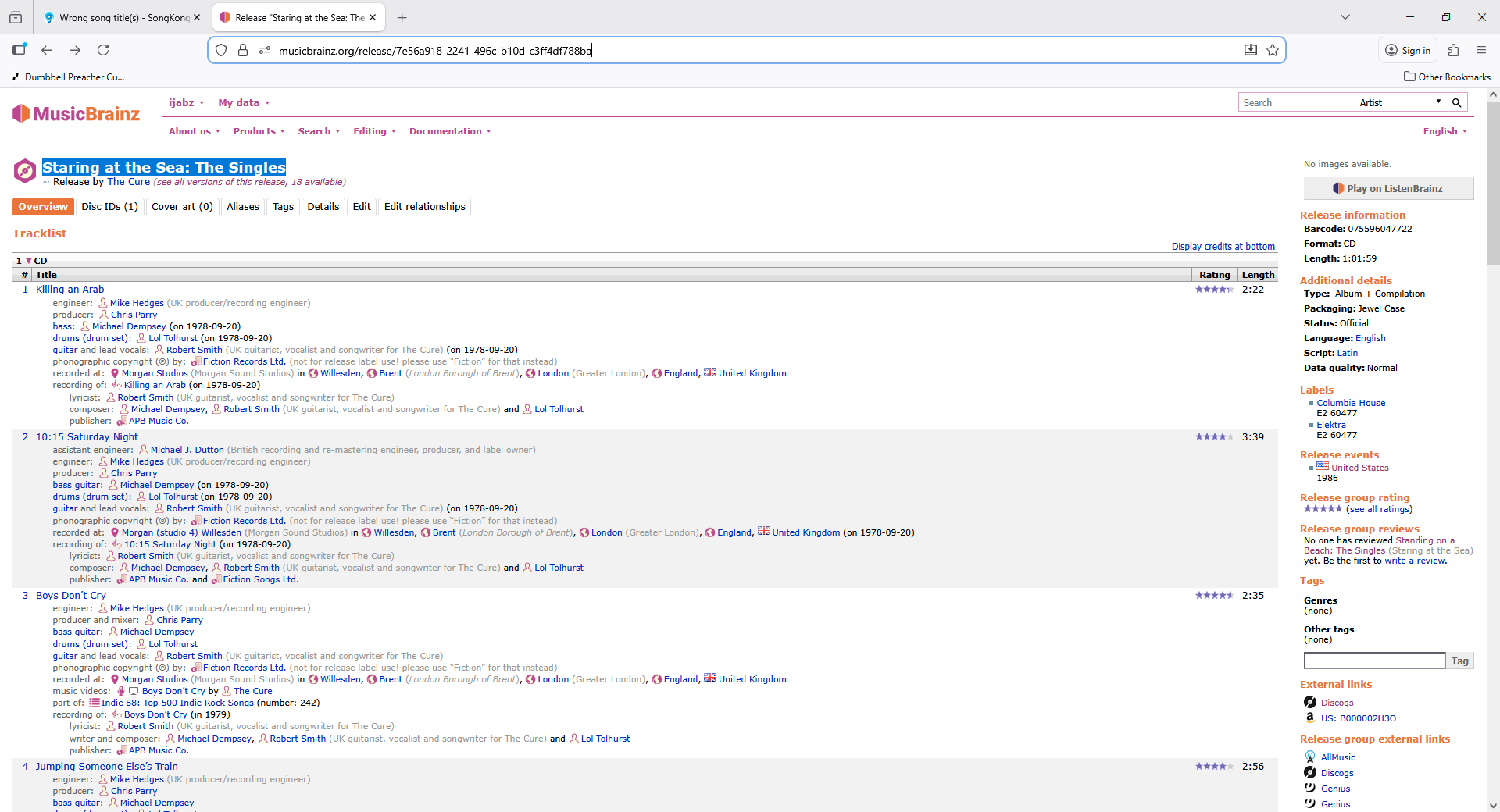
OK. Some more questions: Why did it change the title of Staring at the Sea to Standing on the Beach? I get that it’s a tricky album to match, because the “same” album was released under different names depending on format. But the track numbers being used are the CD track numbers, which are the “Staring at the Sea” release. And when you click through to the linked MB album the title is “Staring at the Sea,” so why did SK change the titles?

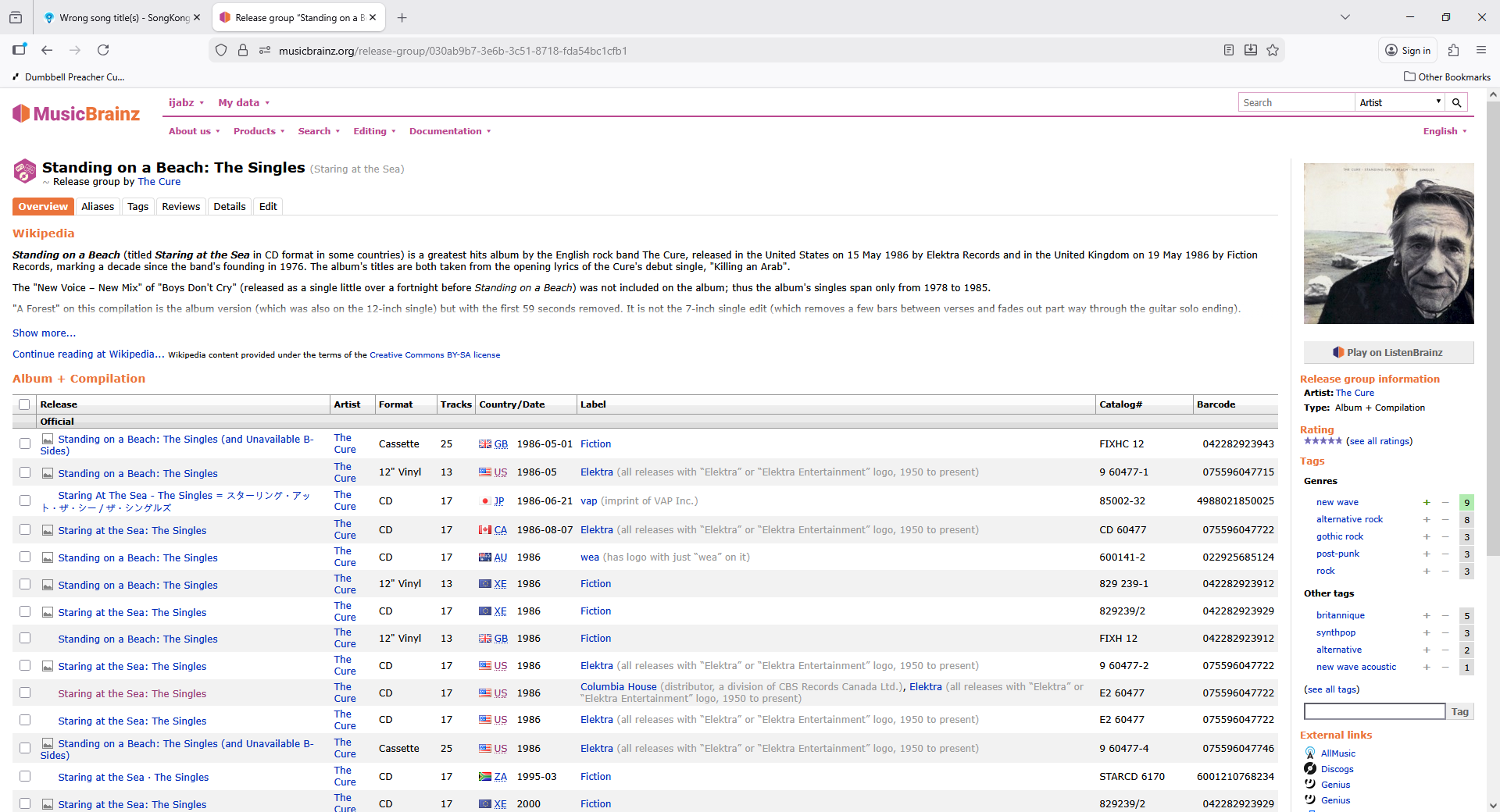
Its because you checked the option Use standard Release title instead of title displayed on this release, so the title of the release matched is Staring at the Sea: The Singles but it is one of 18 releases that are part of the same Release Group and because you enabled this option, we use the title of the Release Group instead and this is Standing on a Beach: The Singles

e.g

image

1 Like

I reset my filesystem its original state and ran delete duplicates just with the metadata. It got rid of a lot of stuff, but not all. I’m now trying to figure out what the right next steps are. I’m focusing on one folder and trying a bunch of stuff in preview mode to see if I can figure it out. What I’m struggling with is that it’s not identifying the duplicate songs, and, furthermore, it’s only matching the MP3s to the MB entries, not the M4As (which are the versions I’d like to keep). Any insights here? Run 15 was the initial delete run, and then runs 16-18 are me trying to drill down on the Billy Joel album with remaining duplicates. I uploaded a new support file.

Also, I’m not expecting you to hand hold me through everything forever. Feel free to point me at documentation or tell me that album matching is messy and it’s never going to be perfect (which I get)! But I am confused as to why some things match and others don’t when they seem to have the same info available.

I think if you had just run Delete Duplicates on the previous data that would have resolved most things because the matching issues were mostly with the addtional duplicate songs

But since you have started again then Delete Duplicates find duplicates purely based on what is currently in the files, it doesn’t try to match songs to MusicBrainz/Discogs because that is the job of Fix Songs. Think of it this way, would be silly if you had run Fix Songs, and then ran Delete Duplicates and it spent lots of time trying to match all the songs you had already tried and failed to match with Delete Duplicates

So running Delete Duplicates and then Fix Songs is the wrong way to go, its acceptable to run Delete Duplicates just based on metadata first but there is no point try to run based on matches to MusicBrainz before you ran Fix Songs so that is why DeleteDuplicates 16 and 17 don’t do anything,

So with Fix Songs on the Billy Joel album, as you say there are duplicates, the smaller grouping of mp3s have been matched to a MusicBrainz Release but the larger group has only been matched MusicBrainz Song Only. I looked into the logs and the problem is having failed to find a match it detected three of the duplicates (2-7, 2-10 and 2-14) for regrouping but not 2-04 because actually the two copies of Its still Rock n Roll to Me have different acoustids. So therefore it found an album to match the group of three , but not an album that could match the group of 10, if you delete 2-04 It’s Still Rock And Roll To Me.mp3 and rerun Fix Songs it should work.

And this brings us to an important point about automated album matching with SongKong it will match most of your music, but it won’t be able to match everything, and it won’t often be immediately obvious why it hasn’t matched something.

Because it does automated matching SongKong is relatively cautious about matching when it encounters contradictory information. So things like contradictory track lengths or Acoustids may be prevent a match, but these are not obvious when you just look at the basic data like title, track no or album.

So it makes more sense to just apply it your whole music collection, then use the information report to tidy up any albums not fully matched rather than focussing on a particular album.

I do plan to add more information about folders that could not be matched if we had some near misses but that work is not done yet.

The SongKong Tutorial explains the functionality, however that is probably not going to help with working out these particular cases. Its all good, we have already identified a couple of improvements that are required in SongKong so for me it is time well spent.

I’ve raised a new issue that would better match your duplicate files to the same album as the bulk of the songs in the folder.

The duplicate checking now fully iterates until there are no duplicates in SongKong 12.2 release