I’ll pop them on dropbox for you and PM you a link.
SongKong reporting empty folders that in fact have valid content
Im sure it is valid on linux, but might be causing a problem for macOS, or maybe just Java so would appreciate you trying out test.
It’s the OS that’s listing the filenames that way. The only way to get rid of the quotes is replace spaces in filename with _.
Would you like me to attempt that for one of the “empty” folders?
Regarding the status report, I kicked it off yesterday and left it running, came back this evening to the regulal SK interface, no report. If I get back to Reports, the only report that exists is FixSongsReport00001
I think this is the smoking gun… :
/start.task
/statusreport.update_progress
/statusreport.update_progress
/style/fontawesome/webfonts/fa-light-300.woff2
/style/fontawesome/webfonts/custom-icons.woff2
/foldertree
/style/fontawesome/webfonts/fa-solid-900.woff2
/start.task
/statusreport.update_progress
/statusreport.update_progress
/statusreport.update_progress
java.util.logging.ErrorManager: 2
java.io.IOException: No space left on device
at java.base/java.io.FileOutputStream.writeBytes(Native Method)
at java.base/java.io.FileOutputStream.write(Unknown Source)
at java.base/java.io.BufferedOutputStream.flushBuffer(Unknown Source)
at java.base/java.io.BufferedOutputStream.flush(Unknown Source)
at java.logging/java.util.logging.FileHandler$MeteredStream.flush(Unknown Source)
at java.base/sun.nio.cs.StreamEncoder.implFlush(Unknown Source)
at java.base/sun.nio.cs.StreamEncoder.flush(Unknown Source)
at java.base/java.io.OutputStreamWriter.flush(Unknown Source)
at java.logging/java.util.logging.StreamHandler.flush(Unknown Source)
at java.logging/java.util.logging.FileHandler.synchronousPostWriteHook(Unknown Source)
at java.logging/java.util.logging.StreamHandler.publish(Unknown Source)
at java.logging/java.util.logging.FileHandler.publish(Unknown Source)
at java.logging/java.util.logging.Logger.log(Unknown Source)
at java.logging/java.util.logging.Logger.doLog(Unknown Source)
at java.logging/java.util.logging.Logger.log(Unknown Source)
at com.jthink.songkong.analyse.general.Errors.addError(Errors.java:44)
at com.jthink.songkong.reports.fixsongsreport.SpreadsheetReportSection.call(SpreadsheetReportSection.java:243)
at com.jthink.songkong.reports.fixsongsreport.SpreadsheetReportSection.call(SpreadsheetReportSection.java:32)
at java.base/java.util.concurrent.FutureTask.run(Unknown Source)
at java.base/java.util.concurrent.ThreadPoolExecutor.runWorker(Unknown Source)
at java.base/java.util.concurrent.ThreadPoolExecutor$Worker.run(Unknown Source)
at java.base/java.lang.Thread.run(Unknown Source)
java.util.logging.ErrorManager: 2
java.io.IOException: No space left on device
at java.base/java.io.FileOutputStream.writeBytes(Native Method)
at java.base/java.io.FileOutputStream.write(Unknown Source)
at java.base/java.io.BufferedOutputStream.flushBuffer(Unknown Source)
at java.base/java.io.BufferedOutputStream.flush(Unknown Source)
at java.logging/java.util.logging.FileHandler$MeteredStream.flush(Unknown Source)
at java.base/sun.nio.cs.StreamEncoder.implFlush(Unknown Source)
at java.base/sun.nio.cs.StreamEncoder.flush(Unknown Source)
at java.base/java.io.OutputStreamWriter.flush(Unknown Source)
at java.logging/java.util.logging.StreamHandler.flush(Unknown Source)
at java.logging/java.util.logging.FileHandler.synchronousPostWriteHook(Unknown Source)
at java.logging/java.util.logging.StreamHandler.publish(Unknown Source)
at java.logging/java.util.logging.FileHandler.publish(Unknown Source)
at java.logging/java.util.logging.Logger.log(Unknown Source)
at java.logging/java.util.logging.Logger.doLog(Unknown Source)
at java.logging/java.util.logging.Logger.log(Unknown Source)
at com.jthink.songkong.analyse.general.Errors.addError(Errors.java:45)
at com.jthink.songkong.reports.fixsongsreport.SpreadsheetReportSection.call(SpreadsheetReportSection.java:243)
at com.jthink.songkong.reports.fixsongsreport.SpreadsheetReportSection.call(SpreadsheetReportSection.java:32)
at java.base/java.util.concurrent.FutureTask.run(Unknown Source)
at java.base/java.util.concurrent.ThreadPoolExecutor.runWorker(Unknown Source)
at java.base/java.util.concurrent.ThreadPoolExecutor$Worker.run(Unknown Source)
at java.base/java.lang.Thread.run(Unknown Source)
MusicBrainz:10480
Discogs:0
songkong:server unable to start controller:java.io.IOException: No space left on device/foldertree
/style/fontawesome/webfonts/fa-light-300.woff2
/style/fontawesome/webfonts/custom-icons.woff2
/reports
/start.done
/foldertree
/style/fontawesome/webfonts/fa-light-300.woff2
/style/fontawesome/webfonts/custom-icons.woff2
/start.task
/fixsongs.select_profile
/fixsongs.select_profile
/fixsongs.go
songkong:server unable to recreate default page:No space left on device/favicon.ico
/foldertree
/style/fontawesome/webfonts/fa-light-300.woff2
/style/fontawesome/webfonts/custom-icons.woff2
/start.task
/statusreport.select_profile
/statusreport.select_profile
/foldertree
/style/fontawesome/webfonts/fa-light-300.woff2
/style/fontawesome/webfonts/custom-icons.woff2
/admin.go
/send_support_files.go
/about.go
/reports
/reports
/about.go
Not sure it explains the MIA files, but I’ve no idea what’s happening in the background.
Okay so I think looking at the screenshot the issue may be with tracks 1 or 8, they both contain a single quote or similar). This may be a total red herring but if you could just make a copy and rename the tracks to track1, Track2 just to disprove/prove the theory that the filenames is the problem would be great.
yep, the reports can be large when the collection is large, am looking to improve this by this and this.
You can delete reports with the Admin:Delete Reports option but then you lose Report0001, the reports are standalone in that they can be viewed without SongKong running bu they do require some other files/folders to run okay (such as the style folder within the Reports folder)
But also I have just realized the last support file is not automatically removed after creation, so there should be a super large $HOME/SongkongSupport.zip file you could delete (I have raised an issue to make sure it is deleted after sending)
No zip file in my user account’s folder tree, but I see what you mean by using storage:
257M    Logs
28G     Prefs
87G     Reports
now on returning to :4567 I’m just presented a blank screen. Time for rm -r ~/.songkong and start again.
Ok, so I wiped .songkong, installed the update you released over the last few days and relaunched SongKong as a fresh install. I pointed it to one of the folders you wanted me to test re filenames, and it processed it without issue:
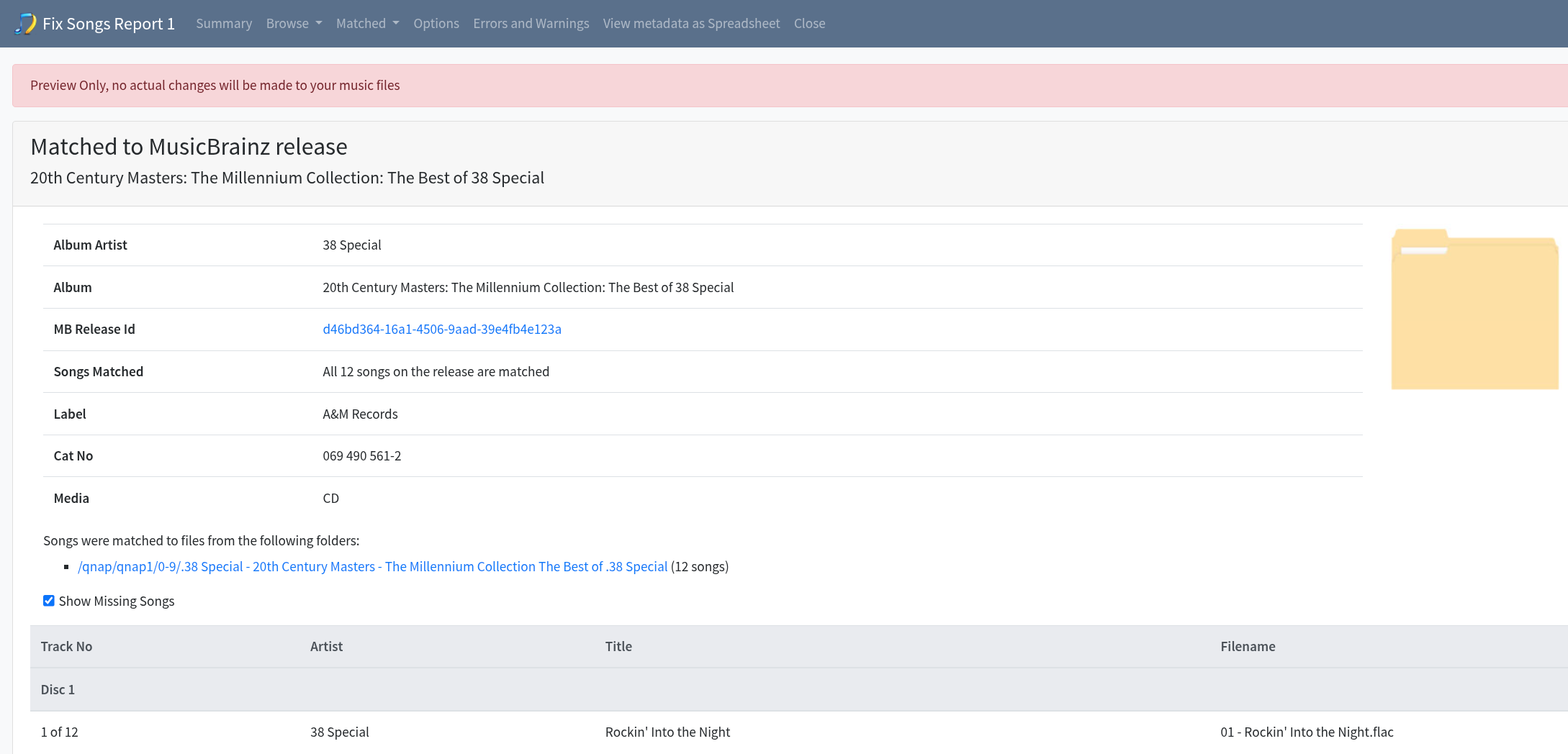
So I’m guessing this all comes down to having run out of disc space after consuming 115GB of storage for ingestion and report generation.
The question now is, is there a way to point .songkong to a different drive (I could resort to a symlink if required).
I presume also that the previous report was likely at least at some level corrupted?
No, there was no loss of disk space when you ran FixSongsReport, but there was a stack overflow and hence ran out of memory when building the report because I didn’t realize I was using a function from google that nested sets rather than merging them, have now fixed this for next release that will prevent that failure and hopefully that also resolves the empty folder problem.
Ok, thanks for your patience.
So currently symbolic link is the solution on linux, here is an article on moving just the database (within Prefs) folder on MacOS, but Im sure you know how do it.
moving .songkong should be fine, as long as it is a local drive not a networked drive.
Should hopefully have a new version out with some fixes by end of the week.
1 Like
Look forward to testing it. I don’t suppose there’s a way to temporarily enable my instance to 5 lookups/sec rather than 2 to save me having to have it run for 40 hours again?
Sorry there is no way to that, even if there was it may not make a huge difference since lookups is only one part of the processing.
No problem. I’ll wait for the update and try again. Would be really good if it could flag any file or memory issues as soon as encountered so it doesn’t run for days to no end. Have sent you an email with attachment re WavPack support.
Memory Exceptions are rare and already handled, as was the case the problem with the orginal report, it still managed to create the bulk of the report.
Already have issue for diskspace - https://jthink.atlassian.net/browse/SONGKONG-1390
Thanks for WavPack stuff but Ive not got time to look at this week.
I was thinking more along the lines of the files flagging as having zero content, meaning something isn’t right … flag it and have config option to terminate scan when condition encountered?
But this should never happen, I think it happened because of the stackoverflow bug and if so it will not happen again now fixed.
Anyway, I have just released a new version, this should also remove most of the errors/warning listed last time and use less disk space for the reports.
I’m pulling the entire library through Fix Songs again. Not sure whether it’s my imagination or not, but it does seem to be getting though the files somewhat faster than was previously the case - based on current stats it looks like it’ll complete in about 2/3 of the time previously taken.
One thing I’ve just noticed - every time one visits http://ip.address/fixsongs.check_progress the started timestamp becomes the time of the current visit. This run actually started just before 4AM.
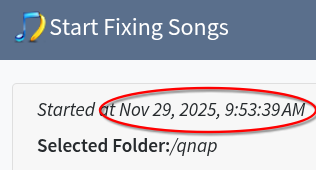
Okay yes replicated so it is a bug, but it does update progress asynchronously, i.e if you leave the page open the Started date remains correct and the progress bar updates, this would only happen if you refresh the page which is uneccessary.
Understood, my browser is the front-end to many things hence tabs being opened and closed often. It’s not a big deal, just thought I’d point it out because I assumed it wasn’t deliberate. Sorry if raising things as I spot them is adding to your todo list.
Not a problem, whilst it is more work in the short term it really helps to get a second pair of eyes on things, raised issue