Ways to Run SongKong
SongKong can be used in several different ways.
For most users the normal Desktop Mode is the easiest place to start, but Remote Mode is particularly useful when your music is stored on a server or NAS.
There is also a Command Line Mode for users who want to automate SongKong using scripts.
Desktop Mode
Desktop Mode is the normal way to use SongKong on a Mac, Windows or Linux computer.
You start SongKong as a regular application and use the SongKong window to select your music folders, tasks and options.
If you have installed SongKong on your personal computer, this is normally the mode you should use.
Remote Mode
Remote Mode lets you control SongKong using a web browser.
SongKong itself runs on the computer or server where it is installed, but you can control it from another device such as:
- Another computer
- A laptop
- A tablet
- A mobile phone
For example, SongKong might be running on a computer in your home office while you control it using a tablet elsewhere in your home.
Why use Remote Mode?
Remote Mode is particularly useful when SongKong is installed on the same computer or server that stores your music.
Instead of transferring large music files across your network so that another computer can modify them, SongKong can process the files directly where they are stored.
This can be especially useful for large music collections and large lossless audio files.
Remote Mode also allows SongKong to be used on machines that do not have their own graphical desktop, such as some Linux servers and NAS systems.
Unlike using SongKong purely from the command line, Remote Mode gives you access to the normal SongKong user interface through your browser.
Desktop and Remote Mode look similar
The Remote Mode interface is designed to work in much the same way as Desktop Mode.
The main difference is that you are viewing SongKong through a web browser rather than directly in the desktop application.
Because the two interfaces are very similar, screenshots elsewhere in this guide may show either version.

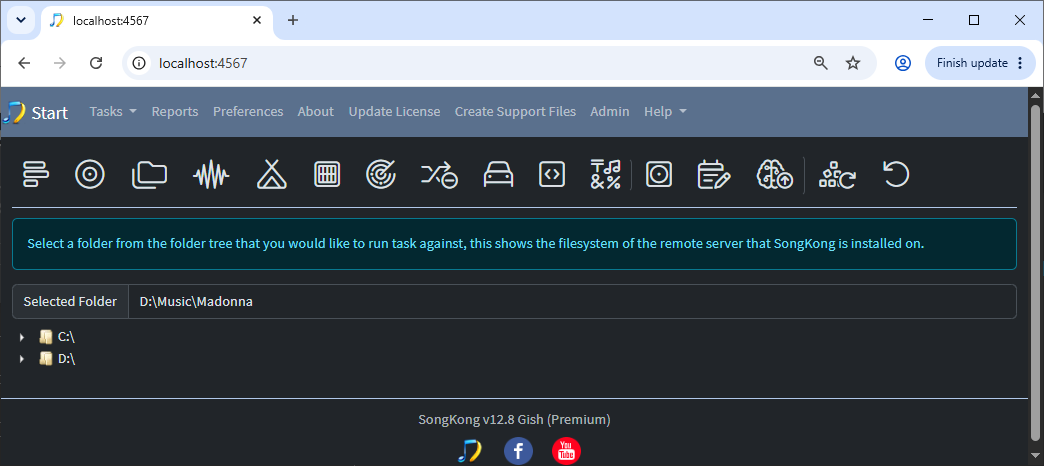
Starting Remote Mode
If you are already using Desktop Mode, you can start Remote Mode from SongKong.
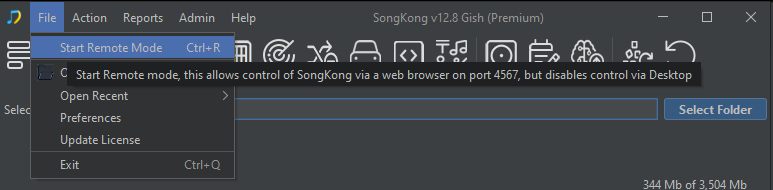
SongKong can also be started directly in Remote Mode, which is useful for servers and other machines where SongKong normally runs without somebody sitting in front of it.
The detailed Remote or Desktop Mode section of this guide explains how to configure and start Remote Mode.
Command Line Mode
SongKong can also be run from the command line.
This is primarily intended for users who want to include SongKong in scripts or automated workflows.
For example, a server could run a SongKong task automatically as part of a larger music-processing system.
If you simply want to control SongKong installed on another computer or server, Remote Mode is normally easier because it gives you the full graphical interface in your web browser.
The detailed SongKong Command Line section of this guide explains the available commands and options.
Which mode should I use?
For most users:
- Desktop Mode — SongKong is installed on the computer you normally use.
- Remote Mode — SongKong is installed on a server, NAS or another computer, or you want to control it from another device.
- Command Line Mode — You want to run SongKong from scripts or automated processes.
Whichever mode you use, the SongKong tasks themselves work in essentially the same way.