What should I do after that exercise?
Songkong stops in an endless loop
It stops again after 786 files, do you want another report?
Okay, suprising yes please
Did it actually go wrong, it seems you only left it running for about 3 minutes and then cancelled it?
Can you retry and leave it for longer , and send me screenshot before considering cancellation
I am sorry, but I wrote down when the app stopped fro several minutes, it was always after 786 files. That is why i stopped it. If I let i go on longer it ends in an endless loop and does not react anymore.
The biggest problem now is that the app does not run anymore. I tried it several times, also after rebooting the computer, but the version I have now on my Mac seems to be corrupt an cannot start.
Tomorrow I will replace it with a fresh version, do you want me to reinstall your plist? You and me have spent too much time I think on this problem, but I really need it tocleanup my libray after switching from Roon to Jplay.
There was no memory error,I’m not convinced it had stopped. We don’t continually load songs, when work queue reaches a certain size we pause loading until more songs are processed because as queue size increases memory usage can increase.
If SongKong starts please run Admin:Empty Database and then try Preview Only and let it run.
I reinstalled a new version witthout the modification and let it work with a smaller subdirectory on my SMB drive.
It stopped as you can see and did not react at all,
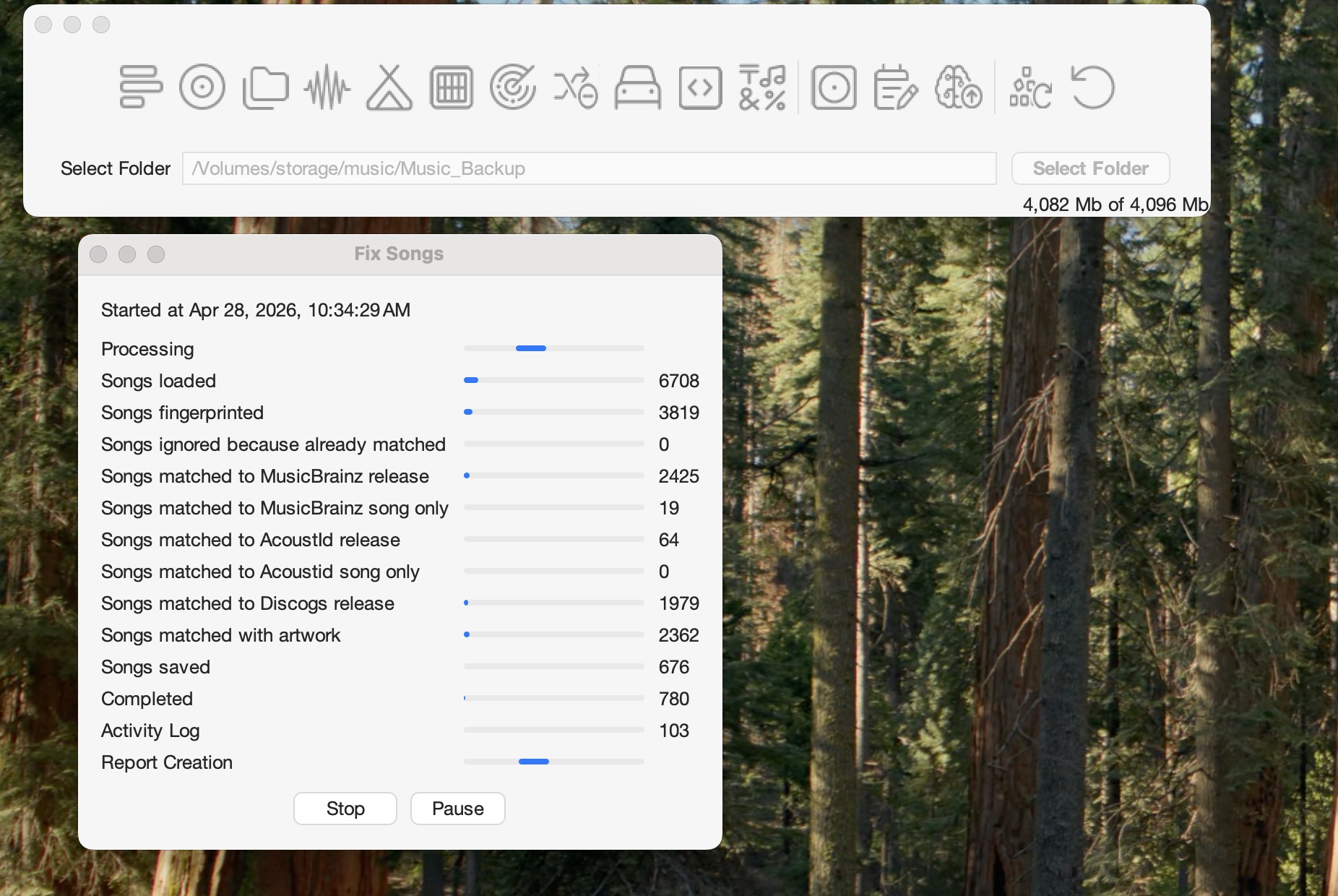
I do not know what to do, so please find a solution, maybe there is stilla bug somewhere. MY mac has no memory consuming apps
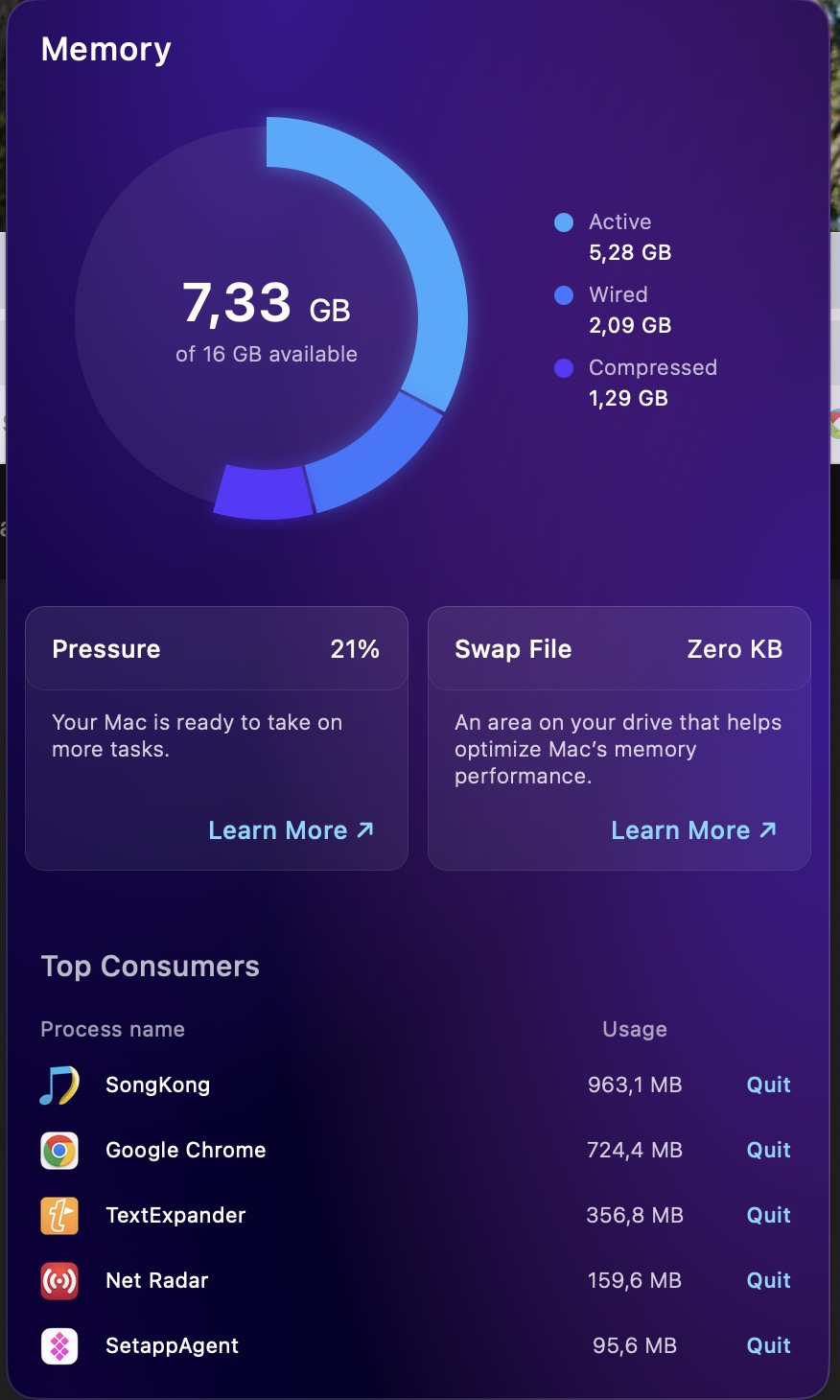
I have a theory to what issue is but I need you to do as I request to make progress please
- Restart SongKong
- Run Fix Songs with Preview Only enabled
- Leave it and don’t stop it unless you get an OutOfMemory error
Until you run this test for me I can’t resolve issue.
Again it stopped, sorry for that.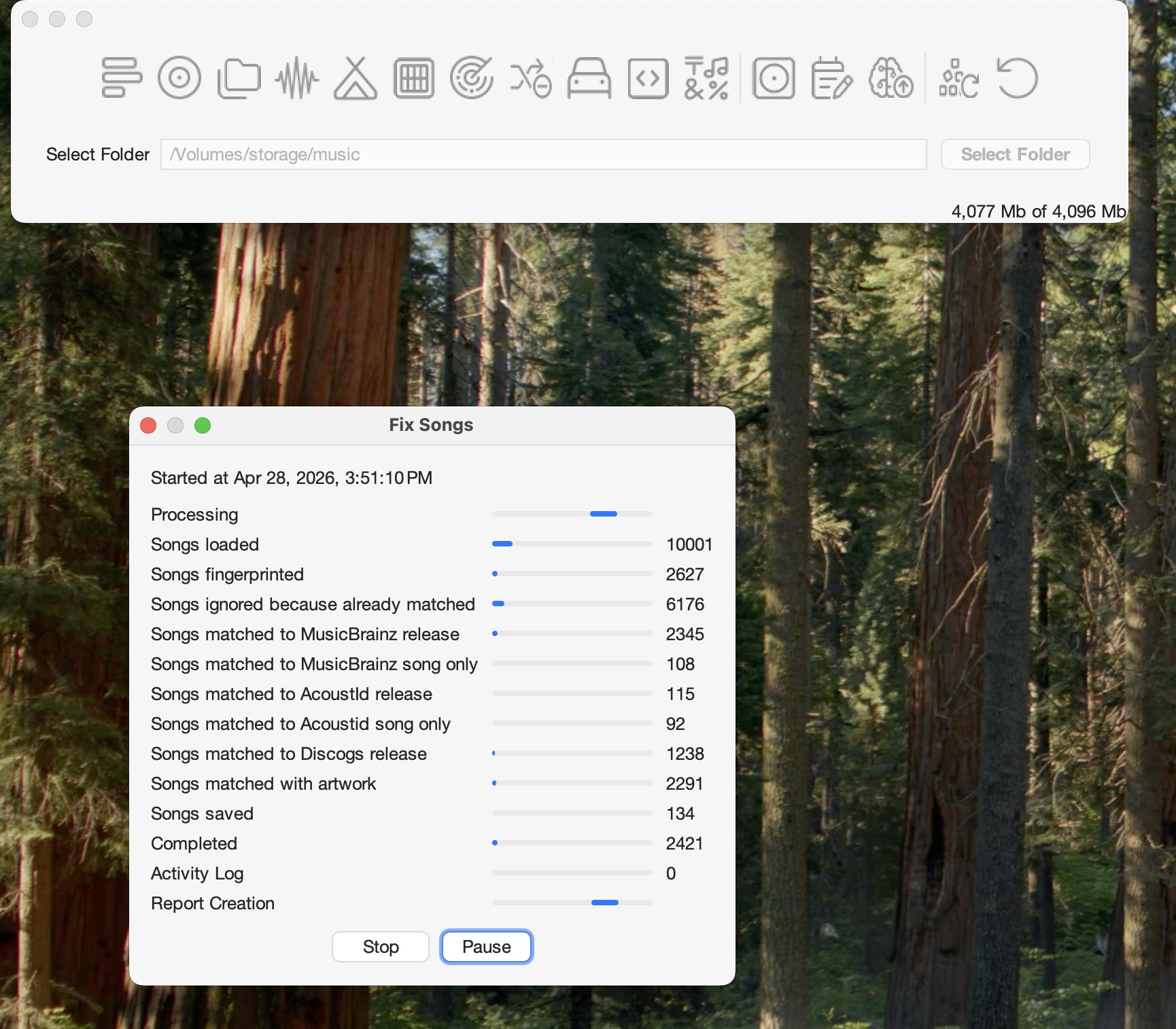
The app is unresponsive, so I cannot make any report
There is no out of memory error, it simply stops.
Here is your out of memory screenshot,preview only
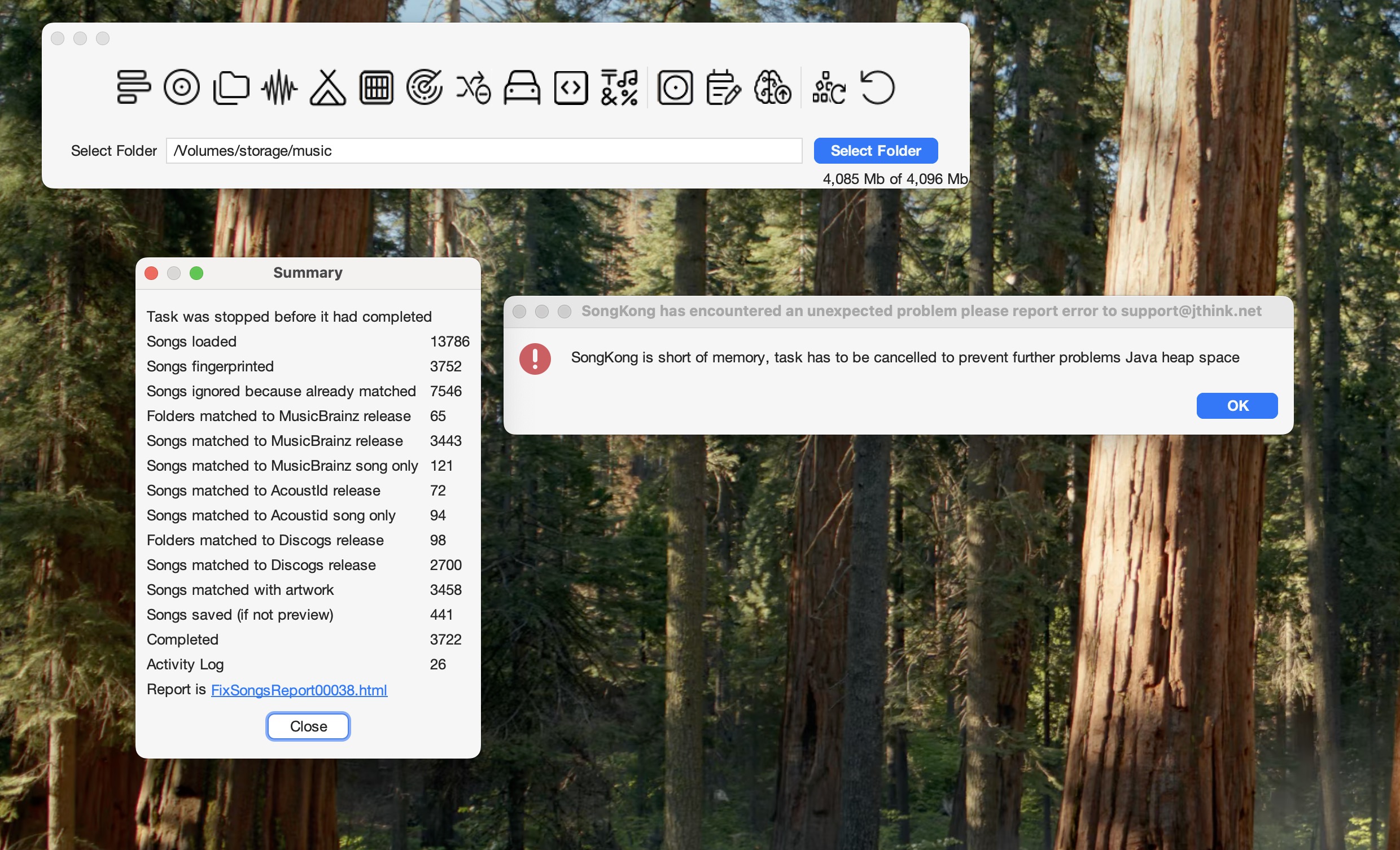
Okay, thankyou, please run Create Support Files and I will look into it tommorrow.
You won’t believe what happened, it completed! but in preview!!!
What do you want me to do? The preview is of course of no value for me, do you want me to rerun it, do you want a report?
Regards,
Mike
That is what I was expecting when I asked you to run it Preview only, what I was not expecting was for it to give an OutOfMemory error when you first tried to run Preview Only. Unfortunately because you have only just run Create Support Files after this last substantial run the logs from the initial failed preview run have been overwritten so I cant see the details of that. I just wonder if maybe you didnt restart SognKong before run Preview Only the first time and there was already a shortage of memory causing it to fail prematurely.
Problem
I have a rough idea of what I think is happening, this is bit technical but I will just explain it anyway for the benefit of anyone reading and then i have an idea that may work.
Songs are bundled into groups (usually based on folders) and then processed through a Work Pipeline, this can include Audio Fingerprinting, Match to MusicBrain, Match to Discogs ectera. The work is put on a queue and the work is done by multiple workers based on how many cpus you have. The queue has a fixed size so if the queue gets full we pause adding any more to the queue until some work is done. The queue also has a timeout for any piece of work so that if the work takes an unreasonable amount of time it is cancelled.
At the end of the Work Pipeline they are sent to the SongSaver Service. If any changes have been made (and not in preview mode) the actual files are modified and Saved count updated, then the Completed count is updated. Because most of the work is File I/O rather than Cpu based there are just a couple of workers for this pipeline because too many workers will just thrash the disc. Also because we may be writing data to actual files we dont want to cancel a piece of work half way through so there is no timeout and the queue size is unbounded.
When running not in Preview I noticed from your progress screenshots that the Matched to MusicBrainz Release counter was much higher than the Saved and Completed counters. It seemed that it was matching songs alright but very slow saving changes and having trouble saving the changes, and If I have a look at your Activity Log there are errors with files
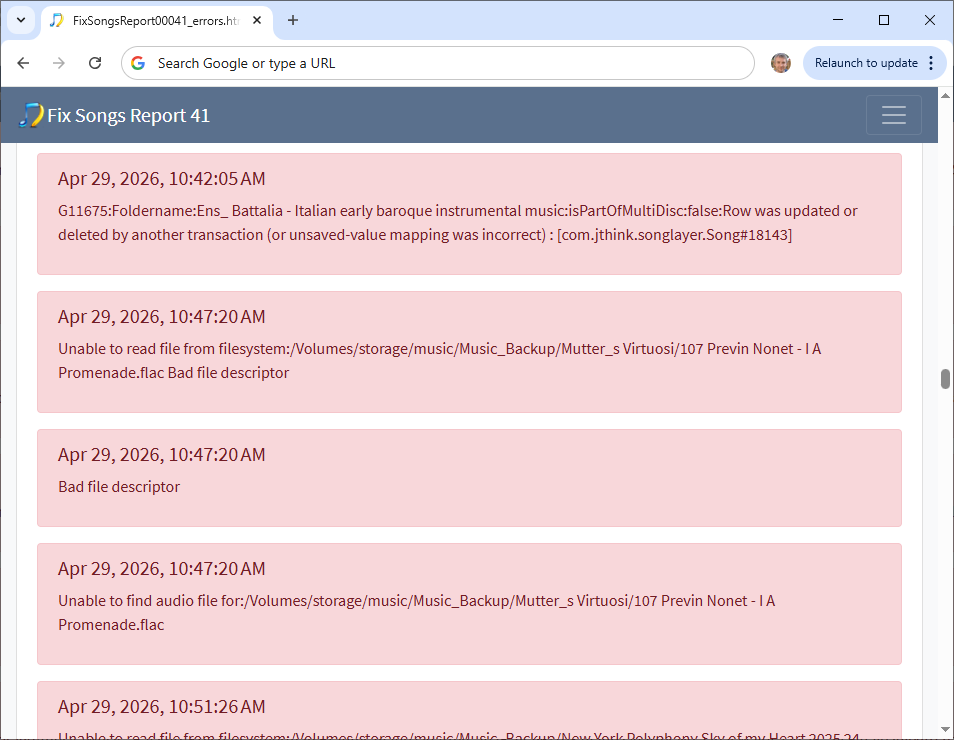
So I think what is happening is your computer is fast but your network is quite slow and unreliable, causing the SongSaver Service queue to build up. Then because the queue is held in memory that requires more memory and we run Out of Memory. Now the queue used to only store the Song Ids of the songs, the actually metadata is stored in database and only retrieved as required so it shouldn’t use that much memory, however in the last release we added success messages to the Activity Log and these are passed down to the the SongSaver so that will increase the memory used although it still doesnt seem to be that significant.
The point of running in Preview mode was that I expected it to work because now the SongSaver Service doesnt actually write back to the networked audio files so it should be much quicker, and hence the queue will not build up and we should not run out of memory, I’m unclear why it did fail first time.
Potential Solution
For you I have a potential solution, by default on a desktop computer the Work Pipeline queue is 500, but we can make it smaller, by making it smaller we slow down how quickly the work gets done and this means that less works gets queued up on the SongSaver queue, reducing the memory required.
- Ensure SongKong not running
- Open Finder
- Select Go menu
- Hold down Option button, Library will appear in the list
- Select Library
- Select Preferences
- Select SongKong
- Edit general.properties file with TextEdit, and add this line
queueSize=50
- Save Changes
- Start SongKong and retry.
And I will do some work on making this more robust so that the SongSaver queue cannot get too large.
Goodmorning Paul,
I did as you asked, let it run overnight but it ended again in a loop as far as I can see.No support file availed, the option is dimmed.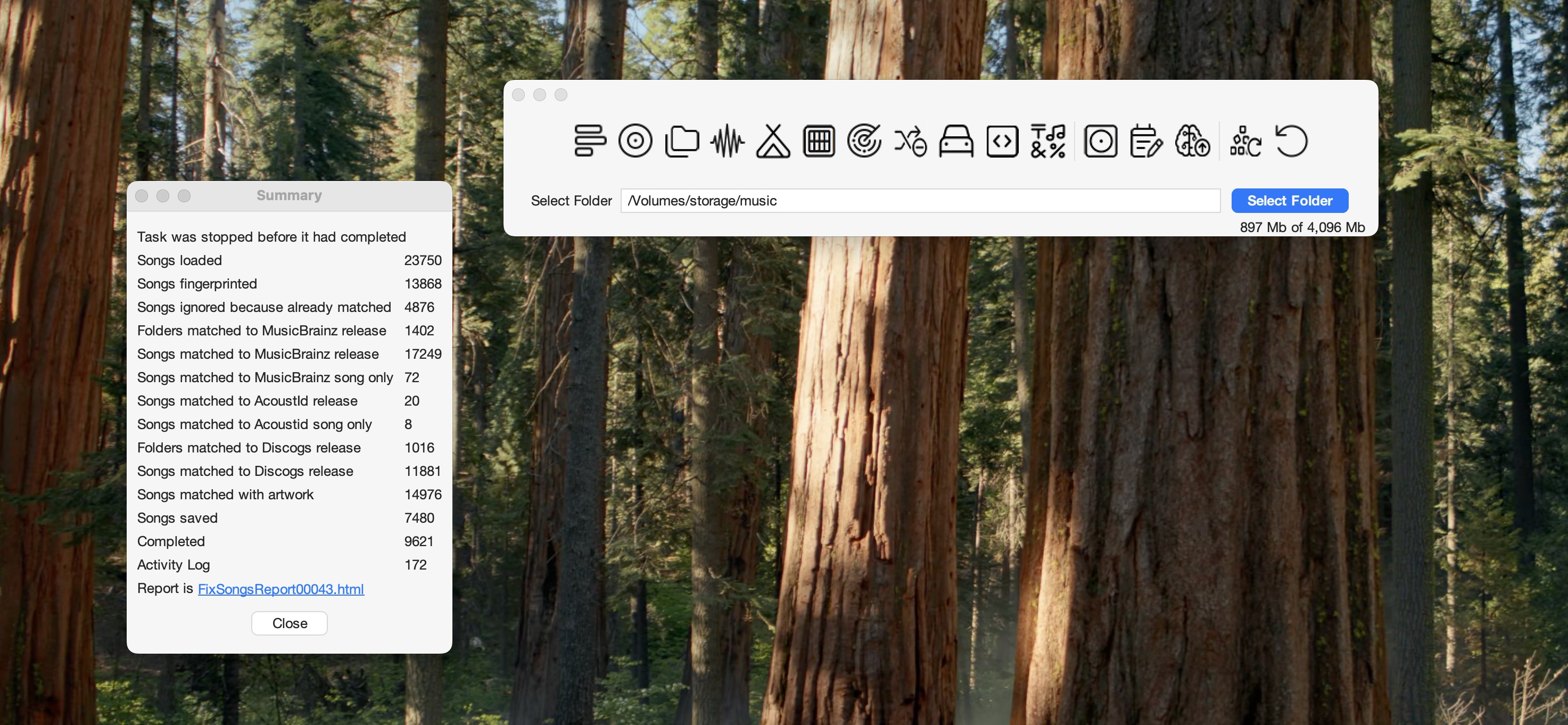
Did a memory error occur?
Was it looping and then you stopped it or had it already finished prematurely and looked as the screenshot above shows?
It does seem it got considerably further.
Could it just be that you are trying to run Create Support Files whilst the screen is like your screenshot shows, in which case I think it might just be that you need to select the Close button to dismiss the dialog first. If that is not issue simply restart SongKong, and then you should be able to immediately run Create Support Files
support files uploaded as you instructed
Thankyou, are you able to answer the first two questions?
Hi, I ve looked at the logs, actually it is not in an endless loop and didnt hit memory problem it was cancelled by yourself whilst it it was still processing. However, the matching to MusicBrainz had actually completed at about 10pm and from then on SongKong was only saving changes to the files, and it was saving files incredibly slowly at a rate of about 1 folder per minute so I can see it might have looked like it wasn’t doing anything.
30/04/2026 06.02.58:CEST:SEVERE: ++SaveStart:29051:/Volumes/storage/music/Music_Backup/Isabel I, Reina de Castilla [Savall]/20 Requiem_ Requiem aeternam (Graduale).flac
30/04/2026 06.03.13:CEST:SEVERE: ++SaveComplete:29051:/Volumes/storage/music/Music_Backup/Isabel I, Reina de Castilla [Savall]/20 Requiem_ Requiem aeternam (Graduale).flac
30/04/2026 06.03.14:CEST:INFO: Stop
So, although there is a bug I will fix for next week to prevent SongSave queue getting too large the underlying issue is that for whatever reason SongKong file saving is extremely slow on your network
And sometimes failing
30/04/2026 05.52.56:CEST:SongSaver:readAudioFile:SEVERE: Unable to read file from filesystem:/Volumes/storage/music/Music_Backup/Kenneth Woods Bloch Schelomo Hebraic Rhapsody Suite for Viola and Orchestra 2025 24-96/103 Suite for Viola and Orchestra, B  41 (Arr  for Cello and Orchestra by Adolph Baller and Gábor Rejitö) II  Allegro ironico.flac Bad file descriptor
java.io.IOException: Bad file descriptor
	at java.base/java.io.FileDescriptor.close0(Native Method)
	at java.base/java.io.FileDescriptor.close(FileDescriptor.java:304)
	at java.base/java.io.FileDescriptor$1.close(FileDescriptor.java:89)
	at java.base/sun.nio.ch.FileChannelImpl$Closer.run(FileChannelImpl.java:116)
	at java.base/jdk.internal.ref.CleanerImpl$PhantomCleanableRef.performCleanup(CleanerImpl.java:178)
	at java.base/jdk.internal.ref.PhantomCleanable.clean(PhantomCleanable.java:133)
	at java.base/sun.nio.ch.FileChannelImpl.implCloseChannel(FileChannelImpl.java:210)
	at java.base/java.nio.channels.spi.AbstractInterruptibleChannel.close(AbstractInterruptibleChannel.java:113)
	at org.jaudiotagger.audio.flac.FlacInfoReader.read(FlacInfoReader.java:106)
	at org.jaudiotagger.audio.flac.FlacFileReader.getEncodingInfo(FlacFileReader.java:40)
	at org.jaudiotagger.audio.generic.AudioFileReader2.read(AudioFileReader2.java:60)
	at org.jaudiotagger.audio.AudioFileIO.readFile(AudioFileIO.java:364)
	at org.jaudiotagger.audio.AudioFileIO.read(AudioFileIO.java:196)
	at com.jthink.songkong.analyse.analyser.task.songsaver.SongSaver.readAudioFile(SongSaver.java:1574)
	at com.jthink.songkong.analyse.analyser.task.songsaver.SongSaver.createSongSaveWrappers(SongSaver.java:1043)
	at com.jthink.songkong.analyse.analyser.task.songsaver.SongSaver.saveSongsToFile(SongSaver.java:978)
	at com.jthink.songkong.analyse.analyser.task.songsaver.SongSaver.saveChanges(SongSaver.java:283)
	at com.jthink.songkong.analyse.analyser.task.songsaver.SongSaver.call(SongSaver.java:246)
	at com.jthink.songkong.analyse.analyser.task.songsaver.SongSaver.call(SongSaver.java:93)
	at java.base/java.util.concurrent.FutureTask.run(FutureTask.java:317)
	at java.base/java.util.concurrent.ThreadPoolExecutor.runWorker(ThreadPoolExecutor.java:1144)
	at java.base/java.util.concurrent.ThreadPoolExecutor$Worker.run(ThreadPoolExecutor.java:642)
	at java.base/java.lang.Thread.run(Thread.java:1583)
So if I fix the queue size that should prevent SongKong failing with Memory Error, but it will take a long time to complete because of the slowness of song saving and some songs will not get saved because of this file descriptor error. The file descriptor error is not due to a bug in the SongKong code it is a symptom of some issue with your local network.
So one solution is to fix the network, but it is difficult for me to give advise on what is wrong with your network.
A pragmatic workaround for this problem would be for you to copy the files to a local drive on your computer, or a pluggable external hard drive. Then when you run SongKong it is just modifying the local files and there should not be any issues.
Is that a viable solution for you?