Good Morning
new trial user before purchasing - installed on windows 11 getting cant start JVM error please advise
John
Good Morning
new trial user before purchasing - installed on windows 11 getting cant start JVM error please advise
John
So it installs okay, but then fails when you try and run it?
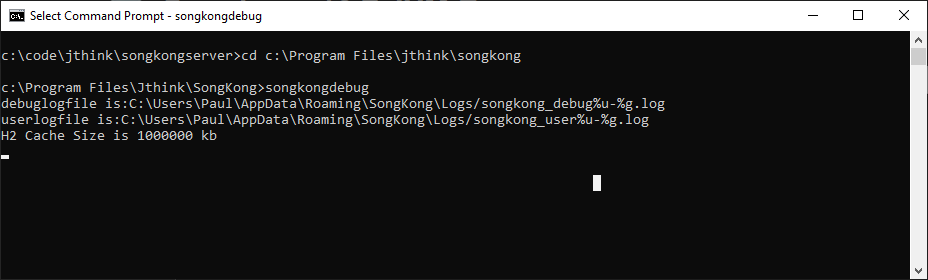
The latest version is 12.9.3 not 12.7 please ensure you are using the latest version, if there is still an issue please run SongKongDebug from the Jthink Start menu and then copy and paste the contents of the Cmd Window. If the window disappears open a Cmd prompt instead, change directory to C:\Program Files\Jthink\SongKong and run SongKongDebug.exe from there
e.g
Apologies i was using the latest version from download page
yes install all ok but fails when starting
debug below
John
Microsoft Windows [Version 10.0.26200.9457]
© Microsoft Corporation. All rights reserved.
C:\Users\john>cd C:\Program Files\Jthink\SongKong
C:\Program Files\Jthink\SongKong>songkongdebug
debuglogfile is:C:\Users\john\AppData\Roaming\SongKong\Logs/songkong_debug%u-%g.log
userlogfile is:C:\Users\john\AppData\Roaming\SongKong\Logs/songkong_user%u-%g.log
java.lang.NoClassDefFoundError: Could not initialize class javax.swing.UIManager
at java.desktop/javax.swing.JOptionPane.showMessageDialog(JOptionPane.java:619)
at com.jthink.songkong.util.UncaughtExceptionHandler.showMessage(UncaughtExceptionHandler.java:73)
at com.jthink.songkong.util.UncaughtExceptionHandler$1.run(UncaughtExceptionHandler.java:46)
at java.desktop/java.awt.event.InvocationEvent.dispatch(InvocationEvent.java:308)
at java.desktop/java.awt.EventQueue.dispatchEventImpl(EventQueue.java:773)
at java.desktop/java.awt.EventQueue$4.run(EventQueue.java:720)
at java.desktop/java.awt.EventQueue$4.run(EventQueue.java:714)
at java.base/java.security.AccessController.doPrivileged(AccessController.java:400)
at java.base/java.security.ProtectionDomain$JavaSecurityAccessImpl.doIntersectionPrivilege(ProtectionDomain.java:87)
at java.desktop/java.awt.EventQueue.dispatchEvent(EventQueue.java:742)
at java.desktop/java.awt.EventDispatchThread.pumpOneEventForFilters(EventDispatchThread.java:203)
at java.desktop/java.awt.EventDispatchThread.pumpEventsForFilter(EventDispatchThread.java:124)
at java.desktop/java.awt.EventDispatchThread.pumpEventsForHierarchy(EventDispatchThread.java:113)
at java.desktop/java.awt.EventDispatchThread.pumpEvents(EventDispatchThread.java:109)
at java.desktop/java.awt.EventDispatchThread.pumpEvents(EventDispatchThread.java:101)
at java.desktop/java.awt.EventDispatchThread.run(EventDispatchThread.java:90)
Caused by: java.lang.ExceptionInInitializerError: Exception java.awt.AWTError: Assistive Technology not found: com.sun.java.accessibility.AccessBridge [in thread “main”]
at java.desktop/java.awt.Toolkit.newAWTError(Toolkit.java:475)
at java.desktop/java.awt.Toolkit.fallbackToLoadClassForAT(Toolkit.java:491)
at java.base/java.util.stream.ForEachOps$ForEachOp$OfRef.accept(ForEachOps.java:184)
at java.base/java.util.stream.ReferencePipeline$2$1.accept(ReferencePipeline.java:179)
at java.base/java.util.HashMap$KeySpliterator.forEachRemaining(HashMap.java:1715)
at java.base/java.util.stream.AbstractPipeline.copyInto(AbstractPipeline.java:509)
at java.base/java.util.stream.AbstractPipeline.wrapAndCopyInto(AbstractPipeline.java:499)
at java.base/java.util.stream.ForEachOps$ForEachOp.evaluateSequential(ForEachOps.java:151)
at java.base/java.util.stream.ForEachOps$ForEachOp$OfRef.evaluateSequential(ForEachOps.java:174)
at java.base/java.util.stream.AbstractPipeline.evaluate(AbstractPipeline.java:234)
at java.base/java.util.stream.ReferencePipeline.forEach(ReferencePipeline.java:596)
at java.desktop/java.awt.Toolkit.loadAssistiveTechnologies(Toolkit.java:540)
at java.desktop/java.awt.Toolkit.getDefaultToolkit(Toolkit.java:601)
at java.desktop/javax.swing.UIManager.(UIManager.java:387)
at com.jthink.songkong.ui.MainWindow.setupLaf(MainWindow.java:212)
at com.jthink.songkong.ui.MainWindow.setupScreen(MainWindow.java:348)
at com.jthink.songkong.cmdline.SongKong.guiStart(SongKong.java:1188)
at com.jthink.songkong.cmdline.SongKong.finish(SongKong.java:1409)
at com.jthink.songkong.cmdline.SongKong.main(SongKong.java:1456)
Failed to launch JVM
So you are using 12.9.3 ?
From Cmd Window can you please enter
type "%USERPROFILE%\.accessibility.properties"
confirmed 12.9.3 my error
C:\Program Files\Jthink\SongKong>type “%USERPROFILE%.accessibility.properties”
assistive_technologies=com.sun.java.accessibility.AccessBridge
screen_magnifier_present=true
Ah, okay you have some assistive technologies configured. When SongKong is built it is sent with a stripped down version of Java containing only the libraries referenced in the code. However, assistive technologies are not referenced in the code but they are used if you have AccessBridge installed as you have.
As a workaround if you simply rename the file then SongKong should start
ren "%USERPROFILE%\.accessibility.properties" ".accessibility.properties.old"
But this should not be necessary so I have raised an issue https://jthink.atlassian.net/browse/SONGKONG-3059
Worth noting although it has
screen_magnifier_present=true
This doesn’t really change how SongKong works, it doesn’t mean text is magnified it is just a hint to Java that there is a screen magnifier running, so render in a way that magnifiers can reliably capture.
Perfect !
thank you !
Software running all OK
John