SongKong Jaikoz

SongKong and Jaikoz Music Tagger Community Forum

Match to one album not working

Hi, sorry the Mozart item was a red herring I was looking at my own support files, so i did have a problem there but now it is working okay for me.

Thanks for the support files, unfortunately there is nothing much in the logs to indicate the cause of issue. Could you try the following:

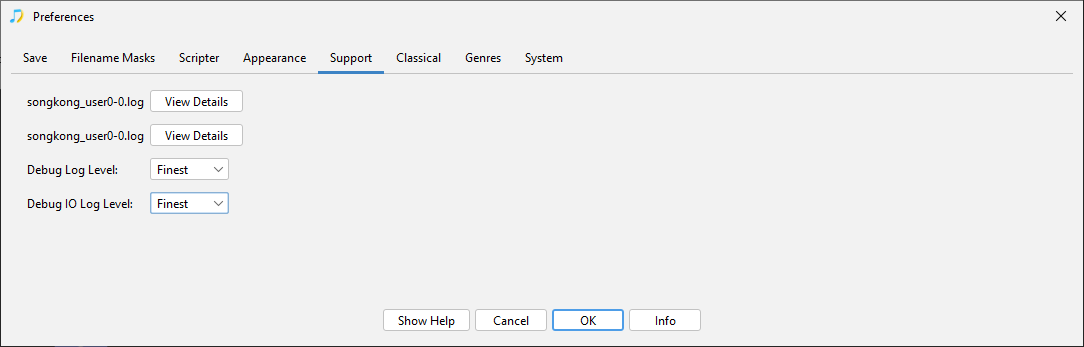
Go to Preferences:Support, and set Debug Log Level and Debug IO Level to Finest
image

Rerun Match to One album task

Then go back to Preferences:Support, and set Debug Log Level and Debug IO Level back to Warning

Then in case the issue is related to your files could you send me the music files for a folder you are trying to match to see if I can replicate the issue here, I will then delete the files afterwards.
Folder

wont let me upload, theese are flac files

also its not just this album its like all of them

tried web ui again , it took about 10 seconds to return unable

deleted the goto folder for rips

reripped cd.

also ran chdsk and sfc /scannow in CMD , restarted PC
musicbrains works, audioranger works.

just not matching to one album.
can i go back to 12.3 ?

Sorry I meant that you could upload the files with something like Dropbox and then send me a private link or email rather than uploading publicably.

Can you try Admin:Empty Database and retry.

If that doesn’t work you can go back to previous version, we did make some substantial changes in last release so totally possible that mau have broken something.

emptied, still nogo.

how do i get it back to 12.3 ?

its all CDs, just started happening … any CD i try to match

As I say it is working here, so curious that not working for you at all. I will add some more debugging in for next release. In the meantime you can go back to earlier release but it would make more sense to just go back to 12.6 as we are currently at 12.7 and if a bug was introduced most likely to be in 12.7 and it would be helpful to me if yo could confirm this by just going back to 12.6

You can go back to earlier version but have to delete existing config so if you have custom profiles ectera may want to make a note of the details beforehand.

This is what you would have to do:

  • Uninstall SongKong
  • Copy *.properties files from C:\Users\username\appdata\Roaming\SongKong to a backup location in case need them later
  • Delete C:\Users\username\appdata\Roaming\SongKong folder
  • Download SongKong for Windows 12.6 from here
  • Reinstall SongKong
  • Re-enter License Details

no go with 12.6, also using remote
i will build a new pc and see if it happens on that rig

so, if iremeber thing i tried last night, and the past couple days.

from CMD scannow also DISM restore

had trouble getting security offline scan to work so
from dsktop , reset windows keeping files. then ran windows offline scan also full scan.

removed extra drives… only running C: and cd drive. reripped a cd sountrack - riding in cars with boys-drew barrymore motion picture- meta was found in accurip …flac

on 12.6 Songk . same results

uninstalled a lot of apps, including SK … reinstalled 12.6 again, restarted
ran with all options off, dont change art, mood ect. both remote and desktop application
both failed

removed taskbar icons, readded fresh ones heh.
song match runs as normal, matches and completes, match to one album insti fails

Not sure if its related but Match to One Album is also not working for me. In my case, enter a specific Discogs URL, SongKong finds it. When I select that matched album and press Next to see the edits, none of the new metadata is shown, only the existing is.

Can you run Create Support Files please.

ok, new HD fior C: , totally fresh W11 install from bootable USB

reinstalled,reentered licenses for DB poweramp and Songkong premium

ripped a cd (damb yankees sountrack 1955… meta complete from accurip

songkong 12.7 fresh install, first item ran through it , will submit report

instant fail to match

also just tried remote ui, no go

Have you tried increasing the debug level as requested and then running because currently the trouble is there is nothing in the logs to give a clue to the error. It seems there is nothing wrong with your computer or the installation, but more likely there is either a bug in SongKong or some issue with the files you are using it with. I know you say you have tried with multiple files but these always seem to be in the same folder, does Match to One Album work if you run it against another folder that is already matched?

When you run Match to One Album are you entering a Url or leaving it to find potential matches?

Would be useful if you could use something like Dropbox to upload an album for me to test just to check it is not file specific.

I assume it was all working when using 12.3 so after the above steps you could go back to 12.3 using this link https://www.jthink.net/songkong/downloads/build1197/songkong-windows64.msi

Just wondering, did the issue start after modifying Security/Virus Scanner ?

no, issue occuring before that, i just was going down that path as a potential solution

will try this, have a folder of completed , cued to get sorted to final folder… only hitch is some only have songkong by song… actully there are some that dont have match to anything, no intenet search clues or posts. discogs,mulsicbrainz , no engines produced results either… audioranger,musiocbrains, i use mp3 tag /w discogs # ID if songkong cant find it… will look for an album thats common in that foulder… like def lepard hyusteria or somethin , heh

not sure if i should be embarrassed.

the cars 1982 “shake it up” matched.

thing is, also songs got loaded… the other ones songs dont get loaded / fingerprinted nothing.
plus it was happe4ning repeadedly, one cd after a next