SongKong Jaikoz

SongKong and Jaikoz Music Tagger Community Forum

Is there a SongKong to MusicBrainz mapping table anywhere?

Looking through the Fix Songs spreadsheet I realise there are numerous columns where I’m not quite sure of their meaning and thus whether they are columns I should spec in or out when I finally pull the trigger e.g. Year vs Album Year vs Original Year vs Original Album Year, Grouping etc.

Is there perhaps as a table setting out SK columns and their meanings online somewhere. I found the field mapping table but nothing to describe the meaning/purpose of some of the more obscure stuff that’s open to interpretation.

Linked to this, is there an ability to map SK fields/tags to specific tags when written to the underlying files? I ask because I’d ideally like to ignore certain tags and map others to a single tag e.g. the various engineer tags could potentially map to engineer when written to file? If that’s not possible it’s not a big deal, I can post process them in my tags database after ingesting them from the files then do the merging / consolidation on my side.

Actually that help document is no longer updated, moved to the SongKong Tutorial section on the forum because it is easier to update, and can add videos and customers can interact with it.

The equivalent page is this

but you are right I need to add a page to describe the logical metadata fields

Regarding this one Album Year stores the date the album was released, Original Album is the earliest version of a release we can find and Original Album Year is the date that version released. Original Year is the date of the earliest release of that particular song (think of a compilation album where the Original Year will be different for every song, but the Original Album Year is the same). Now Year is always the same as Album Year unless Album Format:Use Original Release Date option is enabled, then it is the same value as Original Album Year. So that is why we added the Album Year field because often customers want to store the Original Album Year field in their Year field because only the Year field is supported by most music players, but they still want to store the actual release year somewhere
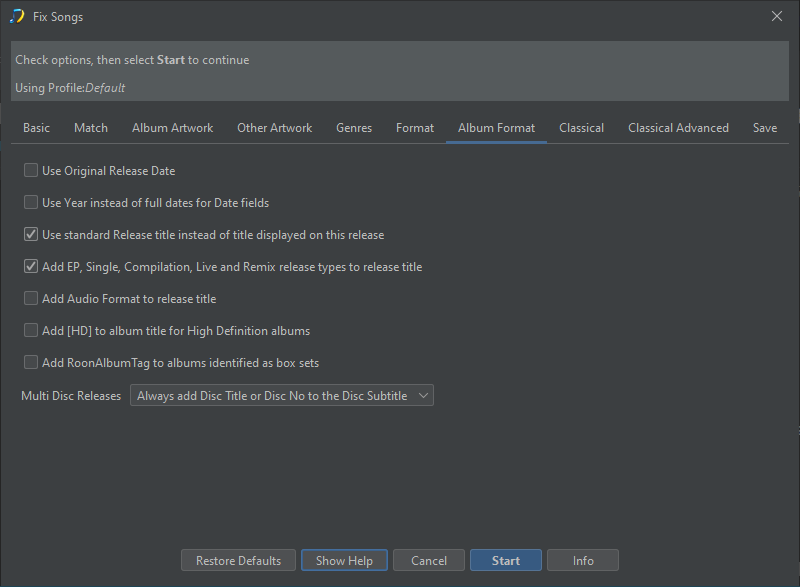
image

We always write tags to same mapping whern using Fix Songs, however you can use Scripter to copy values to other fields afterwards, and MetaGrater or Scripter to delete values. So the longer term plan is to add support for Steps where you could configure SongKong to run multiple tasks with predefined profiles, e.g Fix Songs, Scripter, Rename Files to make this super easy.

But we don’t currently support custom metadata fields so currenlty scripter can only assign values to the standard set of SongKong fields, but custom metadata fields are also going to be added.

So that could be already done with Scripter as follows

if(audioengineer.length>0) 
{ 
   if(engineer.length>0) engineer+=';;;'
   engineer+=audioengineer
}
if(balanceengineer.length>0) 
{ 
   if(engineer.length>0) engineer+=';;;'
   engineer+=balanceengineer
}
if(recordingengineer.length>0) 
{ 
   if(engineer.length>0) engineer+=';;;'
   engineer+=recordingengineer
}

Thanks for the explanation. I’ve already coded 99% of my tag transformation logic in Python and pretty much have a series of scripts that all newly ingested albums are pulled through. One ingests all tags for all files and writes them out to a single flat SQLite table. It’s also capable of writing the database back to tags and forms the basis of my ability to process my entire library at pace, completely and accurately. In some respects it’s not dissimilar to SongKong except that it does nothing to fetch metadata from anywhere - it only works on enriching and standardising what is already there. The only exceptions to that is I maintain a contributor table that contains allmusic’s canonical form of artist names (or my preference if I disagree) along with genre and style keywords (also from AMG) typically associated with that artist. This is mapped to a MusicBrainz contributor table I periodically pull and my scripts then use the canonical name I referred to in preference to anything that might exist in MusicBrainz or any underlying metadata. So I get the MBIDs, and an artist name depicted according to my preferences throughout the lib, even if I’ve run something through a tagger. Similarly, all genre entries are checked against my canonical genre/style tree transformed if necessary and possible, otherwise discarded. If that means an album has no genre associated with it the script then lifts the genre entries related to the albumartist and populates the album’s genre with that. Not perfect, but I can live with the odd misfire which I’m happy to correct manually.

So where using SongKong is concerned my plan is to let SongKong to its thing then run my scripts in the same manner I always have, only I may need to add a few more transformations like merging the engineer example above and then setting the tags I don’t want to keep (like sort tags) to null so that they are deleted when I push my database of changes back to my tags. A long winded way of me saying that I’d prefer to take what SongKong provides as a given and do any custom wrangling on my side.

Had I not stumbled on SK I would have looked to create a merged musicbrainz/discogs of sorts to enrich performer metadata … but SongKong will spare me the considerable effort that would take to build and maintain.

Very useful, thanks. Turns out your’e mapping to the same VORBIS COMMENTS my scripts write to so apart from merging tags after the fact there’s nothing else I’d need to do.

I may have asked this before, so apologies if I have. For the sake of discussion, let’s assume a track in my library has COMPOSER=Lindsay Buckingham;Stevie Nicks and SK has COMPOSER=Stevie Nicks.
… I presume SK will leave me with COMPOSER=Stevie Nicks ? Asking because MusicBrainz isn’t always correct and my original value may be right.

By default yes, but you can add fields like this to the Only modify if empty option to preserve your values.

1 Like