Status Report is much, much quicker than Fix Songs, and yes since the underlying metadata for your songs is already in the database it will read the metadata from the database rather than having to read directly from the files.
Is is possible to "analyse only" when licensed and does that preclude writing changes without rerunning scan?
Great, I’ve triggered the report incorporating most tags and I’ll upload support files again when I get home later this afternoon.
There a way to limit the scanner’s scope to that inventory e.g. inventory the exiting db rather than hit the entire shooting match again?
You can select particular folder(s) but I dont think that is what you mean but im not really clear what you are asking?
But in your case since there are probably only a small number that are incorrectly matched one approach would be go through the potential inconsistencies in the report and where it looks like there was a bad match rematch just that folder using Fix Songs or even better Match to One album
But the inconistencies can be caused by a number of different problems, for example if I look at your report and the Multiple Values in Album Artist tab and the first three listed
A/Angel Snow - Secret (Acoustic
The two tracks in that folder have been matched to different albums, so i assume there is a version of the release that contains both songs, or if not they should be in different folders.
A/Anna Elizabeth Laube - Annamania folder
The issue here is you simply have some duplicate tracks, so this would be run resolved by using Delete Duplicates task.
A/Anna Ternheim - The Night Visitor [2021 Remaster]
Here you have 14 tracks, the first 12 have been matched to an album, the last two have not. the 12 tracks had been matched to the 12 track version by Picard, but they should have been matched to the 14 track version
Hi, i havent recieved a new support file yet was there an issue?
Also, I noticed SongKong seems to have only partially matched the A/Avantasia - Lost in Space, Vol. 2 folder, this should not happen with the options you have could you please send me the files in that folder so I can investigate.
It’s generated, will upload shortly
Thankyou received, frankly I am suprised it took so long for the Status Report to be generated since it is only creating the report (and there is no internet access) but Im wondering if this task is not optimized for multiple cpus I wil have to look into this.
There are also some interesting results when compared to the Fix Songs report I am going to do some further analysis.
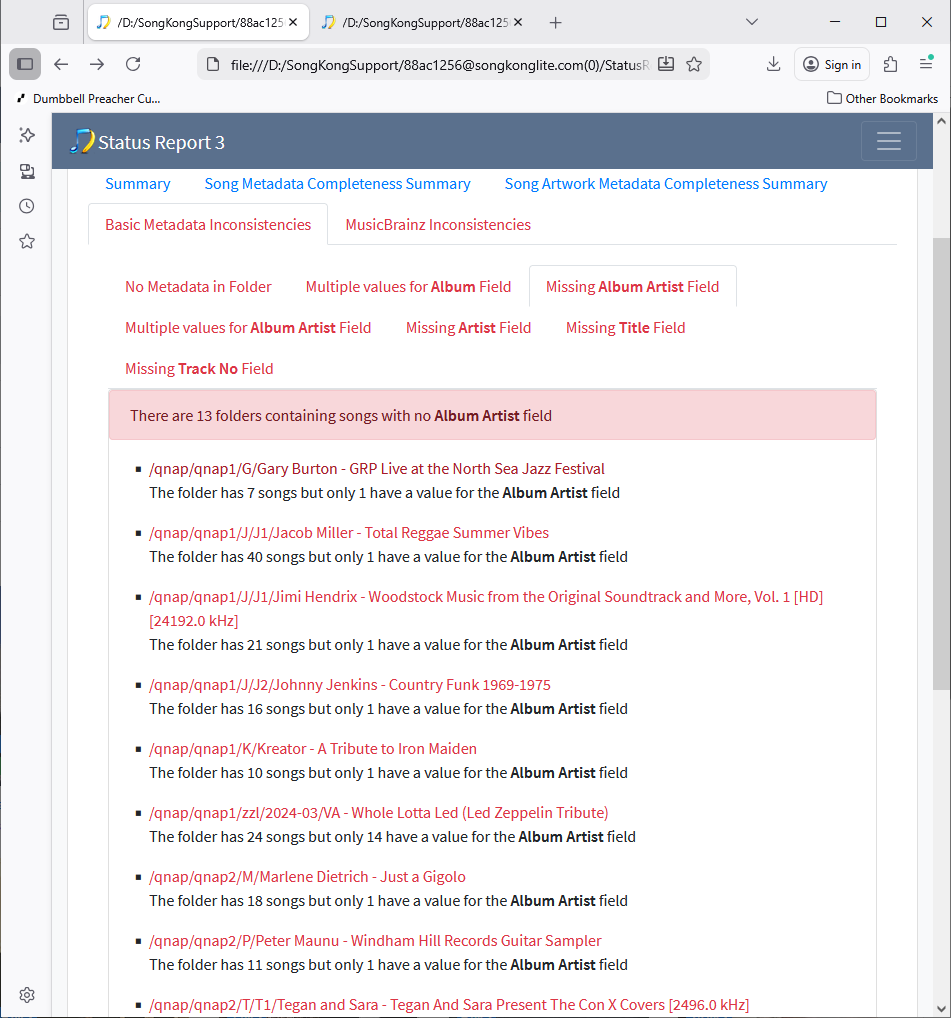
I discovered one bug in the the Inconsistencies Report when ran as part of Fix Songs. The Basic Metadata Inconsistencies sub tabs that say Missing Album, Missing Album Artist ectera are based on the values before Fix Songs task was run so dont take into account fixes made by Fix Songs. e,g we can see that on Status Report on the Missing Album Artist Field tab it says there are missing values for Album Artist for some folders
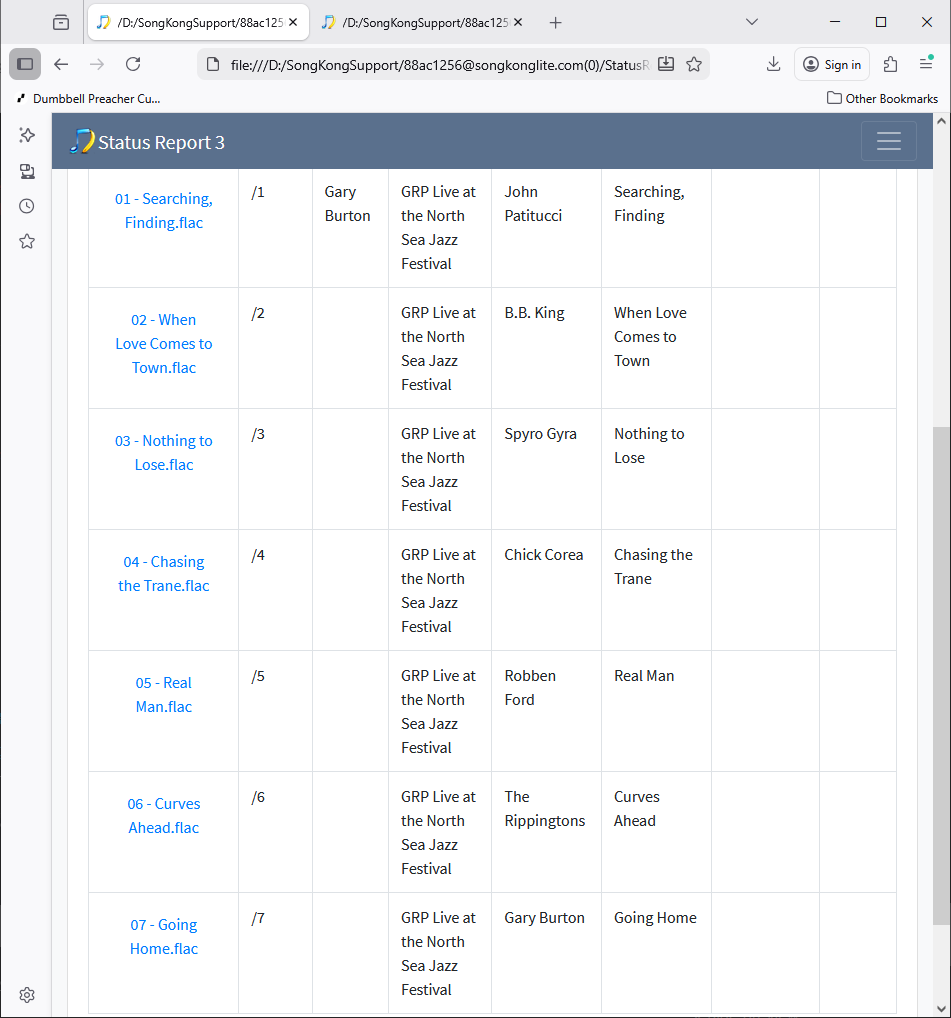
and if we select the first one we can see analysis is correct, only the first track has a value for Album Artist
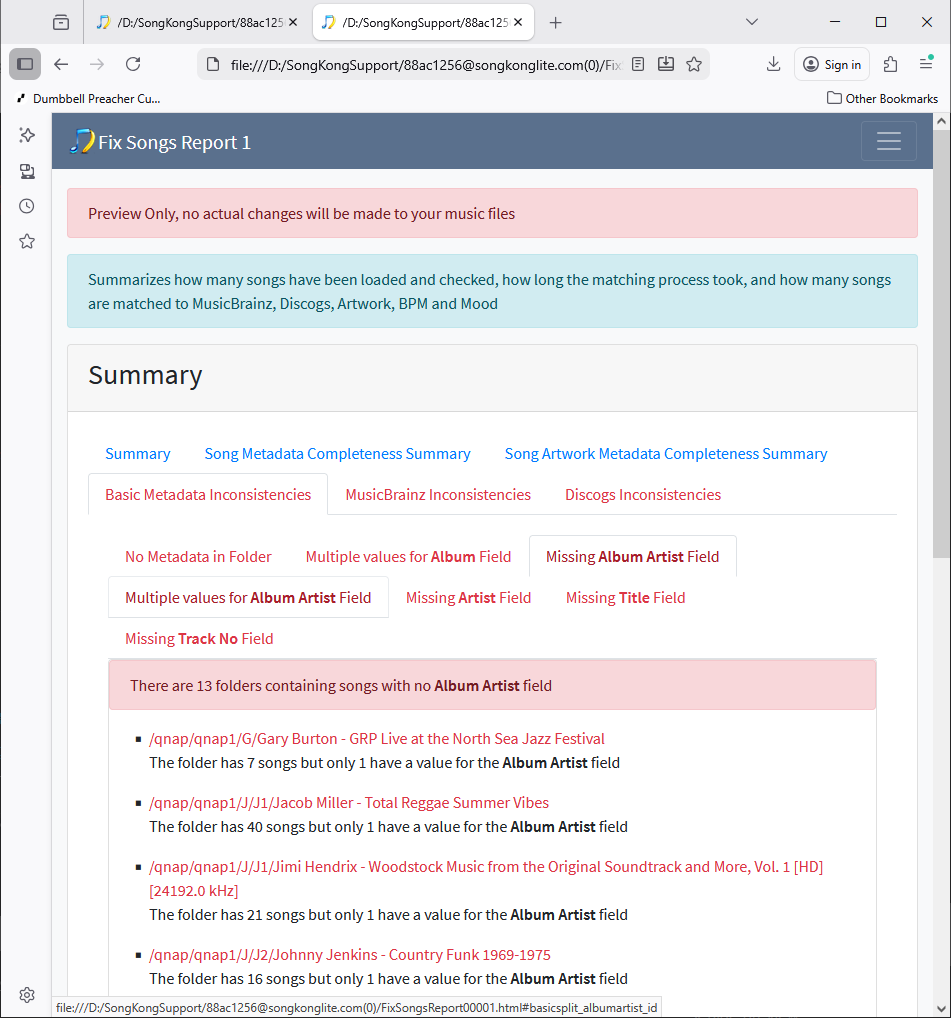
The if we the look at the Fix Songs report it again says there is the same problem
but if we look at the details we can see that it has now been added for all tracks (is actually a Various Artist album)
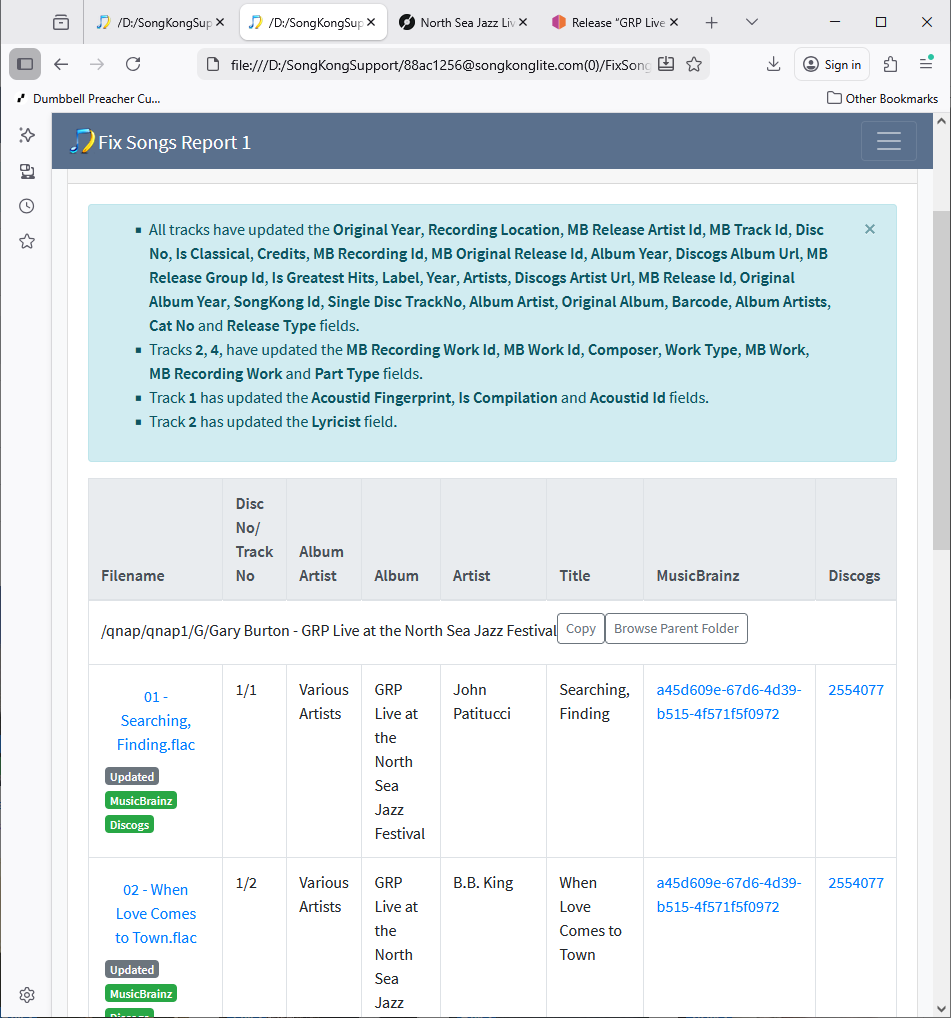
So this folder should never have been listed in the Missing Album Artist Field tab for the Fix Songs run, only the Status Report run, this bug already fixed for next release. It only affects cases where the starting point was no value for a field, there is not an issue if the value was chnaged form something to something else.
Interesting to see MusicBrainz matches were increased by Fix Songs from 17% to 85%.
Hi, I don’t actually need those Lost In Space songs now I have worked out the issue there is some interplay between Picard and SongKong, if we look at Status Report we see Multiple Values for Album:14 folders but after Fix Songs run Mutiple Values for Album is now 86 folders seems worse, what has happened ?
The issue is for these folders Picard has matched some but not all of the songs to MusicBrainz so when SongKong looks at the folder because configured For songs already fully matched to Update Metadata Only it splits the already matched and not matched. Then for the already matched it updates them from MusicBrainz, possibly changing some values so for this example it changed album title from Lost in Space, Vol. 2 to Lost in Space, Part 2. In many cases the album title is changed because your values include the sample rate (e.g /qnap/qnap1/D/Deerhoof - Mountain Moves [2448.0 kHz]) so the update songs get the sample rate removed (because not part of official title) but the remaining songs do not.
Now, what happens to the unmatched songs. Now because they are in their own group they can be matched to an album so there is potential for them to be matched to the same release as the already matched songs, but only if the already matched songs have actually matched to the right release in the first place. In many cases Picard has matched to the wrong album which is why only some songs have been matched e.g qnap/qnap1/A/Anna Ternheim - The Night Visitor had only 12 or 14 songs matched.
But actually they cannot be matched to the right release because you have enabled the Only allow match if all tracks in album were matched option, so for example the right album for the Night Visitor Folder is a 14 track album, but SongKong is only trying to match two tracks so not possible.
So what has happened here is that Fix Songs has exposed errors in the existing metadata that were already there (incomplete matches) but not so easy to see (although they would also be listed in MusicBrainz Inconistencies:Song Missings/One Song Missing/Discs Missing)
To fix this, setting For songs already fully matched to Rematch would allow rematch of all songs in these folders and would probably fix most of these, since only 17% of your songs aready matched to Picard I would be tempted to run with Rematch over the whole collection, alternatively you could do folder by folder for folders in this list.
Okay thinking about this a bit more the ideal solution would be if the default for For songs already fully matched was a new option Rematch if folder only partially matched (otherwise if already fully matched just update metadata). This would help when previously used another musicbrainz based tool like Picard which may have only matched some songs in a folder (and probably to the wrong release), raised an issue
But for now I would recommend you reran Fix Songs with For songs already fully matched set to Rematch and with Only allow match if all tracks in album were matched disabled for best results. Disabling this option would alow matches to albums when you have some songs missing, and when you have duplicate songs. It is not going to cause split albums since the Only allow match if all songs in grouping match to one album option is stil enabled.
Further Analysis of Basic Metadata Inconsistencies
Multiple values for Album Field
Status Report:15 folders
Fix Songs Report:85 folders
So as explained above the increase is due to the fact that Picard had only matched some tracks, so these were then updated by SongKong and the others were not which could lead to differences in Album field, mostly resolved if you rerun with FixSongs set to Rematch
Missing AlbumArtist Field
Status Report:13 folders
Fix Songs Report:13 folders
Actually of the 13 folders that started with missing album artists 11 of them are fixed by Fix Songs but still listed because of the bug I explain above, fixed for next release.
Multiple values for Album Artist Field
Status Report:8 folders
Fix Songs Report:18 folders
So most of the original eight seem to have duplicate names in some songs e.g Keith Jarrett; Keith Jarrett; Keith Jarrett Trio instead of Keith Jarrett; Keith Jarrett Trio and these mostly fixed by Fix Songs.
The eighteen are mostly new and half are because the folder contains duplicates songs, so what happens is SongKong tries to match all the songs into one album and fails because of the duplicates, it then realizes that there appear to be some duplicates so splits into two groups, matches the main group to an album and updates them. It then trys to match the second group which just contain the duplicates but because you have the Only allow match if all tracks in album were matched option enabled and you dont have enough duplicates to completely match the album again it cannot match again so these songs are not updated so then you have differences between these and the matched ones in the album artist field.
If Only allow match if all tracks in album were matched was disabled they would not occur, but useful that they are listed as proper solution is to delete these duplicate files.
The other half are the same issue as the multiple values for Album fields. because Picard had only matched some songs these were the ones updated leading to Album Artist now being different, e.g
Guitar Hits - Guitar Hits Play Eric Clapton
Missing Artist Field
Status Report: 423 folders
Fix Songs Report: 423 folders
In the Status Report these are folders with missing artists, most do not appear to be matched to MusicBrainz. If none of the songs in the folder have a value, there is a small bug in report, it says folders contain 0 songs but none have a value for the Artist field where the 0 should be the number of actual songs, raised a new issue to fix for next release.
Fix Songs fixes some of these, but because of the same bug as found for Missing AlbumArtist field it still lists folders that no longer have issue
Missing Title Field
Status Report: 42 folders
Fix Songs Report: 42 folders
Same issues as Missing Artist Field
Missing Track No Field
Status Report :42 folders
Fix Songs Report: 42 folders
Same issues as Missing Artist Field
MusicBrainz Inconsistencies
Incomplete Folders
Status Report:103 folders
Fix Songs Report:129 folders
In Status Report these are a mixture of folders that were matched to an invalid MusicBrainz release that did not match all tracks, or folders containing some duplicate tracks. Many of these folders were listed under Basic Inconsistencies:Multiple Values for Album/Album Artist field section.
In Fix Songs Report some are the same as in Status Report and some are folders containing duplicates whereby we have now matched one set of the files to an album but not the duplicates as explained in the Basic Inconsistencies:Multiple values for Album Artist Field section
Split Folders
Status Report:11 folders
Fix Songs Report:36 folders
The folder contain songs whereby some have been mixed to one version of an album, and some another. The basic metadata is generally consistent (such as album and album artist) so they didnt come up in basic Inconsistencies but actually they are wrongly matched to multiple albums by Picard.
In some cases there are duplicate files
There is also this weird case /qnap/qnap2/P/Phantogram - Phantogram seems to include two different releases but both with the name Phantogram!
Has added an additional 25 folders, these are cases whereby Picard had matched some but not all songs, and then SongKong was able to find an album that matched all the remaining songs. For example /qnap/qnap1/A/Al Stewart - Time Passages contains 31 songs, Picard had already matched tracks 10-31 but not tracks 1-9, but SongKong found an album with nine tracks that matched tracks 1-9. Now Picard should have matched al 31 tracks to the albums it matched 21 tracks to, running with Rematch would fix this.
IncompleteAlbums
Status Report:319 albums
Fix Songs Report:179 albums
In this section we group songs by the value of the album artist and album field rather than folder. The results are a bit misleading because in many cases what has happened is you simply have two versions of the same album and one is matched to MusicBrainz and one is not, for example you have two versions of …But Seriously so it is not really an incomplete album. However, if you using your music player with files grouped by AlbumArtist, Album as is the norm you would see duplicates of each track which is not ideal so probably the Album field of one of the versions should be modified so listed as seperate albums. So it is useful for this issue to be highlighted but probably should not be listed as an incomplete album.
Because Fix Songs was able to match the second version in many cases the count reduces from 319 to 179.
Split Albums
Status Report:37 albums
Fix Songs Report:1614 albums
In Status Report and Fix Songs Report these are again cases where you have two versions of same album in different folder, and both matched to a different MusicBrainz release. So in most cases nothing is actually wrong its just there would be that problem with media player. I think what is needed is only list as split if we have incomplete matches, i.e we have 5 songs in one folder, and 5 songs in another folder both with the same value for album but matched to two different MusicBrainz Release Ids that are only partially matched (i.e have more than 5 songs), need to think about this a bit more.
Because Fix Songs was able to match so may more releases to MusicBrainz the count has increased because different versions being matched to different MusicBrainz releases, hence appear split when not really.
Discs Missing
Status Report:131 MusicBrainz albums
Fix Songs Report:399 Musicbrainz albums
We are now looking from the perspective of the MusicBrainz releases matched to, there seems to be another bug because many listed such as the first one Al Stewart / Time Passages say
MusicBrainz release has 1 discs, but your songs have only been matched to 0 discs
which makes no sense it should only be showing when have matched some but not all discs, raised issue
An example of a valid ones listed is Arch Enemy / As the Stages Burn!
MusicBrainz release has 2 discs, but your songs have only been matched to 1 disc
Its quite common when release has multiple discs that only some are matched because of various reasons
- You only have some of the discs
- The extra discs are dvds/non-audio discs that you dont want to rip
- Dont have the multidisc release but only the multidisc release was availble to match
- Different discs have been matched to different versions of the release.
After running Fix Songs the number of discs missing has increased, because the number of releases matched to MusicBrainz has increased (from 17% to 85%). It is important to note that although usually SongKong does not allow partial release matches it does allow partial release matches as long as this is restricted to complete matches of discs. This is because of two main reasons:
- As explained above somtimes users dont want to rip all discs because not all audio (e.g https://musicbrainz.org/release/5ea07cc8-8882-442e-8a73-8e92b30e86a9) , or dont have all discs.
- Trying to match a complete boxset is difficult because an issue with one file could prevent match, so we allow matching one disc at a time
One Song Matched:
Status Report: 1 MusicBrainz album
Fix Songs Report:36 MusicBrainz albums
Status Report lists only one folder, Fix Songs Report lists some more including
Blackfoot / Marauder
This is also listed under Basic Inconsistencies:Incomplete Folders under both Status Report and Fix Songs Report. It is another example of Picard only matchig one song to a release, and then because of that one song is updated by Fix Songs, however it is not clear to me why it is not listed for the Status Report:MusicBrainz:One Song Matched as well - raised https://jthink.atlassian.net/browse/SONGKONG-2842
Another example is /qnap/qnap2/M/Meghan Patrick - Heart on My Glass in this case there is a duplicate song, so that song is not fully matched to release, but that was already situation before ran Fix Songs so not clear why not listed in the original Status Report.
Songs Missing:
Status Report:71 MusicBrainz albums
Fix Songs Report214 MusicBrainz albums
These are releases where either you are missing some songs or you have duplicates for some tracks.
To summarize a few issues with the report, many issues already resolved for next release and hopefuly should have another release out by the end of the week.
I’m on holiday starting end of week then I should be able to re-engage with all of this. Thanks for the effort.
I’ll eliminate the duplicates (using the md5 of the audio stream to identify instances of the same md5 in the same folder), test both and if both pass delete one. I’ve been meaning to do this for some time but never gotten round to it. This issue is likely a remnant from recovering a drive crash many years back and having to restore / copy from backups…with files having been renamed to reflect tag casing so quite possible for additional copies to have been incorporated due to case differences in file name.i do have a script that detects duplicate and missing track numbers based on metadata. I should add another that looks at file name.
Clearly I have some investigating/cleanup to do. Pleased my library seems to have helped with surfacing some SK anomalies also. Until you pointed out that fix songs shouldn’t be reporting issues it was able to resolve I’d assumed it was intentional.
We do have a pretty powerful Delete Duplicates task that could do much the same
Enable Find duplicates within the same folder only option
Set Song is a duplicate if has same to Same song and same album(metadata only) and sounds the same option
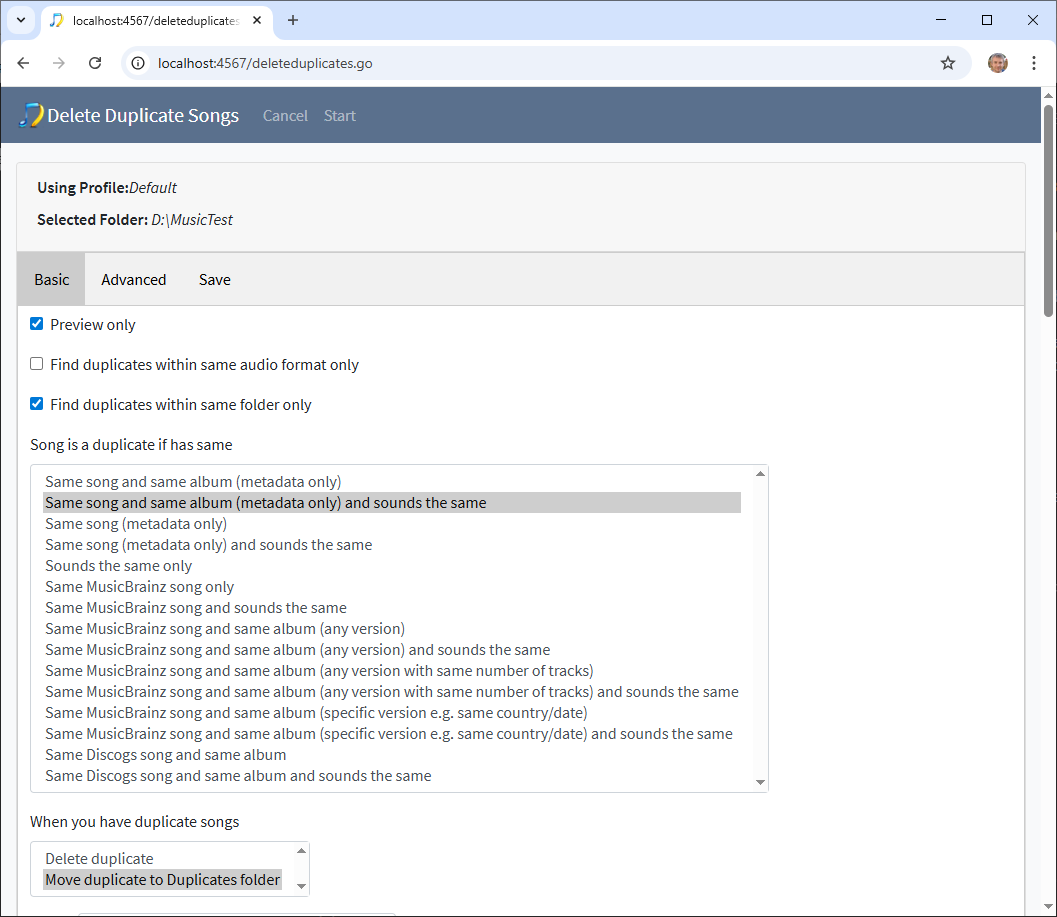
This will restrict duplicate finding to files within same folder, looks for same artist, title and album metadata so can be used before matched to MusicBrainz with Fix Songs, the sounds the same part uses acoustids which is similar to md5 but can work over different formats and allows minor differences
It has been very useful, working with different large libraries is very helpful to me.
Okay so have just released SongKong 12.0 Technique that fixes the various issues with report, the issue with Add to MusicBrainz and also added a new option to For songs already fully matched called Rematch if Only Partial Match that makes it possible to rematch folders of songs that were half matched by Picard without having to rematch songs that are fully matched.
What would be great is if you could do the following:
- Delete $HOME/.songkong/reports (since going to rerun anyway and prevents later Create Support Files re-uploading these, and quicker than using Delete Reports task)
- Install New Version
- Run Status Report
- Run Fix Songs, ensuring that For songs already fully matched is set to Rematch if Only Partial Match and Only allow match if all tracks in album were matched is disabled for best results
- Upload Create Support Files
Then I can double-check problems have been resolved and you have accurate reports.
Status Report took longer than expected to run on your system, have raised an issue for this but no obvious cause may require substantial reworking to improve. But probably worth explaining that SongKong has no requirement/concept of adding files to a library and so even though all metadata may already be in database we still have to process via folder structure because that is the only way we know if any file has changed or been added since the files were last read into database. But the advantage is we only have to read file last modified date, we don’t have to actually read the contents of the file if the file has not been modified since last read.
I can see the advantage of being able to run Fix Songs in Preview Only and then be able to apply those exact results guaranteed, and quite a few customers have asked if possible - so I am going to prioritize the Apply Last Preview Task issue. But it is not a trivial thing to add and will take some consideration.
Will do. You’ve been busy!
Going to kick this off today, there any reason to hold off pending any other updates?
No, there won’t be another release before the end of the year.
Status Report uploaded.
Fix Songs has just been triggered.
Great, thanks - nothing major but found a few errors:
- On Basic Metadata Inconsistencies tab the message
Sort Artist field has no metadata, all songs should have a value for this field not only when the value is different to the 0 field
is incorrect it should say
Sort Artist field has no metadata, all songs should have a value for this field not only when the value is different to the Artist field
Same problem with the Sort Album Artist line, raised issue
-
Basic Inconsistencies:Missing Track No field is incorrectly showing the results for Missing Title instead, raised issue.
-
On the MusicBrainz Inconsistencies:Only Song matched tab it lists
Van Halen / The Very Best of Van Halen and Various Artists / HDtracks 2013 Sampler but when I click on the link
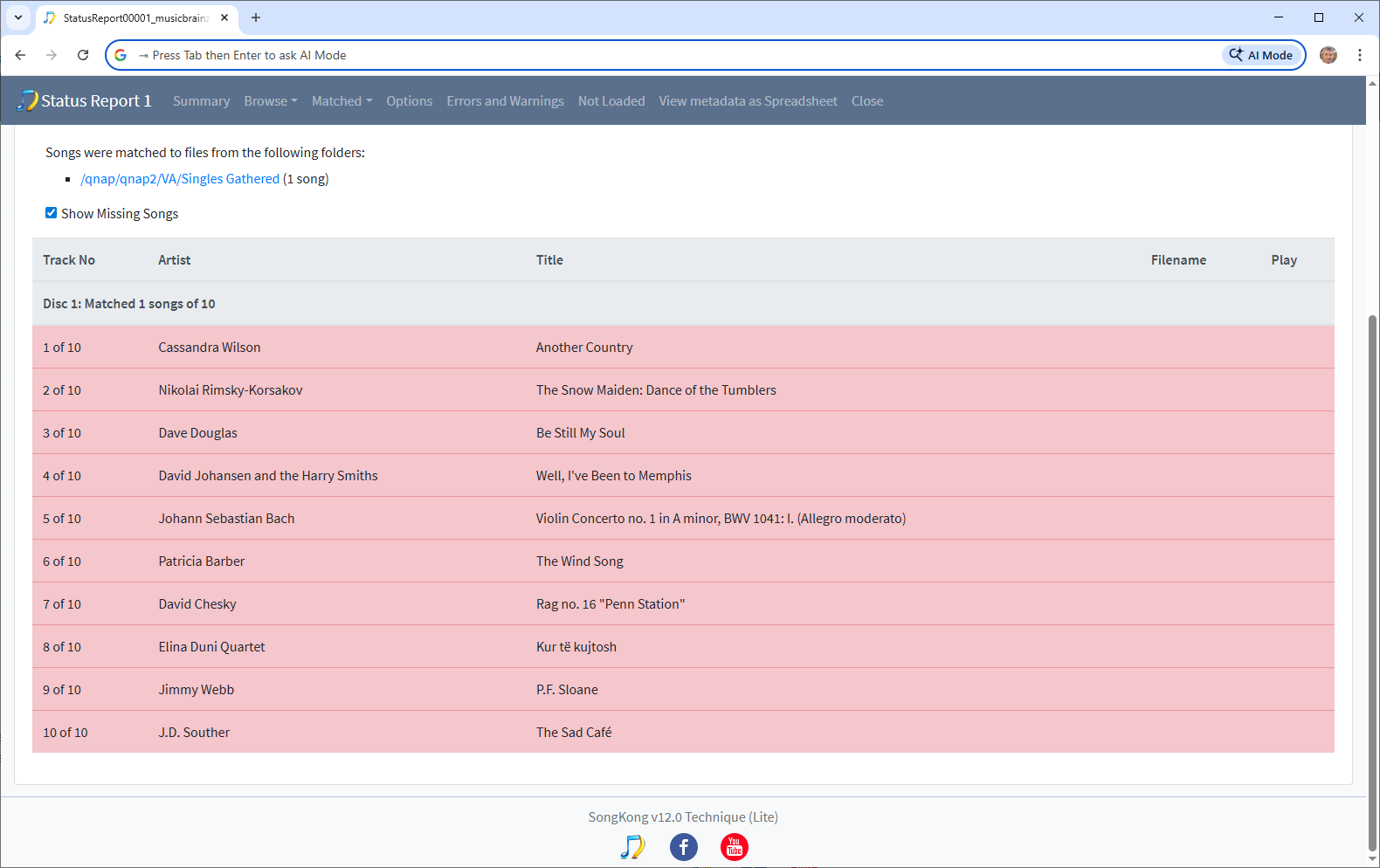
I cannot see any songs matched, then when I click on the folder containing the songs they are all matched to the same release
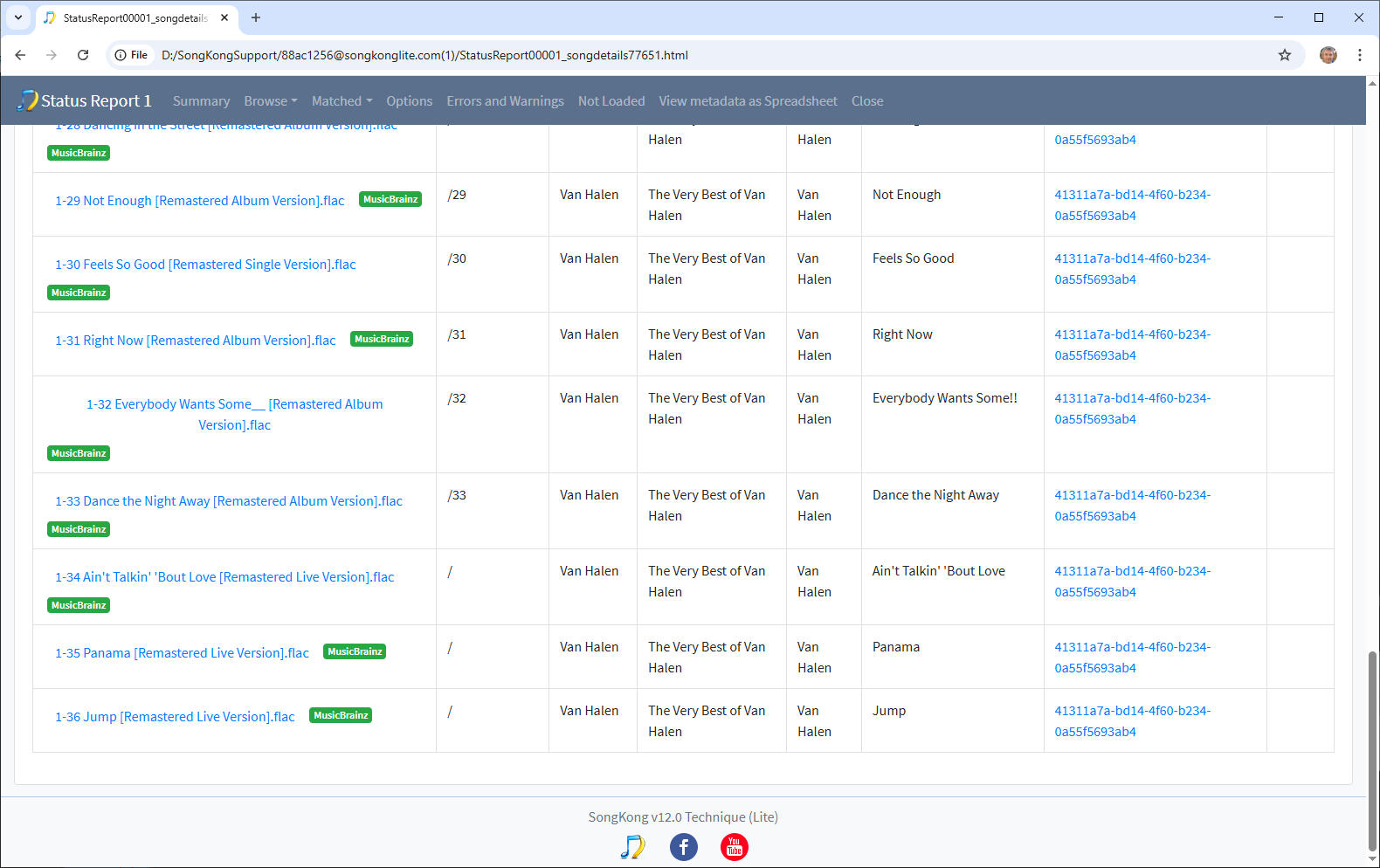
However, the last three songs don’t have a trackno, and if go to Matched to MusicBrainz/VanHalen we see the album has been split into three
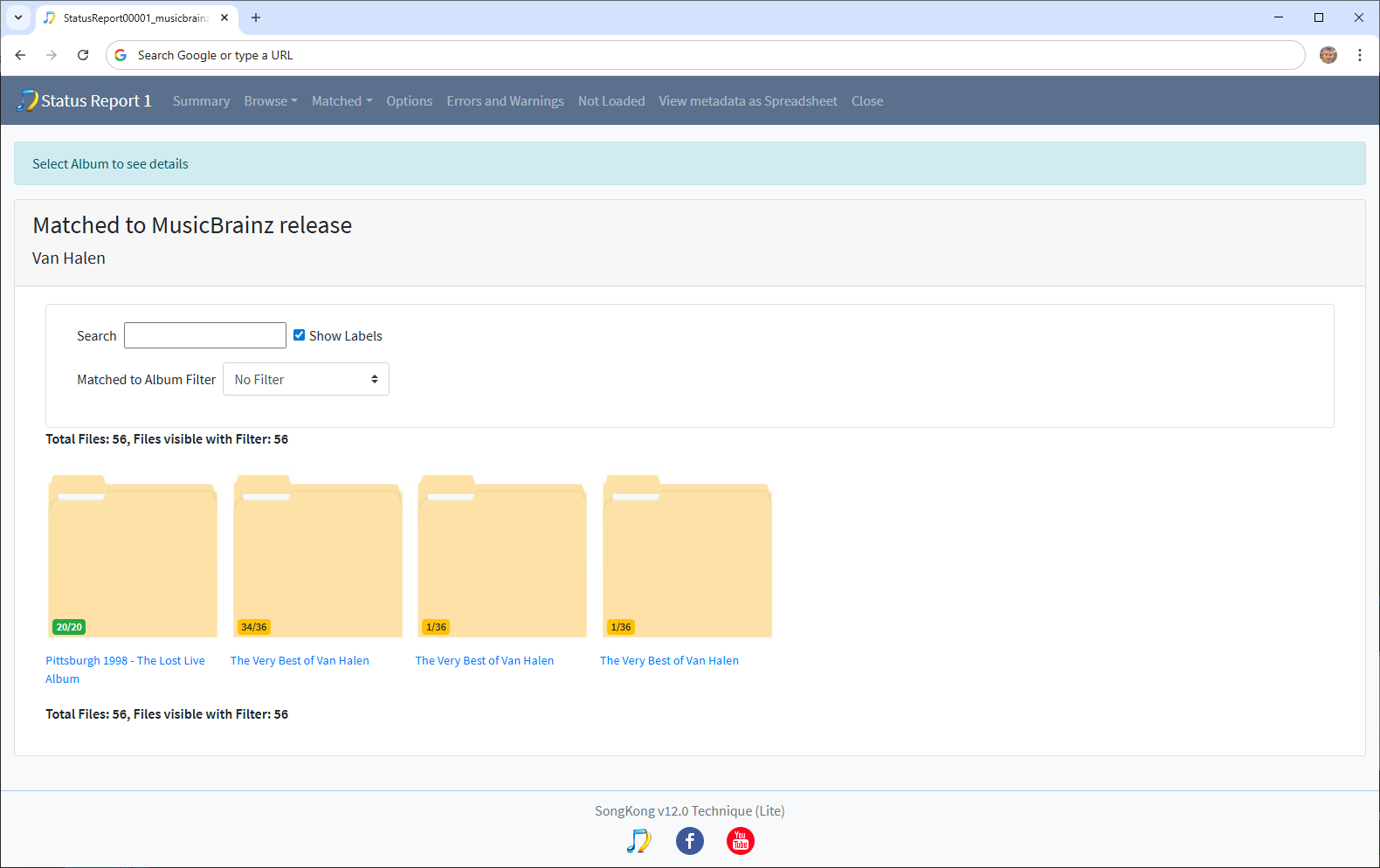
So I think the issue is related to the missing trackno, apart from these two albums all the others listed on the Only Song matched tab are correct, raised issue
- There is slight issue with the new Multiple Albums tab it seems that some albums that now should be listed here are still in either the Incomplete Albums or Split Albums tab
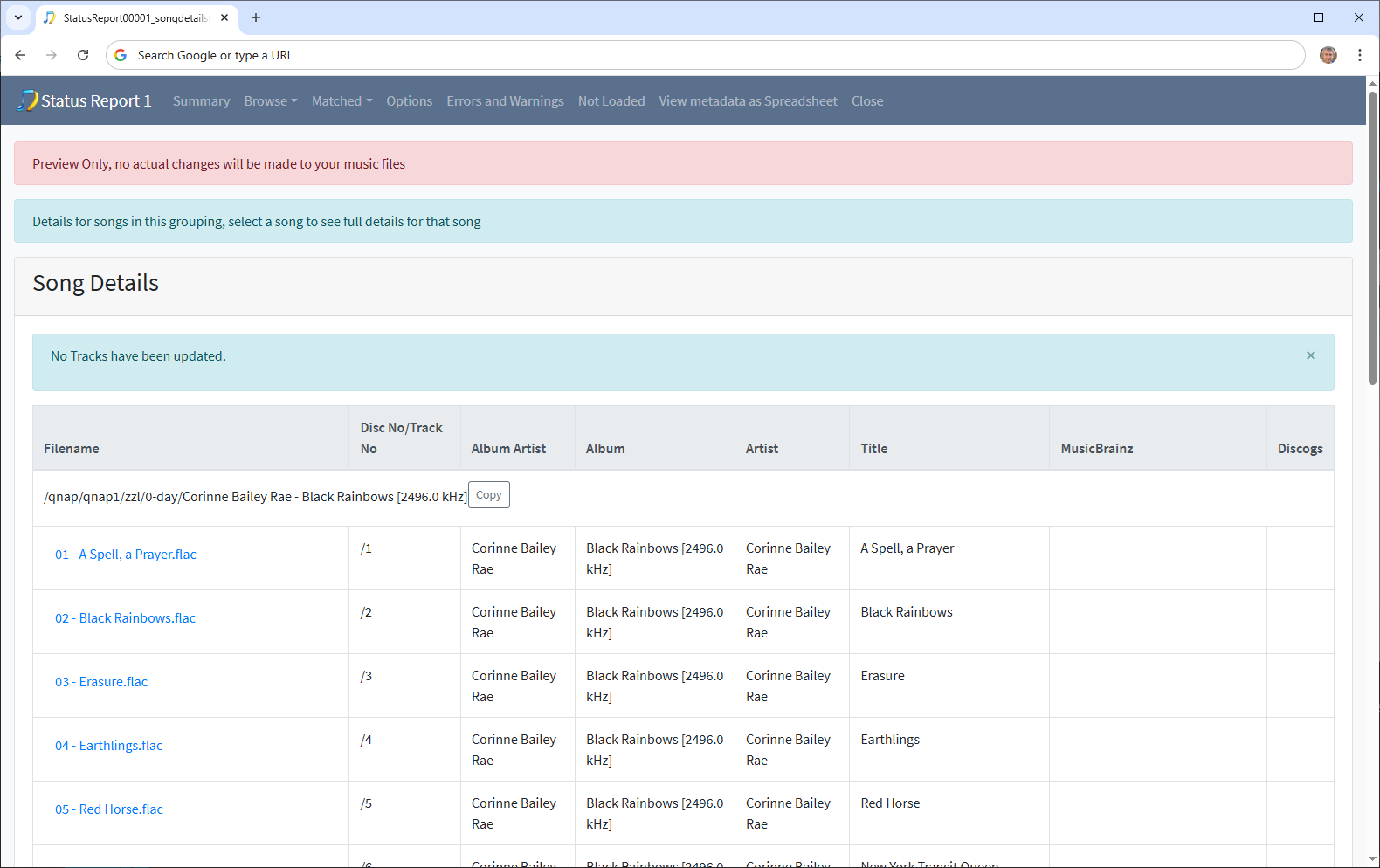
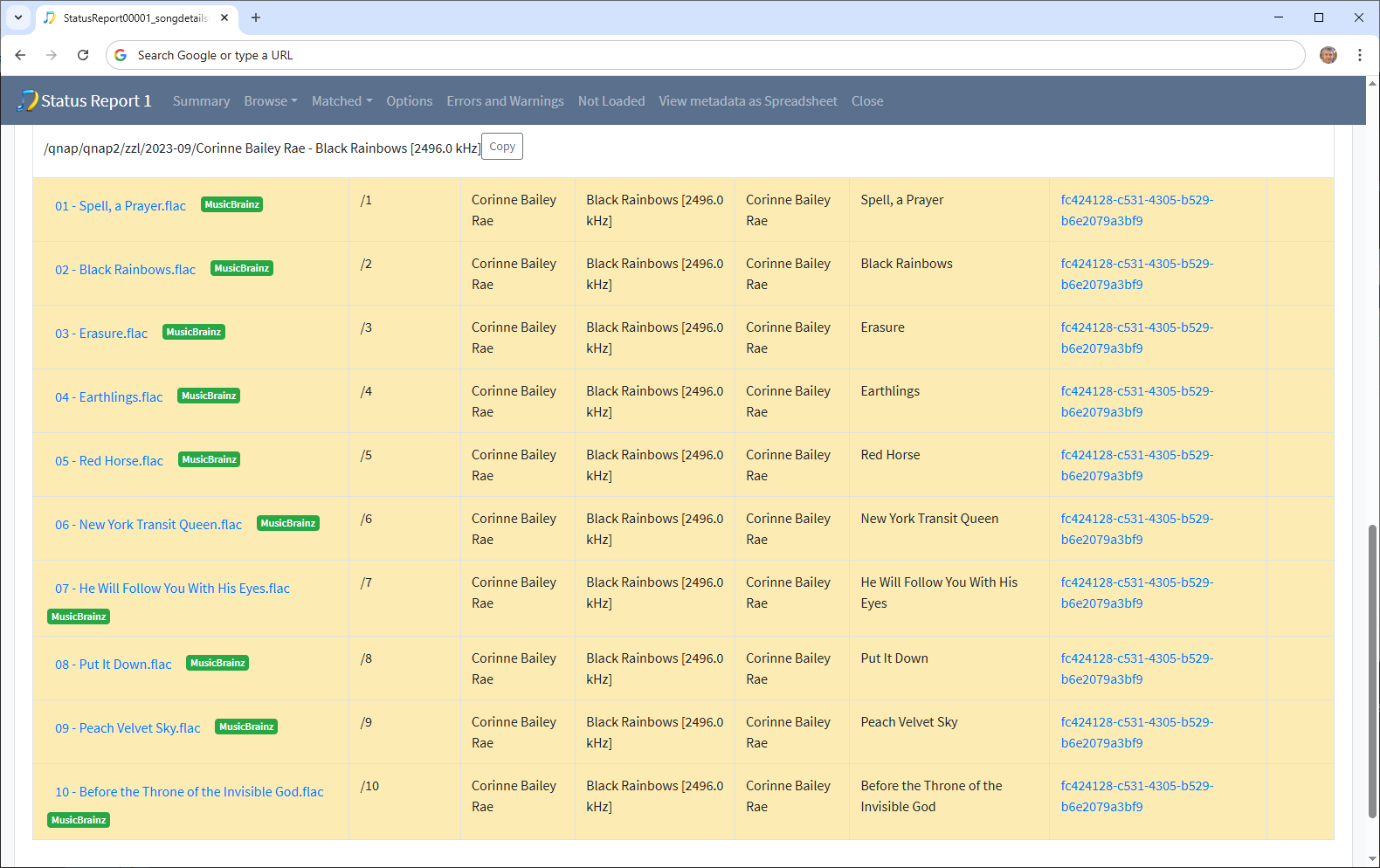
e.g Corinne Baily Rae Black Rainbows still listed in Incomplete Albums, even though copy fully matched and the other fully unmatched, raised issue
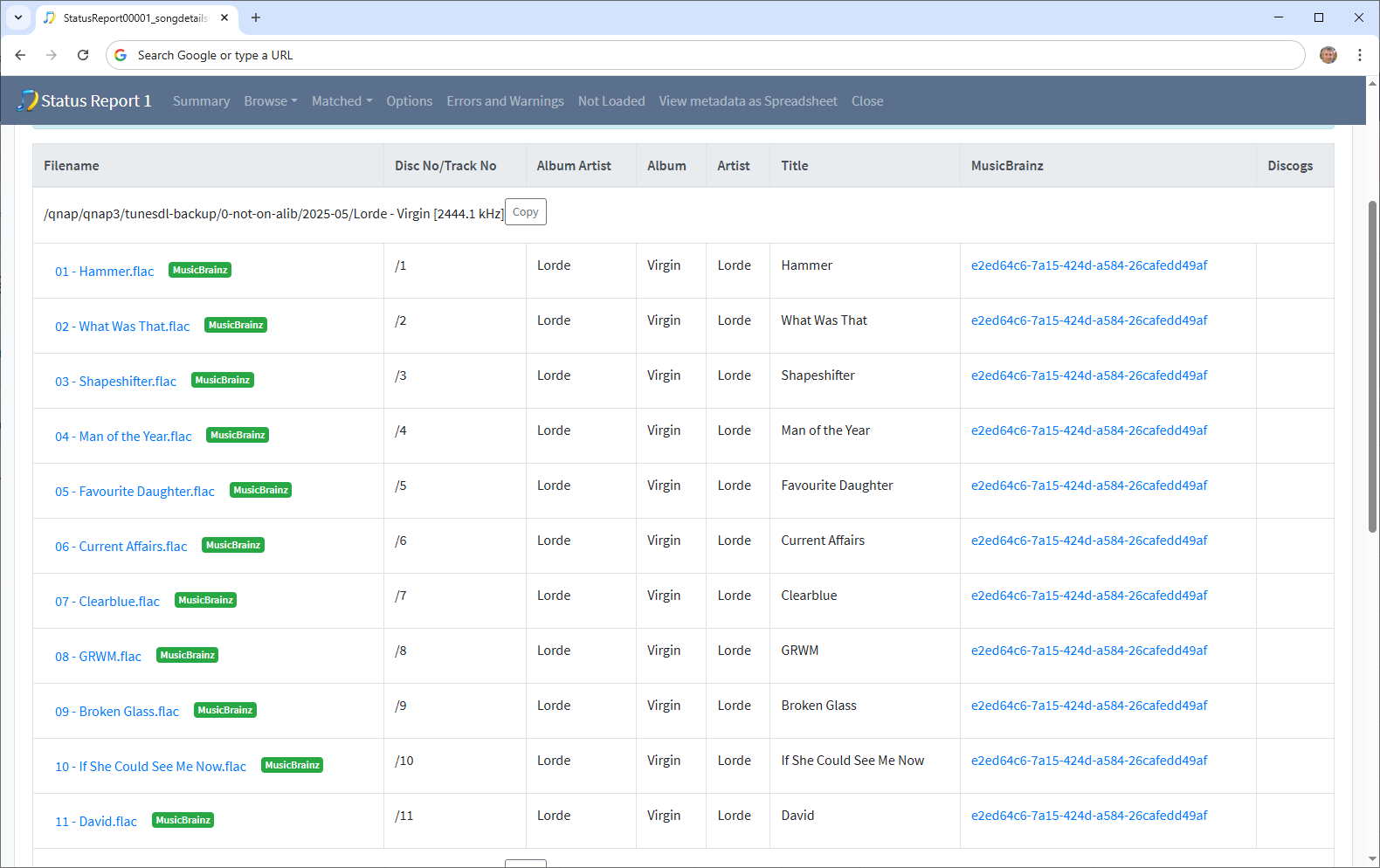
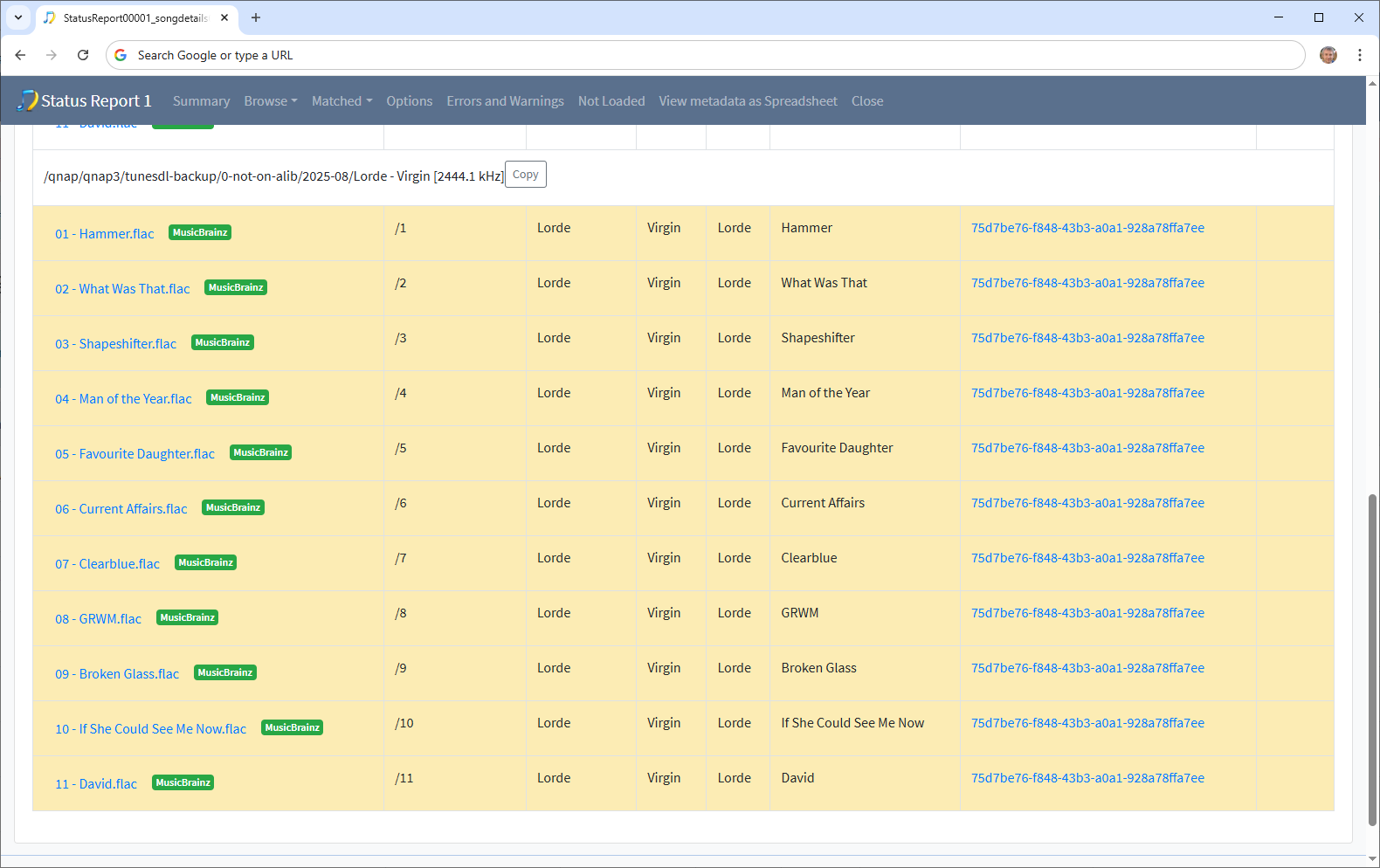
e.g Lorde Virgin still listed in Split Albums even though its two copies both fully matched to a different version of release, raised issue
- Good to see Status Report only took 2 hours this time, but I don’t know why it was quicker because i have not made any fixes for it, will investigate the old and new logs to see if I can account for difference.