We are pleased to announce a a new release of SongKong with 25 improvements and 22 fixes. This release focuses on improving ease of use, especially for new users
New Profile Window
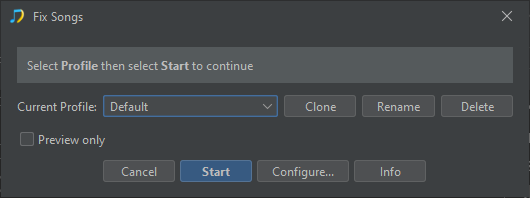
Now, when you select the Start button on a tasks Profile window it will start the task immediately instead of taking you to the Option windows, for new users the defaults are the best place to start so there is no need to get bogged down with the options, we do add the Preview Only option for the task to the Profile window for quick access to this option. The Options window is still available via the Configure… button
Improvements to Match to One Album
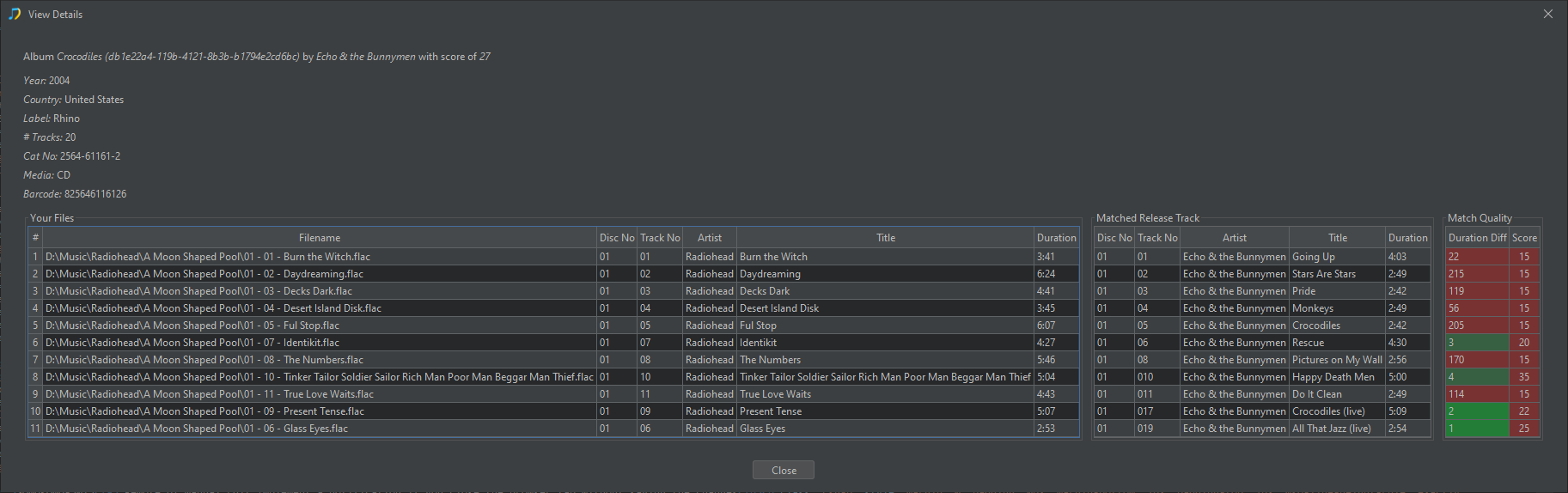
Now, if you specify a MusicBrainz or Discogs Id SongKong will try very hard to match your tracks to it even if does not appear to be a good match, but it will warn you by showing the match with colour coding to make it clear it is a bad match
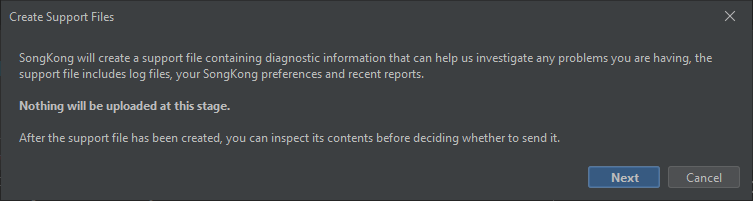
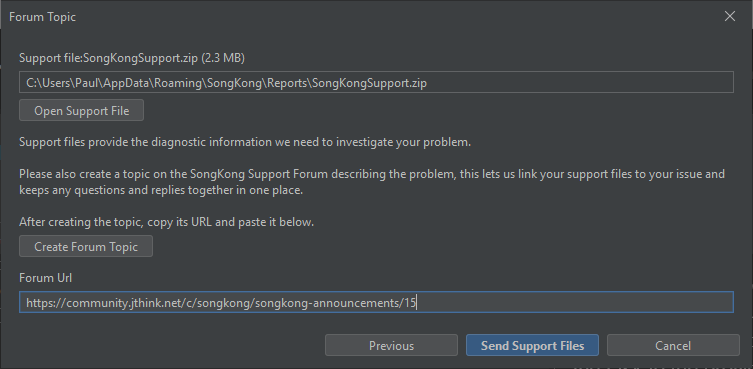
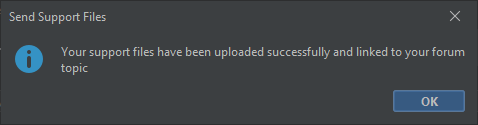
Create Support Files
Create Support Files has now been split into stages to make it simpler to understand and to allow customers to view and modify the support file before it is sent, so now see the following screens
Created new Docker Simpler Docker builds
We have created new Docker builds for Arm32 and Intel that are based on more modern Java and Linux environments, and we have created a new Arm64 build
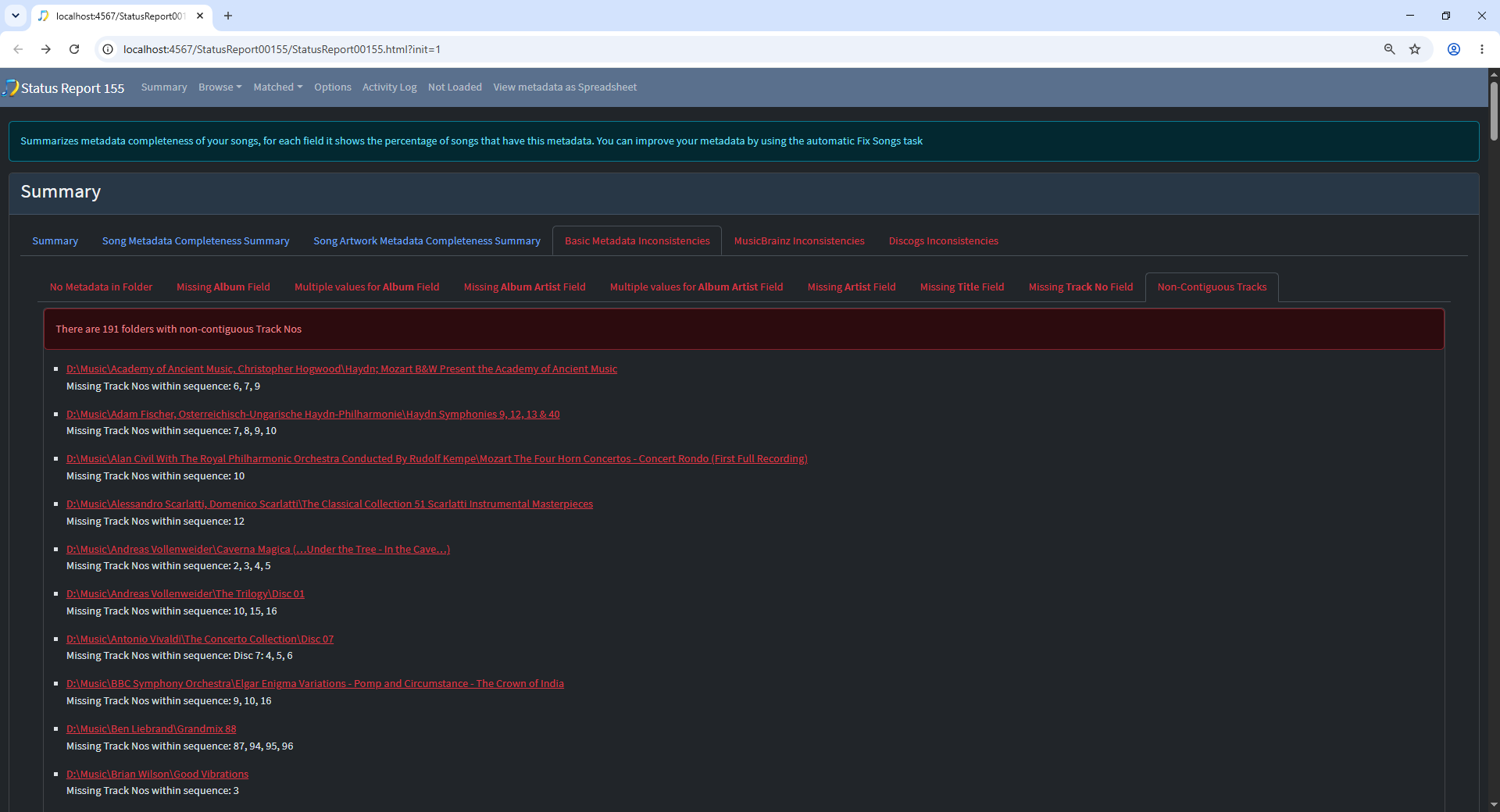
Add a Non-Contiguous Tracks tab section to Basic Metadata Inconsistencies
Add a Non-Contiguous Tracks tab section to Basic Metadata Inconsistencies, i.e if there are songs in folders but there gaps in track numbers we highlight here, this is useful for detecting incomplete folders that are not matched to MusicBrainz or Disocgs so will not show up in Discogs/MusicBrainz Songs Missings tabs
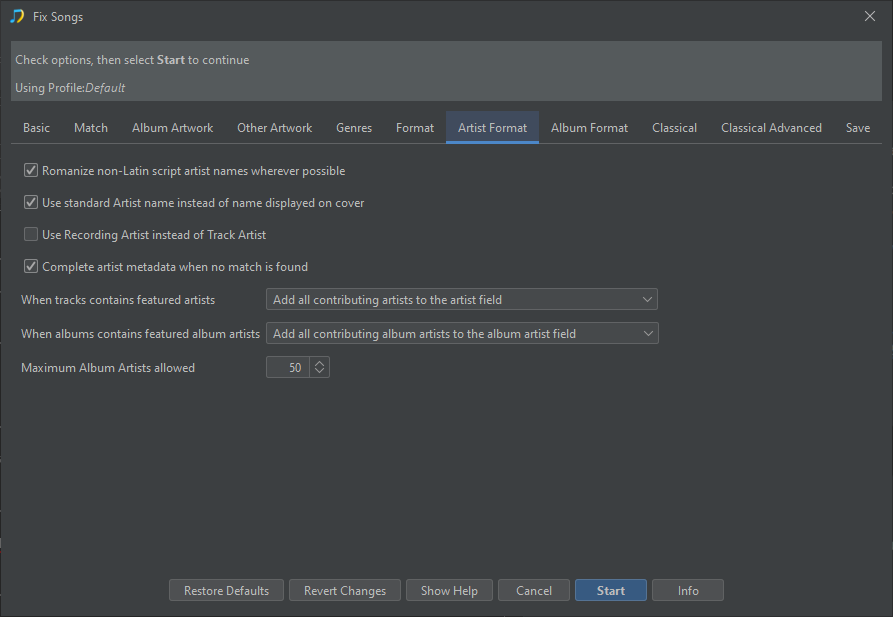
New Complete artist metadata when no match is found Option
When SongKong is unable to match a song to MusicBrainz or Discogs, it can still try to complete missing artist metadata using the information already stored in the file. For example, it may create missing Artists or Album Artists fields from the existing Artist or Album Artist values, look for an unambiguous MusicBrainz artist in order to add artist IDs and sort names, or identify a collection as a Various Artists album. Because this information is derived from the existing text rather than from a confirmed release match, it may occasionally be incorrect.
In previous versions this happened automatically and could not be disabled now you can disable this option if you prefer SongKong to leave artist metadata unchanged when no match is found.
Reports are No Longer Automatically Opened
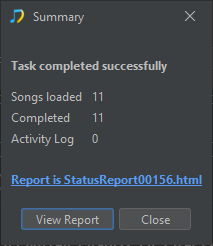
Reports are no longer automatically opened because this could make the workflow confusing, instead the summary window show a link and View Report button once a task has completed so that the report can be opened easily.
The full list of improvements and fixes can be seen below
Improvement
SONGKONG-1754 Artwork:Save Artwork to FS Writes original image size should be resized image size
SONGKONG-2016 Allow user to check support files before sending
SONGKONG-2034 Watch Folder: detect newly added album folders within existing artist folders
SONGKONG-2838 When add artwork with Manual Edit it should be possible to replace a folder.jpg file or if none exists, also save one?
SONGKONG-2845 In Profile screen change Start to Configure… and add a new Start button that bypasses the config screen
SONGKONG-2850 Hide Desktop UI immediately when exiting
SONGKONG-2855 Reports: Distinguish Metadata Updates from Files Requiring Resave
SONGKONG-2865 Add option to disable the automatic calc of albumartists from albumartist etc when no match
SONGKONG-2886 Useful when Renaming Files if we added Info messages when associated files are renamed or moved
SONGKONG-2896 For ‘Default’ profile change default of ‘Rename Files based on metadata’ to ‘Yes if Matched to MusicBrainz Release’
SONGKONG-2905 When splitting a folder containing duplicates, prefer matching all groups to the same release
SONGKONG-2917 Basic Inconsistencies shows Multiple Album/Album Artist but not highlighted in View Details Page
SONGKONG-2918 Add a Non-Contiguous Tracks tab section to Basic Metadata Inconsistencies
SONGKONG-2922 Docker:Create Arm64 Docker Image
SONGKONG-2935 Docker:Create Simpler and Smaller Arm32 Build
SONGKONG-2967 Docker:Create Simpler Intel Docker Build
SONGKONG-2988 Dont add Release Credits for particular roles from Discogs if already added that Role for some Tracks in MusicBrainz
SONGKONG-3013 Remote UI:Manual Edit:Implement a notification if you close the browser tab without saving the changes
SONGKONG-3026 Manual Edit should allow multiple folders to be loaded if clear they are from multiple discs of same album
SONGKONG-3027 No need for After SongKong has Finished Processing Option
SONGKONG-3030 Match to One Album: Allow user to override poor match when a specific release has been selected
SONGKONG-3031 Manual Edit should default to the the Songs tab rather than the Options tab, would be more useful.
SONGKONG-3039 Colour for missing fields in summary report is murky in dark mode
SONGKONG-3041 In Match to One Album Add Song Duration/Track Duration and Score to View Details Page
SONGKONG-3042 Split Format tab into Format and Artist Format tab
Bug
SONGKONG-1433 Albunack:Some Discogs albums with subtracks only seen by SongKong without subtracks
SONGKONG-1904 Mac SMB filenames with / in name display incorrectly on other platforms
SONGKONG-1933 Remote UI:Validation required on optional options
SONGKONG-1970 If Folder for writing AllArtwork is read only log warnings to Activity Log
SONGKONG-2031 Improve performance of Web Progress Pages
SONGKONG-2556 Whitespace not shown in song details report because html sees it as unimportant
SONGKONG-2593 Review how SongKong works if license server down
SONGKONG-2708 Licenses sent to email containing ‘+’ character confuse validation
SONGKONG-2849 Always display summary when task complete and give user option to open report rather than opening automtically
SONGKONG-2867 Acoustid progress bar double counting in some cases
SONGKONG-2884 Purchase of license with ‘+’ in it gets replaced by space and then fails to send
SONGKONG-2975 License Verification incorrectly says unable to verify license check firewall
SONGKONG-3011 For Id3 SongKong Metagrater does not delete Comments frame (COMM) it should if has empty description
SONGKONG-3028 RemoteUI should also show summary page instead of going to Report
SONGKONG-3029 Match to One Album going direct to MusicBrainz when Albunack already has
SONGKONG-3032 Tasks should default to IsPreview even after license installed
SONGKONG-3033 When processing folder already in unmatched folder can cause issue
SONGKONG-3034 MusicBrainz/Discogs Inconsistencies section should not show if no Inconsistencies
SONGKONG-3035 Unable to do complete Spreadsheet Report:Invalid row number (1048576) outside allowable range (0…1048575)
SONGKONG-3036 Not truncating super long value for ChoirSort field correctly
SONGKONG-3037 Add Album Composer to Never modify option in Add Artwork profile
SONGKONG-3038 Create Support Files is in Admin for Desktop but main page for WebUI
 ):
):