SongKong Jaikoz

SongKong and Jaikoz Music Tagger Community Forum

Some issues w/ Jaikoz & Linux

Hi!
Once again i must thank you for this amazing program Jaikoz is. It took me quite a time to wrap my head around it, and although i’m using it for some time now, i’m still learning…

So i have several question. Sorry if this makes this thread a bit confusing… I recently ditched Windows and now use fedora and mint. I’m new to Linux overall (so this could just be some parameter issue?), but i find the program to behave a bit differently between those 2 OS versions (win >< linux).

The main obvious one being ; when loading files from a folder, it will (seemingly) randomly load them, as opposed to windows where it would keep the file order. The track order is kaput and if we load multiple subfolders (ex; all albums from a label), you can’t really order them following the track order within same subfolder.

Then another, much more annoying issue this time, is that although i could use Jaikoz yesterday, today i can’t open the settings anymore. Worth noting that I put main music folder over the NAS as the default opening folder in the settings yesterday (i thought it would help to not manually go to the music folder every time i click open folder). Today it seems like it tried to open and analyze the whole folder… Which i soon cancelled.

I’ve checked for a log file and here’s what it says :

06/02/2026 13.38.41:com.jthink.jaikoz.MainWindow:runOnEventThread:GRAVE: Loading music files on startup
06/02/2026 13.38.41:com.jthink.jaikoz.TagDisplayer:loadFilesAndFolders:GRAVE: LoadFilesAndFolders
06/02/2026 13.38.41:com.jthink.jaikoz.data.AudioFileFromDirectoryAndFilesLoader:run:GRAVE: Started AudioFilefromDirLoader
06/02/2026 13.38.41:com.jthink.jaikoz.MainWindow:runOnEventThread:GRAVE: Jaikoz a été configuré avec une mémoire minimum de tas de 504 mb, mémoire de tas maximum de 8 004 mb
06/02/2026 13.38.41:com.jthink.jaikoz.MainWindow:runOnEventThread:GRAVE: Jaikoz 12.4 Ween utilisant Java 21.0.2 21.0.2+13-LTS 64bit sur Linux 6.18.8-200.fc43.x86_64 amd64 sest initialisé correctement 
06/02/2026 13.38.41:com.jthink.jaikoz.MainWindow:runOnEventThread:GRAVE: No of logical cpus:12
06/02/2026 13.38.41:com.jthink.jaikoz.monitoring.MemoryManager:addMemoryNotification:AVERTISSEMENT: Low memory limit is set for:G1 Old Gen:7133881958
06/02/2026 13.38.42:com.jthink.jaikoz.data.AudioFileFromDirectoryAndFilesLoader:run:GRAVE: Load Songs:Start:Database song count:3576
06/02/2026 13.38.46:org.jaudiotagger.audio.mp3.MP3File:checkAudioStart:AVERTISSEMENT:  /mnt/nas_media/music/(01) GENRES/--== tech-house ==--/(-) Terry Lee Brown Jr.-/va-terry_lee_brown_junior-selected_remixes_3-(plac063-4)-read_nfo-web-2009-mk2/10-forteba-caliphone_(terry_lee_brown_junior_remix).mp3:Checking further because the ID3 Tag ends at 0x3e0fd but the mp3 audio doesnt start until 0x3e50e

Sorry for the french inside the logs, but it basically says that Jaikoz was configured with a memory min of 504mb, max 8004mb. What is this ? If this is the problem, how can I change that ?
Moreover, I’ll get rid of those corrupted files, but since my lib isn’t all that new and old files lived through quite some disk transfers, there are most likely more corrupted ones… If this is what’s causing the issue, do you maybe know of a program to could help me catch these corrupted files and report them somewhere so i can handle them before hand ?

Many thanks again ! Hopefully this is not too confusing… :slight_smile:

Ok, I found the file “settings.properties” in which i deleted all values at variables:

startupReadFolder=
baseFolders=
browserPath=

Now Jaikoz has stropped trying to read all my music at every opening. But i still can’t open the settings :frowning:

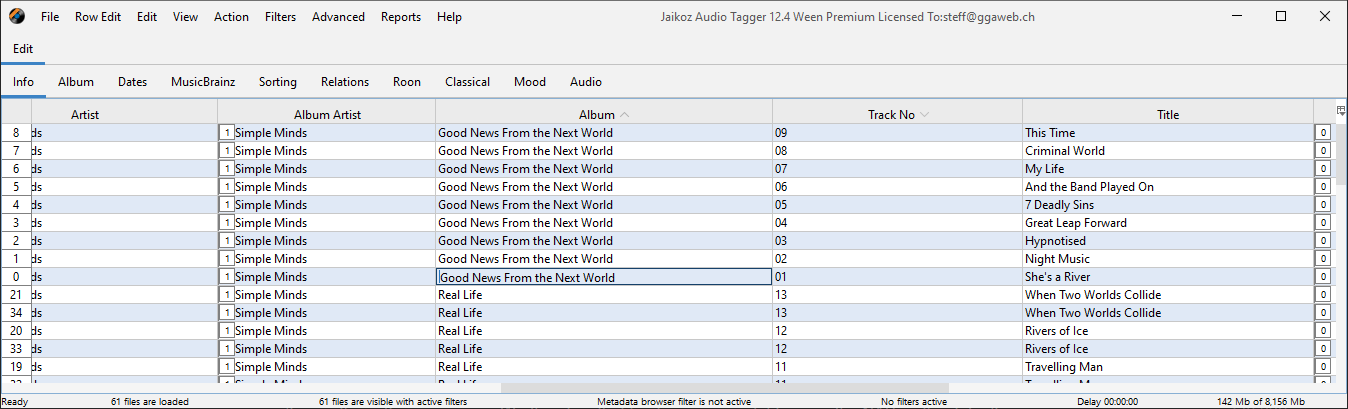
So the files are loaded in thwe order they are presented by the Operating System, for Windows this is alphabetical and I believe is for linux as well, so I think the issue is that probably your filenames are named so they dont align with your track nos (i.e title comes before trackno in filename) please ensure the filename column is visible and have a look.

But also regardless of the order they are loaded you can sort by multiple columns, click on the first column header to sort by it, then click to on second column to sort by that, and click again to reverse order.

For example here to demonsrate have sorted first by Album name and then Track No in descdending order

image

image

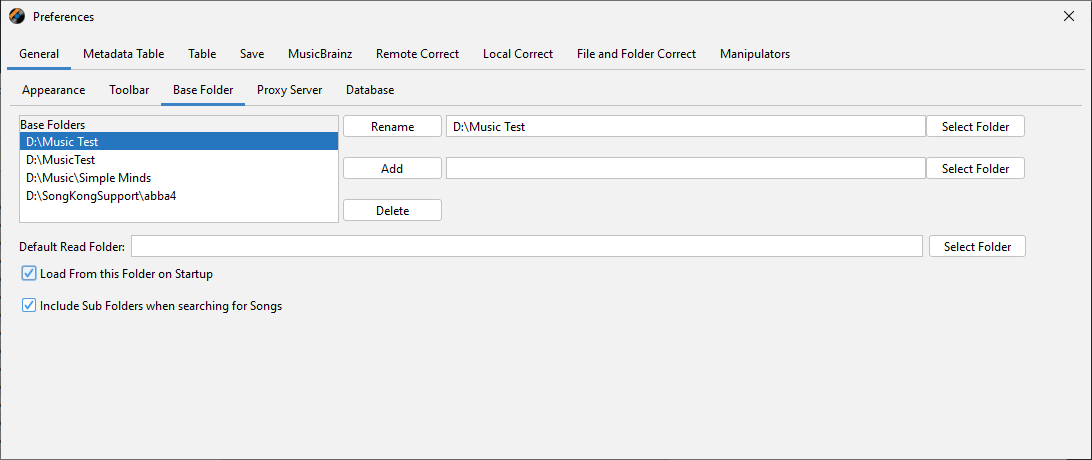
So I guess you enabled Load from the Folder on Startup, what you wanted to do was just set a Default Read Folder

That fine, that is just the min and max memory allocated

That is not issue.

I think you may have corrupted the file, instead close Jaikoz delete the file and then try again.

Perfect, thanks a lot for the help ! :slight_smile:

1 Like

Hi @paultaylor,

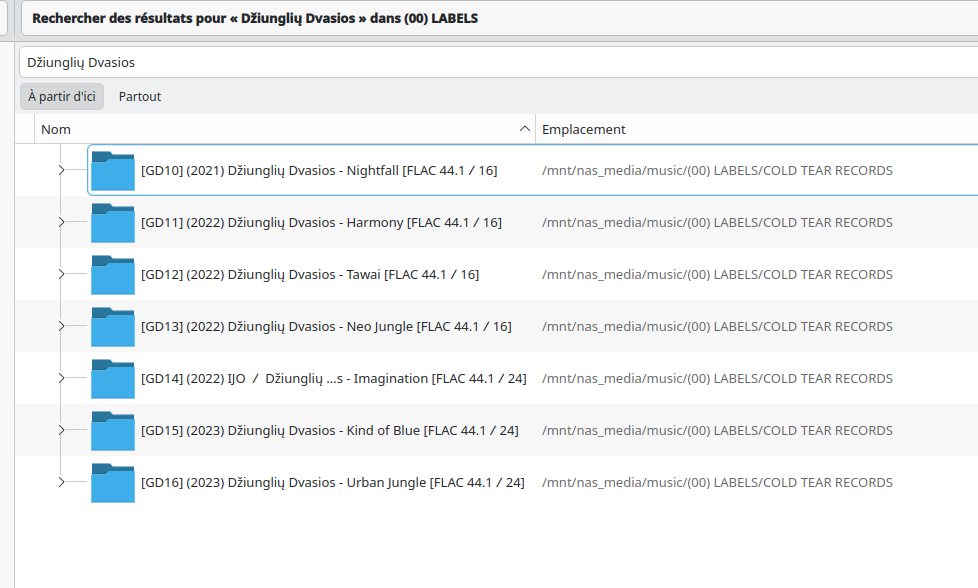
I think i may have found a bug with (at least) discogs scrapping. None of the releases from Džiunglių Dvasios can be matched. I’m wondering if this could be due to the special letters in the name ?
Exemple : (https://www.discogs.com/artist/10113454-Džiunglių-Dvasios)

Seems unlikely because Jaikoz has full unicode support, but might be an issue please run Advamced:Create Support Files.

Done ! I’ve been using it extensively today, so… it’s quite far in the logs i would say :slight_smile:
Got many more other release the program couldn’t find but didn’t wrote them down.

Hi, I cant find reference to it in logs can you give me the folder name of the album please.

I’ve created new files with this other album in the meantime (https://www.discogs.com/release/15553453-Helena-Hauff-Kern-Vol5). For the other logs, you can search for these

1 Like

Hi, are you saying it didn’t match this album. Part of the issue might be that you seem to only be using Correct Metadata from Discogs but our primary databaase is MusicBrainz and the Acoustic Ids can only be used to help match to MusicBrainz

This release is on https://musicbrainz.org/release/acb0ea9d-0e20-4a1f-8a5f-ccf7309057f6 so try using Correct Metadata from MusicBrainz or AutoCorrect (this combines MusicBrainz and Disocgs into one)

You’re absolutely right, i’m now almost exclusively using Discogs matching because i found MusicBrainz to scrap incorrect data (like getting data from different albums over files from a same album/folder), some other times it will get data from a completely incorrect file, overall most information automatically found tends to be incorrect.

And since i mostly work with label folder, it’s a much greater pain to correct because navigating MusicBrainz website and getting IDs is much more tedious than Discogs.

Also, i tend to trust Discogs a bit more over music genres or style, although not perfect, but nothing can be :slight_smile:

Per exemple, i’ve just tried again over these 2 releases. First one not found, fair enough, doesn’t seem to exist. But second one, it copies track_artist into album_album, which is wrong. Album artist should be “S.U.N. Project”. This also reflects onto the “Tri” tab (not sure what’s called in english).

And there are no music genre or style attached. Anyway, just an exemple of why i’m mainly using Discogs

You can use both, yes Discogs is better for stuyle and genre but not anything else in my option. You can configure so its gets metadata from Musicbrainz, but not Genre/Style only getting them form linked Discogs release.

That is wrong but that is not how Jaikoz works usually, matching is album based and it always puts the same value of album artist for all songs in album, can you tell me exactly how you did this match?

I’ve selected these 2 releases, then first clicked on Retrieve AcoustID , then clicked on Auto Correct from MusicBrainz Server. It should be using the default mode (didn’t change any settings in Jaikoz behavior regarding MusicBrainz)

image

Dont get it, perhaps you could run Create Support Files again.

The MusicBrainz match is failing because of metadata differences it is not being matched to a MusicBrainz Album.

But it is matching Song Only, and this should usually just modify the value for artist not albumartist, but I think if albumartist is currently empty in your files it then copies artist to albumartist as an optimization (which is wrong in this case)

10 févr. 2026 15:18:02: INFOS: AcoustId Song Only Match pour 131 :( 1) à Crazy Stories par S.U.N. Project
10 févr. 2026 15:18:03: INFOS: AcoustId Song Only Match pour 132 :( 1) à The Suburbs par S.U.N. Project
10 févr. 2026 15:18:04: INFOS: AcoustId Song Only Match pour 133 :( 1) à Pink Bubbles par S.U.N. Project
10 févr. 2026 15:18:06: INFOS: MusicBrainz Song Only Match pour 139 :( 1) à Turbo Booster (remix) par DNA
10 févr. 2026 15:18:07: INFOS: MusicBrainz Song Only Match pour 138 :( 1) à Let It Burn (remix) par Solar System
10 févr. 2026 15:18:07: INFOS: MusicBrainz Song Only Match pour 142 :( 1) à Looking for You (remix) par Insomnia
10 févr. 2026 15:18:08: INFOS: MusicBrainz Song Only Match pour 134 :( 1) à I Feel (remix) par Freak Show
10 févr. 2026 15:18:08: INFOS: MusicBrainz Song Only Match pour 136 :( 1) à Wicked (remix) par Sesto Sento
10 févr. 2026 15:18:08: INFOS: MusicBrainz Song Only Match pour 137 :( 1) à 380 Volt (remix) par Spectral Hades
10 févr. 2026 15:18:09: INFOS: MusicBrainz Song Only Match pour 143 :( 1) à Dance of the Witches (remix) par Bad Boys
10 févr. 2026 15:18:09: INFOS: MusicBrainz Song Only Match pour 140 :( 1) à Computer Breath par Fatali
10 févr. 2026 15:18:10: INFOS: MusicBrainz Song Only Match pour 135 :( 1) à Space Dwarfs (remix) par Atomic Pulse
10 févr. 2026 15:18:10: INFOS: MusicBrainz Song Only Match pour 144 :( 1) à A Hard Ride (remix) par Astralex feat. Roomnoise
10 févr. 2026 15:18:10: INFOS: MusicBrainz Song Only Match pour 141 :( 1) à 380 Volt (remix) par Slackjoint

If you put in the correct value for Album Artist (S.U.N Project) and retry it think it will work