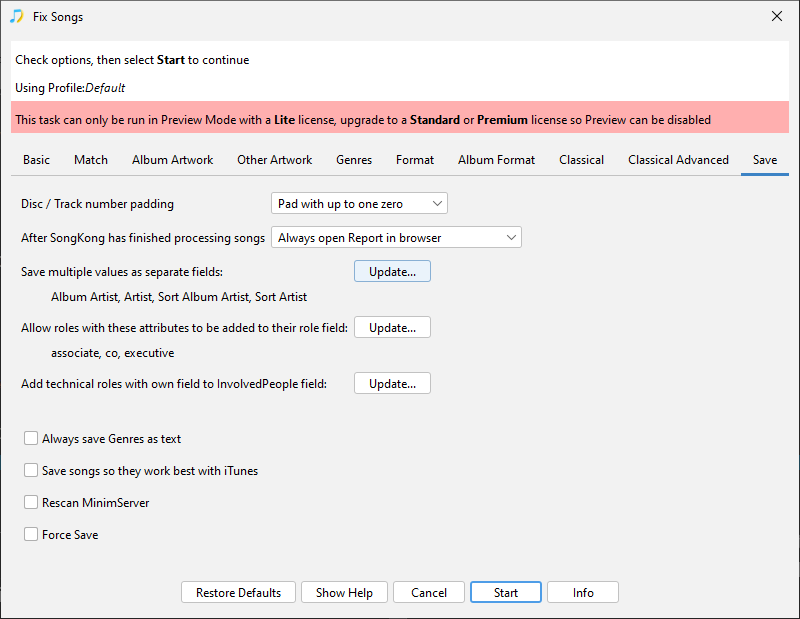
Yes, you can do with the Save as Multiple Values option on the Save tab
When an album is by multiple people we store the album credit as it appears on the album as a single value in the Album Artist field and then add each of the main performers as a separate field to the Album Artists field (note the plural). For example an album credit to Johnny Cash & June Carter would store
- Album Artist:Johnny Cash and June Carter
- Album Artists: Johnny Cash
- Album Artists: June Carter
This has a number of advantages, most players only understand a single value for the AlbumArtist so this way guarantees they get Johnny Cash and June Carter not just Johnny Cash which would be the case if they only took the first value from the Album Artist field. Secondly we preserve the exact album credit, for example this credits using and , but it could be with , ft etcetera. Thirdly the individuals are listed in the Album Artists field, so applications that understand multi value artists can use the Album Artists field instead, this is what MinimServer does.
However some applications such as Navidrome understand multiple artists, but only use the Album Artist field not the Album Artists field. This option lets you store the album artist as multiple values in the Album Artist field just like the Album Artists field, it also lets you apply the same logic to the Album Artist Sort field, it is recommended you select both fields if you use this option.
You can also do exactly the same thing for track artist by selecting the Artist and Artist Sort field as well.