SongKong Jaikoz

SongKong and Jaikoz Music Tagger Community Forum

Match release with filename provider id hints

I’ve been customizing and testing Jaikoz and it’s working out pretty good so far. I’ve been thinking about how I’m going to tackle a good chunk of files from my early Beatport/Tracksource downloads from ~2006. Most of the are untagged wav files. It’s going to be time consuming, but the good thing is I can ID the tracks with the correct release/ studio from my purchase history. I’m going to have to lookup the correct release in Discogs and use that ID in Jaikoz. While I can click my way through it I was thinking it would be a lot faster just to add the ID to the filename as a hint. Similar to my Filebot/ Plex workflow.

For example, if you added {DOID=2315120} to the filename then Jaikoz would have a hint for the correct match.

Very necessary, especially with electronic music where an individual track can be part of multiple release types, from singles, EP’s, Albums, etc then doubly so across labels.

Could potentially do the same thing with MB and maybe BandCamp.
Are the tracks in their own release folders or not?

no, they are all mixed together in folders by purchase date. they could be if that would help, would potentially be faster than naming each file, but there are a lot of files that are just single tracks.

Yes, that would help massively.

If that was the case then Autocorrect should be able to correctly identify the correct songs and rerleases for the majority, that would be by first step rather than doing one at a time.

What else in the folder name might help match a release correctly as the app stands?

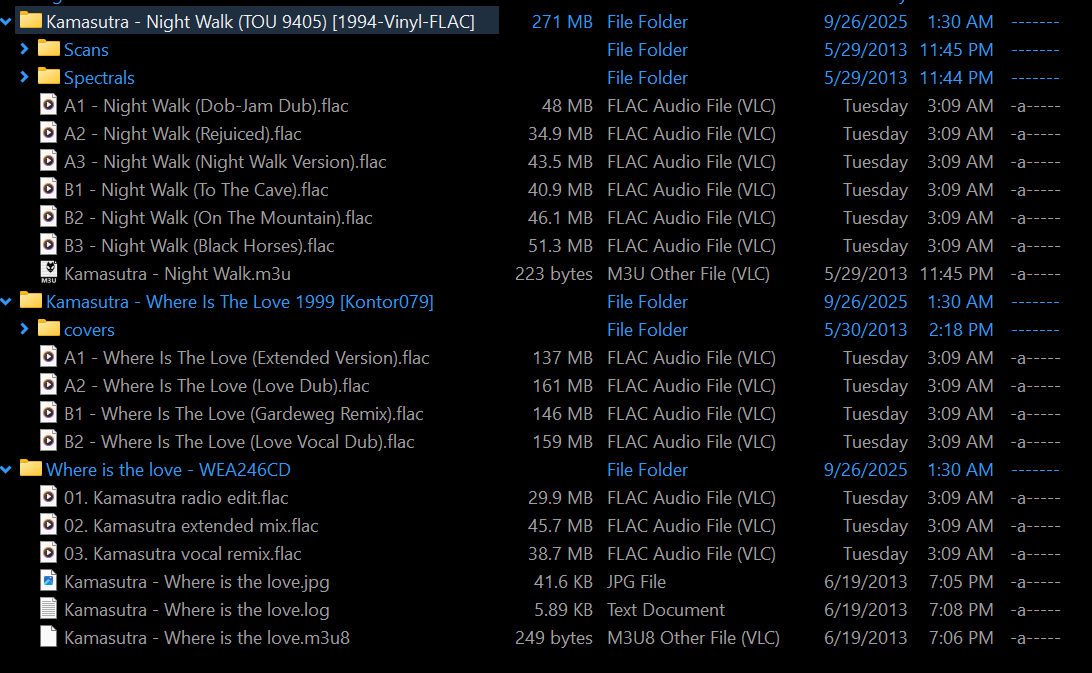
This is a good example of what I’m dealing with, tons of these in my collection.
https://www.discogs.com/master/93433-Kamasutra-Where-Is-The-Love

I have 4 of these in my collection (not raw wav files but already in folders)
I’ve tested with one manually matching in Jaikoz

I was wondering if putting the catalogno in the file name would help, but I’ve already done some that had it in the folder name and it doesn’t look like it helps at all.

Was thinking about this idea, that you could use the catalog no too, but you’d also have to put the media type in the name as well because there are cases where different media types share catalogno and have the same track count.

So what happens if you just run AutoCorrect on these folders ?

There is no code that looks for catalogno in foldernames or even metadata as a basis of finding a match simply because most users do not have this information in their files, and the combination of AcoustId and metadata usually gives good results.

However, if you want to match one album to a particular catalogno then we already have Action:Match to Album:Match Songs to MusicBrainz by Catalog No and Action:Match to Album:Match Songs to Discogs by Catalog No that you can use.

It gets them wrong/ incomplete… especially because they don’t all exist in MB. I’ve actually wound up creating the missing releases in MB (which is hilariously the kind of work I was trying to avoid) but when I do it fills out matches and works with cover art and all fields filled out.

we already have Action:Match to Album:Match

Yes, I’ve been using this… especially matching to discogs to get a first correct match, saving, then filling out MB with missing releases and rematching again.

The reason for the request is that I have several years and countless files and it would be faster for me to do these hints on the file system (directory opus) vs doing it in the Jaikoz interface + a lot of the content I will be updating have catalogno/ media in the folder names already.

That said, no matter how I attack this, certain parts of my collection are going to take a lot more time and care than others.

It might be woreth experimenting with SongKong, firstly without needing a license you could run Fix Songs against the folder in Preview mode and see what results you get, although it doesnt do catalogno matching the algorithm is currenlty slightly beter than the Jaikoz one, I suspect many folders will be identified correctly without the help of catalognos.

Secondly, SongKong also allows tasks to be run from comand line so for the problems ones if you know any programming an an option could be something like

For each Folder:

  • Extract CatalogNo from Filename
  • Search for Matching Catalogno on MusicBrainz/Discogs
  • Use SongKong Scripter task to add MusicBrainz/Discogs Id for that catalogno for the files
  • Use SongKong Fix Songs task to update Metadata from MusicBrainz/Discogs based on the ids added

I tested this folder with SongKong.

image

It didn’t match Night Walk at all which exists on Discogs
https://www.discogs.com/release/71025-Kamasutra-Night-Walk

Matched the Kontor release as the digital release
https://www.discogs.com/release/21942169-Kamasutra-Where-Is-The-Love
instead of the vinyl
https://www.discogs.com/release/167201-Kamasutra-Where-Is-The-Love

It matched the last release to the Eternal Label correctly
https://www.discogs.com/release/11713011-Kamasutra-Where-Is-The-Love?redirected=true

I might use SongKong on well known artists/ releases to speed things up. The reality is there’s a lot of traps with electronic music that is hard to account for so I’ll probably be doing a lot of manual prep/ match to get it right.

This metadata library cleanup project has been on the back burner for 10 years. Not going to be a problem if I take my time with it and help add content to MB while I do it I guess.

Wierd that it preferred the six track digital release to the four track vinyl release, if you could run Create Support Files I can tell you why and why it didnt match the Night Walk release.

Thinking about the catalogno matching a bit more.

The way matching works on both Jaikoz and SongKong is

  • Songs are clustered into groups based on folder/metadata.
  • Then try and find potential matching releases based on acoustid/metadata
  • Eliminate any releases that dont provide a decent match for every track in the grouping
  • If we have multiple matches that match all tracks equally well then user preferences such as preferred country,preferred format and preferred release date help score those releases better so most likely to be selected match.

I don’t think searching for a match by catlogno is going to be that helpful for finding initial matches, most users don’t have them and difficult to parse because often subtle diferences in how the catlotgno is recorded

But I can see at the last stage that we could boost the score if we find a match between Album catalog no and songs Catalog No field /filename, that would improve the accuracy of your results.

If I was to do this I would add it to SongKong and then Jaikoz.

When I get back on that computer tomorrow I’ll upload the logs. If it sends logs for the work I did after it you might check what it did with my Birocratic folder. I collected his entire discography from Bandcamp and most of the releases already existed on MB but most of the files did not have acousticid’s and he self releases so no label/ catalogno. First tried a few albums at once and it failed to match which I find happens when I try too many release at once. Turned off Bandcamp checks and then did one release folder at a time, but even then it couldn’t match it unless I explicitly matched it with a MB ID manually.

Then I got to the singles and it was the same thing, had to do one at a time… there were also some I had to add to MB. I’m also finding, that even if I can pull metadata from an auto match, it won’t write DISC.NO when writing tags unless it correctly matched to a MB release. Even if I filled the fields out manually. At least I noticed that with todays batch.

It really seems to work best when an entry for MB exists, so I’m adding, fixing, editing issues there as I go along since one of my destinations for my archive will be a Plex server… but at this pace its going to take me a couple of years just to get through my electronic section alone.

Once I had done that, I was messing with acousticid’s and trying to get it to update MB with an acoustic id but it would always say there were x amount of new thumbprints to submit and it really never did it… and it wouldn’t update that field. I was also trying to figure out how to update MB from Jaikoz when I would fill out/ update genres… not sure it actually did it.

Hi, are you able to send the support files so I can look into this?