Subject: Artwork Source Preference & Square Artwork Option?
Hi Paul,
I purchased SongKong yesterday and have been running it on a large library of mine. Overall it’s doing a good job with metadata, but I’ve run into an issue with artwork that I’m hoping you can clarify or possibly consider for a future update.
I use Discogs a lot for editions, catalogue numbers, and identifying pressings — it’s brilliant for that. But as you know, the artwork on Discogs is very inconsistent: lots of full jewel-case photos, poorly cropped scans, padding on the sides, shadows, non-square images, and low-quality user uploads.
After running FixSongs, I’ve ended up with roughly 10% of my library now having non-square artwork , even on albums where I previously had clean square covers that I had manually curated over time. For visual consistency within Apple Music this is extremely noticeable and quite frustrating.
My questions are:
- Is there any way to preference certain artwork sources over others? For example, Bandcamp artwork is almost always clean, high-quality, and perfectly square, while Discogs artwork often isn’t.I’d like to be able to rank artwork sources or disable Discogs artwork entirely while still using Discogs for metadata.
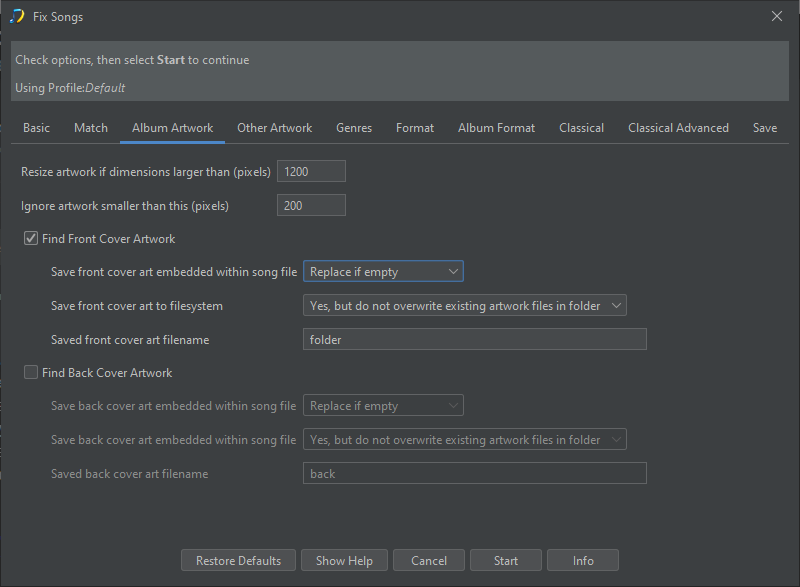
- Is there any setting I’ve missed that would prevent SongKong from embedding non-square artwork? (e.g., a “square-only” filter or aspect-ratio rule)
- Is it possible to configure SongKong to only add artwork when none exists , rather than overwriting existing artwork unless the new artwork is demonstrably better?
Right now I’d honestly prefer no artwork to incorrectly shaped artwork, and I’d rather create a square version manually than end up with inconsistent aspect ratios throughout my collection.
If there’s a way to control or restrict artwork sources and aspect ratio that I missed, I’d appreciate any guidance.
I did spend quite a long time carefully trawling through all the setting I found before coming here . I may however have missed something
If not, I hope this is something that could be considered, as it would help users maintain a visually consistent library.
Thanks,
gus