SongKong Jaikoz

SongKong and Jaikoz Music Tagger Community Forum

A case of mis-identification of classical work

In an earlier thread I reported hundreds of cases of Songkong misidentifying what should be grouped together as a classical work. I am in the process of rerunning SK over my whole library and am happy to report that “hundreds” is now reduced to just one single case! But as I am at a loss to understand why it fails for just this single work (*) I thought i would ask. The 24 Chopin preludes form part of a collection, but are not a “work” in the classical performance sense of an entity to necessarily be performed together in sequence. The overall MBID, https://musicbrainz.org/work/d1f6b371-c9b4-4c6e-bb85-16bcfc369d5e does not have a “type”, so I thought would not be considered for this. Any thoughts on what the distinctive factor here might be?

There’s a log file on its way.

(*) - There are actually two albums with the complete Chopin 24 Preludes by the same performer and both behave in the same manner.
Your comprehensive testing and Classical knowledge has been very useful for improving SongKong classical support, thanks.

It is because the Work Type logic we added was for multi level works e.g if we have an Opera and each track is a recording of a Scene, and that scene is part of an Act, then if the Act was part of something larger we check it is of type Opera/Concerto ecetera before allowing it.

In this example we are only going up to equivalent of Act level and we don’t check the type at this level. Whether or not we should I’m not sure but I don’t think so because there are going to be too many cases where the Work Type is not set when it should have been so if had to be a certain type it would prevent Work getting set.

OK, I see this. This would actually be fine in terms of tagging were it not that SK strips the prefix

Prelude no. ${n} in ${key}, op 28:

from all of the titles. This obviously differs from track to track which leaves just the tempo indication *Agitato" as all that remains of the title, leaving actually no remaining indication in any of the tags that this is Prelude no. 1.

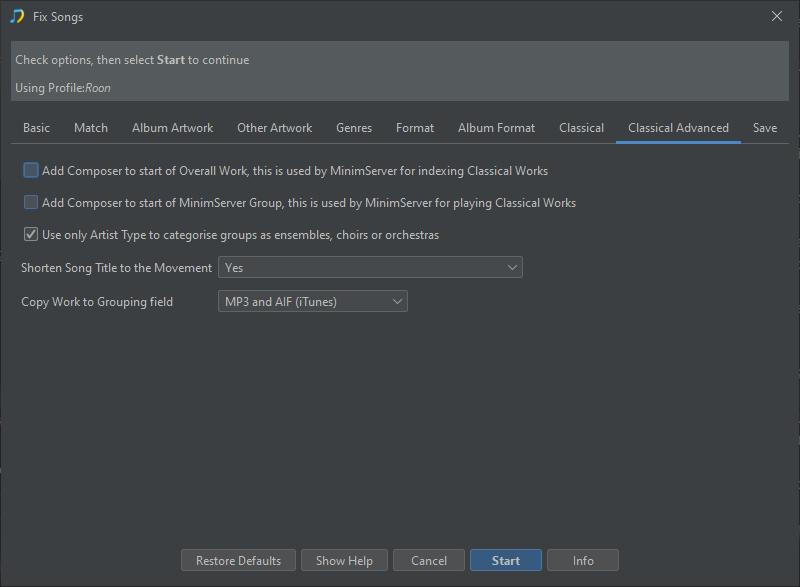
That will be because you have enabled Shorten Song Title to Movement if this was disabled it should use MusicBrainz title for the Title field

image

Indeed, except that I want it on for 95%+ of the albums, so I need to run SK separately with an option change for this single album.

Actually, I was (incorrectly) assuming a different behaviour for this option which would be to shorten the the title by removing the initial string matching the work, but to leave it alone if there is no match. My expectation here was confounded because of course there are no movements here in the sense that a classical music collector would understand.

Actually “Shorten Song Title by removing work prefix” would be a very useful option to have. (It would be my default).

See Section 5 of Tutorial: Classical Work and Movement Algorithm

There may be a bug here, essentially if can derive Work : Movement from the song title it will use that to determine the Movement title, if it cannot it will use linked Work if it can. So for track 1 the MusicBrainz Track Title is

Prelude No. 1 in C major

and the MusicBrainz Work Title is

Prélude no. 1 in C major, op. 28: Agitato

There is no parent work in the MusicBrainz Track Title so it looks at the MusicBrainz Work Title instead and I think code is seeing the ‘:’ in the work title and therefore assuming the stuff to the left is the Work and the stuff to the right is the Movement. But it is not checking that the stuff to the left actually is the Work, which it is isn’t because it is different for every track

And then because you have the option selected, the value we have calculated for Movement is also used for Title

Raised an issue for this.