Well you can do that , just map / to /music
Docker compose - any examples?
I understand from your previous comments that your experience with Docker is limited, but that is a bad practice. And sorry to sound harsh, but very poor advice to providing as support on your forum when some of your users are likely unfamiliar with the security risks of this suggestion.
Volume mounts are a direct hook into the system. if you mount / into the container, you are giving anything running into the container unrestricted access to modify or delete system files on the host. That is a complete system compromise and not a good practice. I am not suggesting you would purposely compromise my system, but surely you know how these things can happen by accident. The whole point of Docker with bridge networking is to isolate the application in a “sandbox.”
Hi, yes I know it is bad practice but it sounded like that is what you wanted to do when you said it would be great to implement exposing the container root.
Sorry I don’t understand what you actually want?
I was talking about exposing the root inside the container in your web UI where you select a folder.
I am sorry I was not clear enough. Let me try again.
Docker allows me to mount volumes anywhere in the container. So for example, I could mount volumes to
/music
/data
/storage
Most similar containerized applications similar to songkong like Plex, Lyrion, etc. support selecting any of those directories available inside the container to specify your data or library. However Songkong’s web UI is currently limited to only expose /music and I would like to see the other volume mount points without having to place them in /music if possible. That is what I was asking. I thought you understood that as that was the last discussion point in the original request from @Pprior, but admittedly this was an old thread. Sorry about that.
My request was to expose in your web UI where you select a folder, the / inside the container so a user can select from /music or any other /path that is available in the container. If you wish to keep things tidy, you could hide all of the system and config related directories that are known and should not be selected anyways (but most of the others do not bother doing so). This would leave the selector show just /music and any other root directories that a user chose to mount in the docker container. I believe this change would address the original question raised which you captured as an issue here:
https://jthink.atlassian.net/browse/SONGKONG-2543
Ok I get it, so currently the code expects to find something mounted under /music, instead it should display whatever has been mounted from the dockers root /. So user could map a folder to /music or to any other path.
There continues to be confusion about docker practices. As a developer supporting potential homelab users I think it would definitely benefit you to explore this a little more as many of us are exactly the kind of people who would use a product like yours. In my case I’ve currently moved to a different solution even though I’ve already purchased a license.
Docker containers do not reason from the host’s real path structure. They reason only from the internal mount paths presented to them. So example: /mnt/tank/data/music is the real folder on Ubuntu, mapping it as /music in one container and /data/music in another destroys path consistency across the stack. That inconsistency makes cross-container interoperability, path translation, troubleshooting, and filesystem-aware operations more fragile. Best practice is to map a common parent consistently in all related containers, such as /mnt/tank/data to /data , so every app sees the same directory tree.
By forcing internally the only option to be /music that breaks our flexibilty and is not best practice. We are NOT asking you to expose root folder. What the ask is a simple variable that could default to /music within the progam but be able to be changed. I see no operational reason why you would want to force every single program user to put their files in a folder called /music.
It’s very unlikely that any docker user is going to be mapping folders as root (/). You continue to miss the idea on that one.
Yes, any path inside the container.
@Pprior did a better job of explaining why. It is best to keep all the internal mount points across your containers the same.
It is good to still provide users a recommended mount point in your example Docker run statement and compose file. I would suggest you will get more adoption with a published example Docker compose file also. This will open you up to novice users on many platforms.
Hi, thanks I get it (or at least think I do). Currently SongKong builds the folder tree data starting at /music I should change it to build from / instead. I realize this isn’t the actual / but it just means that anything mounted to any virtual folder such as /data will now be accessible within SongKong
So would be no new special variable required just instructions that your music folder(s)/volumes(s) need to be mounted in order for SongKong to be able to process them. But would no longer have to be mounted to /music mount point, could now be mounted to anything you like.
Correct?
I will try and get this done soon
That is correct.
The container is a virtual Linux environment based on the base linux image specified in your dockerfile. So / is the root directory in the virtual linux environment running inside the container.
The user needs to map a persistent storage location for the /songkong VOLUME you have defined in the dockerfile otherwise they will lose their prefs, database, logs and reports when the container shuts down.
Once you support selecting from the container / for your music, then a user can either mount their library to your recommended /music VOLUME or specify their own mount point like /data inside the container in their compose file (or docker run statement). A volume for /music will still always be created on the host when the container runs because you have that defined as a VOLUME in the dockerfile, but if the user has not mapped a persistent storage location, it will disappear when the container shuts down. A user can define as many volumes as they wish for the container in their compose file (or run statement) both with and without a persistent host storage mapping. Those without a persistent host storage mapping will disappear when the container shuts down.
Hi, I have fixed this in this release so now SongKong looks from the virtual / mount point, please give it a go.
Thanks Paul!
I can indeed see the full directory tree from / inside the container and can now mount both of my volumes with the same paths that I use in other containers.
1 Like
Sorry, I see absolutely no benefit in the new solution. Besides the actual directory where the music files are located, I now see a lot of system files that are completely pointless to display in this context. Therefore, I would suggest—if it’s feasible with reasonable effort—that instead of an “either/or” solution (i.e., old or new view), a configurable “both/and” option (i.e., choose “as before the last update” or “as with the new update”).
Best regards, Klaus
Hi, okay well there are benefits from some users, but not for you and I can see what you mean which is why I originally did it the way I did.
Okay, so my first thought was a solution when SongKong starts see if there are any files under /music if so just display /music. If not display from /. The one problem with this solution if they want to mount two folders and one was /music e.g /music and /music2 then /music2 would not be visible
Another solution would be similar to what you suggest, an option just on docker, displayed on the main page, only display from /music but im not sure if that would be clear to users.
An option tied to updates isn’t going to make sense after a few versions.
Another option would be to hide most of the known existing directories that are system related that are not need there. I would not hide “/media” and “/mnt” as those are both common ones to use also.
Personally I do not see this as any different then running SongKong on any of the other platforms. On Windows, the folder selector allows you navigate through all of the visible Windows system directories, but I suppose you have to navigate there to see it. So another option could be to change the selector UI so the extra folders are not visible until the user selects to navigate up a level from /music effectively always showing from the previously selected folder forward with and easy means for the user to click up one or more levels of the tree to expand visibility. This should satisfy concerns of clutter on the screen for users happy with just using /music while providing a simple means for other to go to / and select their own base folder.
Thanks for the ideas regarding my post. For me, the solution was simply ideal; I could get started immediately upon launching Songkong (I use Songkong exclusively remotely, in a Docker container on my QNAP NAS).
Mikes, Paul: I understand your considerations better now, and as I said, if it’s complicated, then I’ll just have to be satisfied with the current solution; it doesn’t fundamentally prevent me from working. If a solution is possible, then this suggestion (Mikes!) would be very suitable in my opinion:
“So another option could be to change the selector UI so the extra folders are not visible until the user selects to navigate up a level from /music, effectively always showing from the previously selected folder forward with easy means for the user to click up one or more levels of the tree to expand visibility. This should satisfy concerns of clutter on the screen for users happy with just using /music while providing a simple means for others to go to / and select their own base folder.”
Thanks, best regards, Klaus
If you default it to /music but leave it as an editable choice for the end user (field I can type or browse /data/media/music into), I think that would fix the hassle that @Airtoklaus is having while still allowing docker users to change things to fit workflow.
1 Like
Well any platform can use the WebUI, so for example this is on Windows
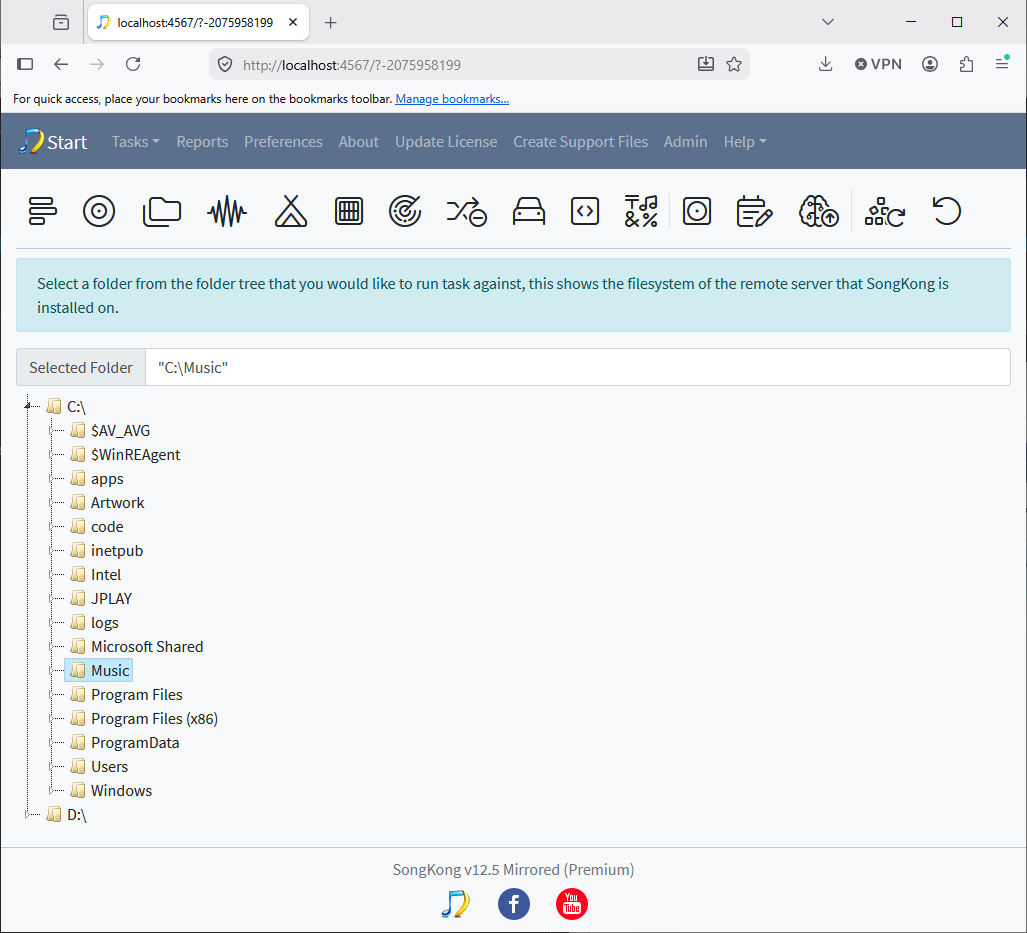
and WebUI is popular on standard headless linux where I have never had a complaint from customers about showing full hierachy.
The issue is only with Docker version where it seems customers want both the cleaness/simplicity of just viewing /music whilst also wanting to be able to use for folders not under /music
So i think the neatest solution is a Docker only option on the main page that says
Only show /music folder
What do you think?
From the beginning, I was only interested in the Docker solution. I can’t comment on the desktop version, as I don’t use it.
Paul: In my opinion, your suggestion is spot on – it gives the user the option to choose between “cleanliness/simplicity” or “being able to use folders not under /music”.
Therefore, I support your suggestion.
Thanks and best regards, Klaus
1 Like
Fixed in SongKong 12.6
1 Like